Dancing Pets AI Video
Reference video
Watch video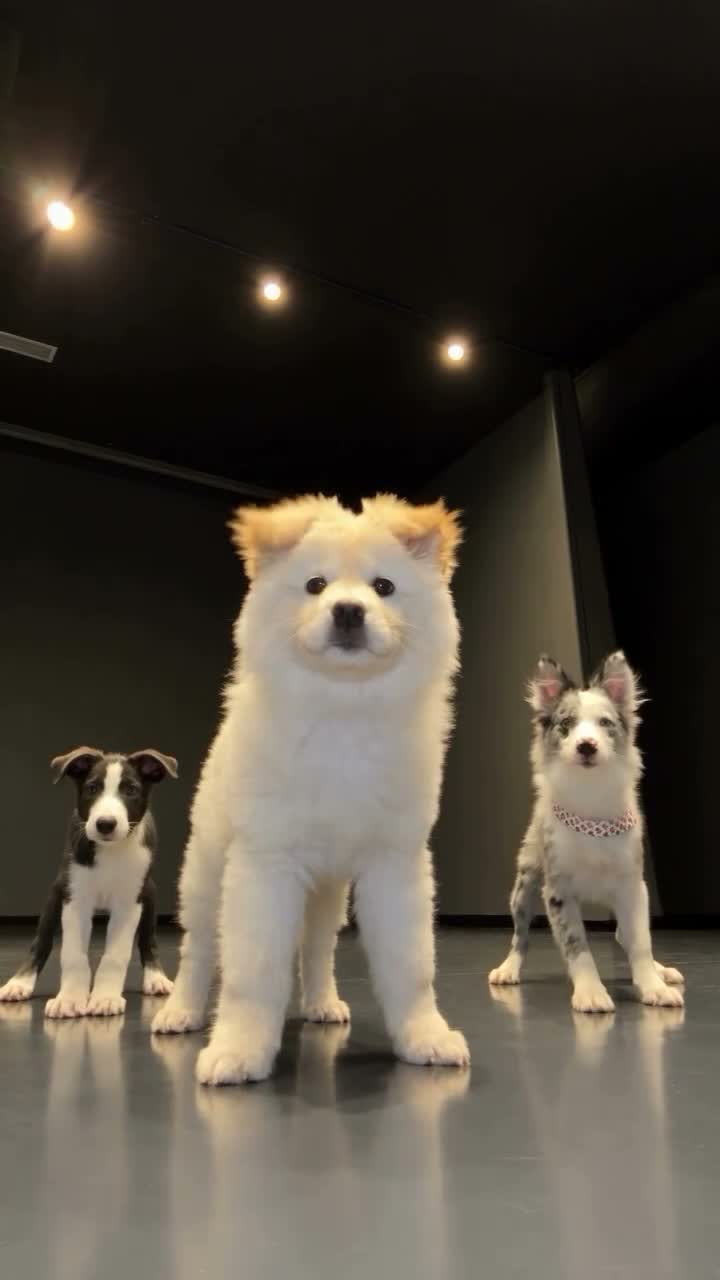
Dancing Pets AI Video
Dancing Pets AI Video
Upload Your Photo
Use one clear, full-body photo of a single pet per slot. The main pet photo replaces the large foreground dog. Extra photos fill the back-left dog, then the back-right dog, in slot order — if Extra pet photo 1 is empty, Extra pet photo 2 replaces the back-left dog. Pets without a photo stay unchanged.
Resolution
20 seconds · 9:16 vertical. Higher resolution uses more credits per generation.
20 seconds · 9:16 vertical
Dancing Pets AI Video is a photo-to-video motion-transfer template: you upload one to three pet photos, and AI transfers the choreography of a built-in 20-second reference dance onto your pets. The reference shows three dogs dancing in a studio — one large dog in the foreground and two backup dancers behind it. Your main photo replaces the foreground dog, and optional extra photos replace the dogs in the back. The camera, room, lighting, timing and audio come from the reference, so you do not need to film or upload any video.
What is the Dancing Pets AI Video?
It is a motion-transfer video template on imageat. Higgsfield Genjutsu takes the fixed reference video as the motion source and your pet photos as identity references, then renders a 20-second, 9:16 vertical clip in which your pets perform the original dance. The previews on this page show the reference video, not a generated result.
How to Create Your Dancing Pets AI Video Video
Creating your own dancing pets ai video video is simple:
- 1Upload a clear photo of your main pet in the Main pet photo slot. It replaces the large foreground dog.
- 2Optionally add up to two extra pet photos. They replace the back-left and back-right dogs in slot order.
- 3Choose 480p or 720p and check the credit cost shown for that resolution.
- 4Generate your dancing pet video, preview it and download it.
Photo order: which pet goes where
Photos are used in upload-slot order. The main pet photo always replaces the large foreground dog. The first extra photo you supply replaces the back-left dog, and the second replaces the back-right dog. Empty slots are skipped: if Extra pet photo 1 is empty and Extra pet photo 2 is filled, that photo becomes the first extra photo and replaces the back-left dog.
Background pets without a photo stay unchanged
You do not have to replace every dog. With only a main photo, both background dogs keep their original look. With two photos, the back-right dog stays as it is. The workflow tells the model not to blend identities, duplicate a pet, swap positions or add animals.
Tips for clear pet photos
Use one pet per photo, shown full-body and in focus, with good light and nothing covering the face. Side-on or slightly angled shots that show the legs, tail and markings help the model keep fur color, ears and proportions consistent. Avoid group shots, heavy filters and screenshots.
Uses for a vertical pet video
The 9:16 format fits TikTok, Instagram Reels, YouTube Shorts and phone-sized stories. Use it for a pet birthday post, a family group chat, a profile video for your pet account, or a fun way to show several pets dancing together.
Limitations
The reference features dogs. Cats, rabbits and other animals with a different body shape can produce less consistent anatomy or motion. Fast movement and overlapping pets can affect how closely each pet matches its photo, so output fidelity is not guaranteed. Dancing Pets AI Video is an independent imageat template and is not affiliated with Higgsfield or any pet brand.
Tips for Best Results
- One pet per photo, full body visible, in good light.
- Put the pet you want in the spotlight in the Main pet photo slot.
- Leave extra slots empty to keep the original background dogs.
- Start at 480p to check a photo before generating at 720p.
Best Prompts for Dancing Pets AI Video
Want more control over the motion? Copy one of these prompts and use it in our AI video generator to fine-tune the dancing pets ai video style.
Dancing Pets AI Video, smooth controlled camera movement, realistic motion, cinematic lighting, stable composition, natural depth
Dancing Pets AI Video, immediate visual hook, smooth motion, clear centered subject, polished 9:16 social video
Dancing Pets AI Video, gradual movement, atmospheric depth, elegant pacing, wide cinematic reveal
Dancing Pets AI Video, energetic camera movement, strong parallax, dramatic scale, crisp detail
Why Choose ImageAt for Dancing Pets AI Video
Fast turnaround
Most generations finish quickly; busy periods can take longer—we deliver your video here the moment processing completes.
Realistic Transformation
Powered by cutting-edge AI algorithms for incredibly realistic transformations.
Social Media Ready
Create shareable content perfect for TikTok, Instagram, and Twitter.
FAQs About Dancing Pets AI Video
Create this trend with imageat
Go beyond the dancing pets ai video — generate any AI video from text or an image with Veo, Kling, Seedance and more.