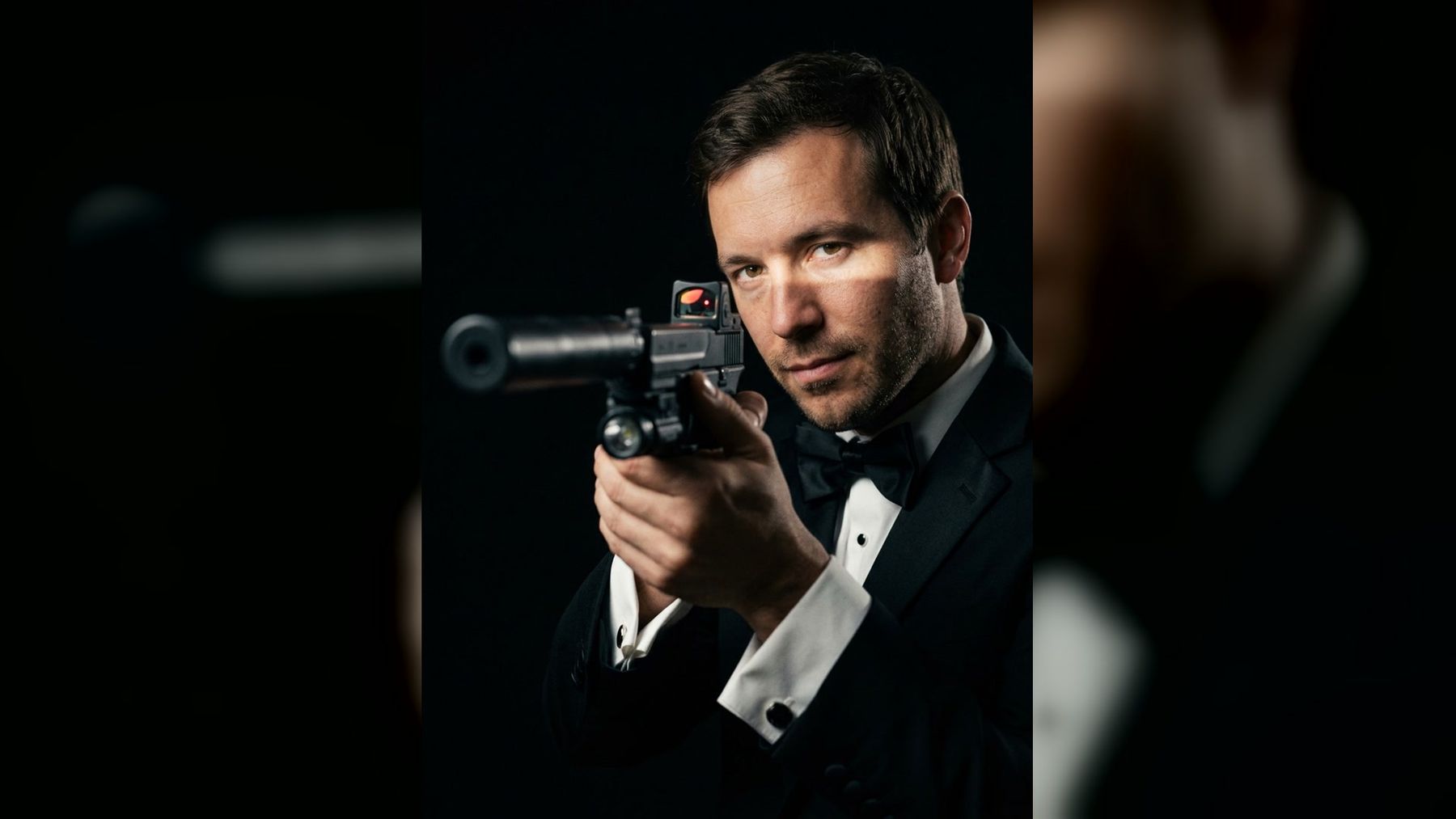
Robert Pattinson was officially announced as the next James Bond on November 16, 2026. The casting news immediately made the black-tie spy portrait timely again: a dark background, controlled light, formal tailoring, and a direct gaze that reads clearly even on a phone screen.
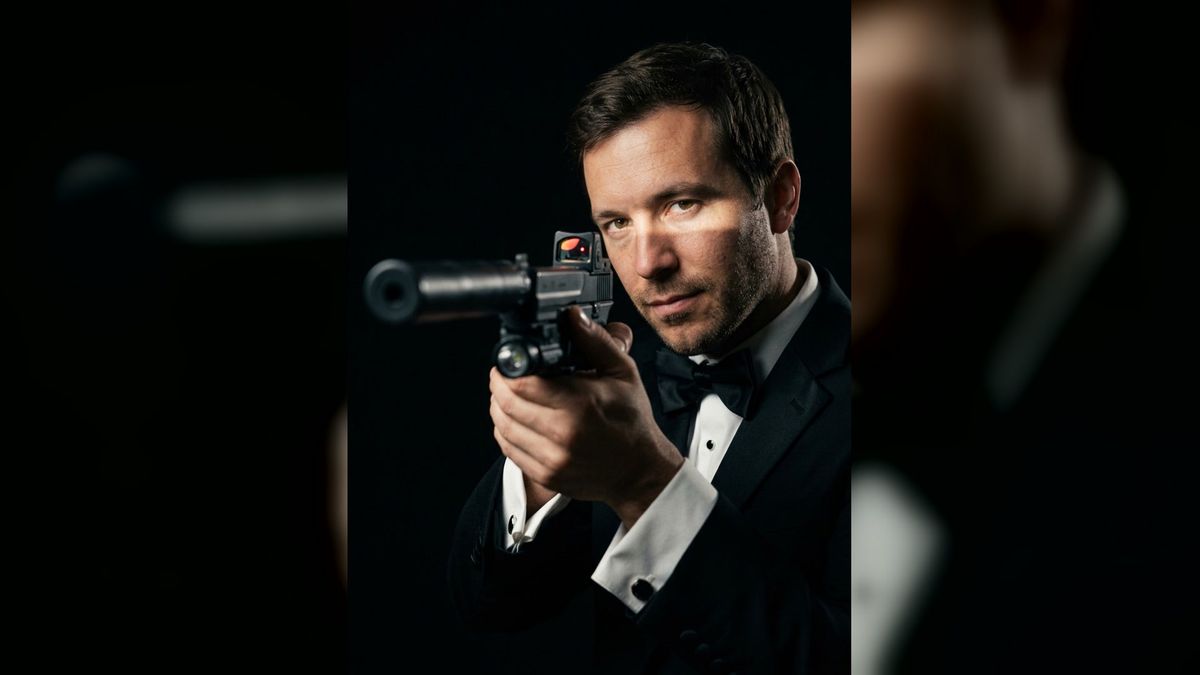
If you want your own version without copying an official poster, the Robert Pattinson James Bond photo trend on imageat turns one selfie into a vertical secret-agent portrait. This guide explains the visual ingredients, how to choose a source photo, what to change to make the result personal, and which mistakes make the look feel less convincing.
The short answer: what makes the portrait look like 007?
A convincing modern spy portrait depends on five elements working together:
- a black tuxedo or sharply tailored dark suit;
- a white shirt and compact black bow tie;
- low-key lighting that leaves much of the frame in shadow;
- a calm, focused expression rather than an exaggerated action face;
- simple composition with one subject and very little background detail.
The image does not need an official logo, movie title, actor likeness, or copied poster layout. In fact, removing those elements usually makes the result feel more like your portrait and less like an imitation.
Why Robert Pattinson and James Bond are trending together
Amazon MGM Studios announced Pattinson as James Bond on November 16, 2026. Its official announcement also named Denis Villeneuve as director and Steven Knight as screenwriter. Those are confirmed production facts; costume design, poster art, a release date, and the final visual direction were not established by the portrait trend itself.
That distinction matters. The imageat template is a fan-style interpretation of familiar secret-agent portrait language, not a still or poster from the forthcoming film. It uses recognizable visual shorthand—black tie, darkness, a hard strip of light, and a centered action pose—while putting the uploaded person in the frame.
Current US search results show strong informational interest in Pattinson's casting. Google autocomplete includes “robert pattinson james bond,” “robert pattinson as james bond,” “reactions,” and “release date.” In a US Google Trends comparison covering the previous three months, the exact casting query reached its normalized peak of 100 around the announcement. That 0–100 figure is relative interest within that comparison, not an absolute search-volume count.
What the imageat trend actually does
The live trend page asks for one clear, front-facing selfie. It produces a 3:4 portrait and preserves the uploaded person's face, hair, and general build while adding formal black-tie styling, a two-handed action pose, and dramatic low-key lighting.
The workflow is template-based, so you do not have to write a complete prompt. Generation uses credits from a paid plan. Check the current cost on the Generate button before starting, because displayed pricing can change.
This page owns the generator intent. The purpose of this article is different: it helps you understand and improve the portrait's visual choices, source-photo quality, framing, and responsible presentation.
Choose a source selfie that can survive dramatic lighting
The most important creative decision happens before generation. A dark cinematic treatment cannot rescue a blurry, tiny, or heavily filtered face.
Use a front-facing or slight three-quarter angle
Look toward the camera or turn only a few degrees. A steep profile makes it harder to preserve both eyes and can fight the template's forward-facing pose. Keep your chin neutral rather than lifting it dramatically.
Keep the face large in the frame
Use a head-and-shoulders image or a waist-up photo. If your face occupies only a small part of a group shot, the model has less identity detail to work with. Crop first if necessary with the image resizer, but do not cut through the hairline or chin.
Prefer soft, even source light
Window light or open shade works well. Avoid sunglasses, deep hat shadows, colored club lighting, and hard sunlight across only half the face. The template adds its own directional contrast; starting with neutral light gives it more freedom.
Skip beauty filters and motion blur
Heavy skin smoothing can remove the texture that makes a portrait recognizable. Motion blur, low-resolution screenshots, and aggressive social-app compression can soften eyes and hair. Use the original camera file when possible.
Upload only a photo you have permission to use
Use your own image or one shared with clear consent. Do not present a generated celebrity likeness as a real photograph, a leak, or official promotional material. If another person appears in your source image, get their permission before uploading or posting the result.
How to make the James Bond-style portrait
- Open the Robert Pattinson James Bond photo trend.
- Upload one clear selfie in JPG, PNG, or WEBP format.
- Preview the crop and confirm that the face is unobstructed.
- Check the credit cost shown on the Generate button.
- Generate the portrait and inspect facial identity, eyes, hands, clothing edges, and the action prop.
- Download the result only after checking that it does not contain accidental text, distorted details, or a misleading official-looking mark.
If the first version misses your likeness, change the input before repeatedly generating from the same weak photo. A cleaner selfie usually helps more than extra editing.
The five visual ingredients to inspect
1. Black tie with a simple silhouette
A tuxedo works because black lapels merge naturally into a dark background while the white shirt creates a narrow area of contrast. The result should read as formal without requiring a brand label or exact costume copy.
Watch for lapels that change width unexpectedly, doubled shirt buttons, an off-center bow tie, or cuffs that blend into the hands. These small errors become obvious in a profile picture.
2. Low-key lighting
Low-key lighting does not mean making the entire image underexposed. It means allowing shadows to dominate while placing a controlled highlight on the eyes, cheekbones, shirt, or hands.
A useful pattern is one narrow key light from the side with very little fill. The eyes should remain readable. If both eyes disappear, the portrait feels accidental rather than cinematic.
3. A focused expression
The strongest expression is restrained: relaxed mouth, steady eyes, and minimal eyebrow movement. A broad grin changes the genre toward party photography, while an exaggerated scowl can look theatrical.
Choose a source image with a neutral expression. Let posture, lighting, and tailoring do most of the storytelling.
4. Clean negative space
Dark negative space separates the subject from visual clutter and leaves room for a crop. It also helps the image work in several formats without adding text.
Do not fill the background with skylines, explosions, cars, flags, logos, or interface elements. One face, one pose, and one light pattern are enough.
5. Safe action framing
The live template uses a spy-movie action pose with a suppressed-pistol-style prop. Treat the output as fictional imagery. Never use a real weapon to recreate the pose for a source photo, never point a weapon at a camera operator, and do not post the image in a context where viewers could reasonably mistake it for a threat.
For a softer version, use secret-agent styling without a weapon: adjust the crop toward the face and tuxedo, or create a separate custom image with a gloved hand, watch adjustment, earpiece, sealed envelope, or empty silhouette instead.
Prompt starters for a more original secret-agent portrait
The imageat trend works without a prompt, but these partial ideas can help if you make a separate custom version with the AI image generator. Finish each starter with your own setting, camera angle, mood, lighting direction, and identity-preservation request.
- “Original black-tie intelligence officer portrait, narrow side light...”
- “Minimalist espionage editorial, dark tailored suit, quiet confidence...”
- “Rainy-night operative portrait through textured glass...”
- “Vintage diplomatic courier in a modern hotel corridor...”
- “Formal gala guest with a subtle earpiece and sealed envelope...”
- “High-contrast studio portrait with a black bow tie and rim light...”
Avoid adding “official poster,” studio logos, franchise typography, a specific actor's face, or an exact recreation of existing key art. Those details do not improve your likeness and can make the image misleading.
Six ways to personalize the result
Make it a profile picture
Crop around the head and shoulders while keeping both eyes visible. Test the image inside a circular preview before posting. Important details near the corners will disappear on many platforms.
Try a no-prop black-tie version
Keep the tuxedo, dramatic light, and direct gaze, but replace the action prop with a cuff adjustment. This works better for professional profiles and avoids ambiguity around fictional weapon imagery.
Shift the color temperature
A cool blue-black treatment feels modern and technical. A warmer amber highlight suggests an older film-noir atmosphere. Use one dominant temperature instead of mixing several neon colors.
Build a fictional agent identity
Invent a role rather than borrowing an existing character: diplomatic courier, museum security specialist, investigative photographer, or private aviation coordinator. Change the setting and accessories to support that role.
Use a monochrome finish
Black and white emphasizes facial structure, shirt contrast, and grain. Check that the skin does not merge into the background and that the white shirt does not clip to featureless brightness.
Create a matching pair carefully
For a couple or friend concept, generate each portrait separately with matching light direction and crop. Do not upload someone else's photo without consent. A coordinated pair usually looks cleaner than forcing two small faces into one template intended for one person.
Common mistakes and how to fix them
Mistake: using a screenshot instead of the original selfie
Fix: Return to the original camera file. If it is small, use the image upscaler conservatively before uploading, then inspect the eyes and hair for artificial sharpening.
Mistake: choosing a full-body photo from far away
Fix: Crop to a waist-up or head-and-shoulders composition. The face needs enough pixels for identity preservation.
Mistake: copying official poster text
Fix: Remove titles, logos, release dates, studio marks, and actor credits. Share the result as fan-made or AI-generated where context could otherwise be unclear.
Mistake: hiding both eyes in shadow
Fix: Choose a brighter selfie or a result with a narrow catchlight. Mystery comes from selective shadow, not from erasing the expression.
Mistake: overlooking hands and prop geometry
Fix: Zoom in before posting. Count visible fingers, inspect where hands overlap, and check whether straight edges connect logically. Regenerate if the grip or silhouette looks anatomically impossible.
Mistake: claiming the image shows a future movie costume
Fix: Describe it as a secret-agent portrait or fan-style concept. The trend does not establish the actual costume, campaign art, or scene design of the forthcoming film.
How to crop it for social platforms
The template's 3:4 result is naturally suited to portrait posts. Keep the eyes near the upper third and leave space around the hair. For a square avatar, crop around the head, bow tie, and upper shoulders. For a vertical story, preserve more of the formal silhouette and keep any important detail away from interface zones at the top and bottom.
For a wide banner, do not stretch the portrait. Place the full portrait over a blurred, darkened extension of the same image, or crop deliberately around the face and light stripe. If you resize the file, preserve its aspect ratio and inspect the final export at the size viewers will actually see.
Responsible posting checklist
Before publishing, ask:
- Is the source photo mine or used with permission?
- Does the caption make clear that the portrait is fan-made or AI-generated when needed?
- Have I removed official-looking logos, titles, and fake release information?
- Could the action imagery be mistaken for a real threat in this context?
- Are the eyes, hands, suit edges, and prop geometry coherent?
- Does the post avoid impersonating Pattinson or speaking on behalf of the film?
- Have I followed the platform's disclosure rules and imageat's responsible-use terms?
A short label such as “AI-made black-tie spy portrait” is clearer than implying the image came from a studio campaign.
Frequently asked questions
Is Robert Pattinson officially the next James Bond?
Yes. Amazon MGM Studios announced Pattinson in the role on November 16, 2026. The announcement named Denis Villeneuve as director and Steven Knight as screenwriter. Treat later production details as unconfirmed unless they come from the studio or another primary source.
Is the imageat result an official James Bond poster?
No. It is a personalized, fan-style AI portrait built around familiar black-tie secret-agent imagery. It is not official key art or a frame from the announced film.
Do I need a prompt for the trend?
No. The live trend is a one-photo template. Upload a clear selfie, check the displayed cost, and generate. Prompt starters are useful only if you decide to build a separate custom interpretation.
What photo gives the best result?
Use a sharp, front-facing selfie with even light, visible eyes, minimal filtering, and no face obstruction. Head-and-shoulders or waist-up framing is more useful than a distant full-body shot.
Does generation use paid credits?
Yes. It uses credits from a paid plan. The current cost appears on the Generate button, so check it before running the template rather than relying on an older fixed number.
Can I make the portrait without a weapon?
The live template has a fixed spy-action composition. For a no-prop alternative, use a custom image workflow and keep the tuxedo, dark background, controlled light, and focused expression while substituting a watch adjustment, envelope, earpiece, or simple empty-hand pose.
Can I use the result commercially?
Do not assume commercial rights from the visual style alone. Review the applicable terms, platform rules, rights in the source photo, and any relevant publicity or trademark considerations for your intended use. Avoid official logos and claims of studio affiliation.
Final checklist for a convincing result
Start with a clean selfie. Keep the face large and unobstructed. Look for restrained expression, readable eyes, coherent hands, simple tailoring, and uncluttered negative space. Remove anything that falsely suggests an official film poster.
Then open the Robert Pattinson James Bond photo trend, check the credit cost on the Generate button, and create one carefully reviewed portrait rather than treating every dramatic image as ready to post.