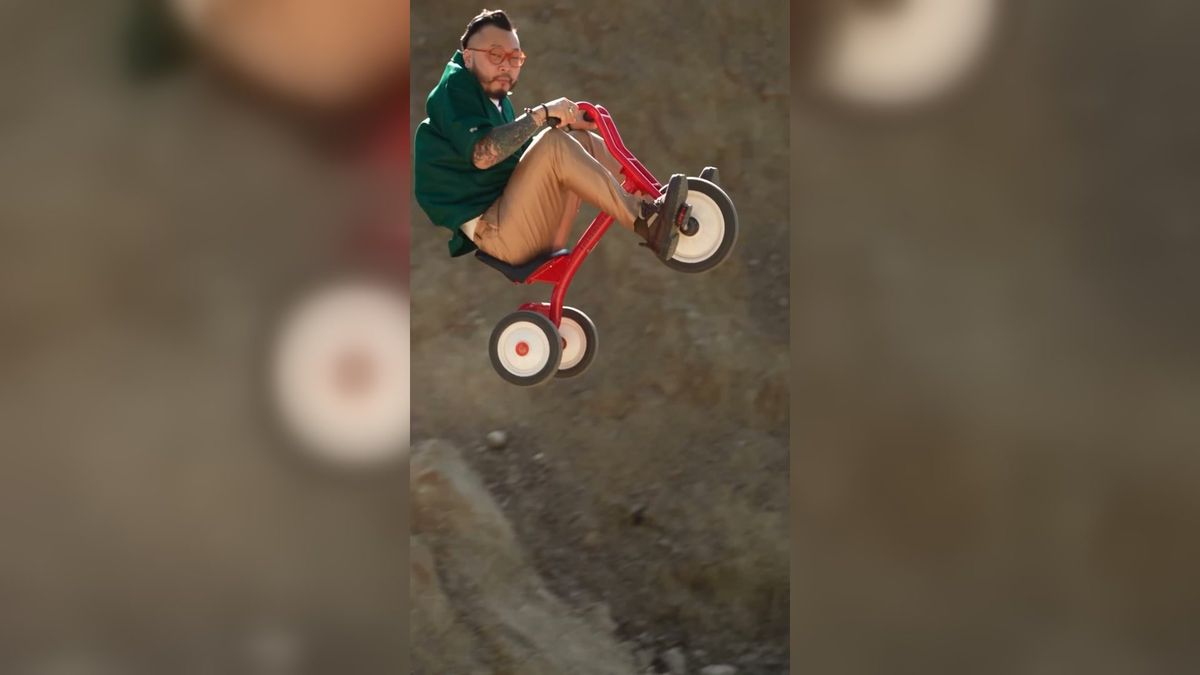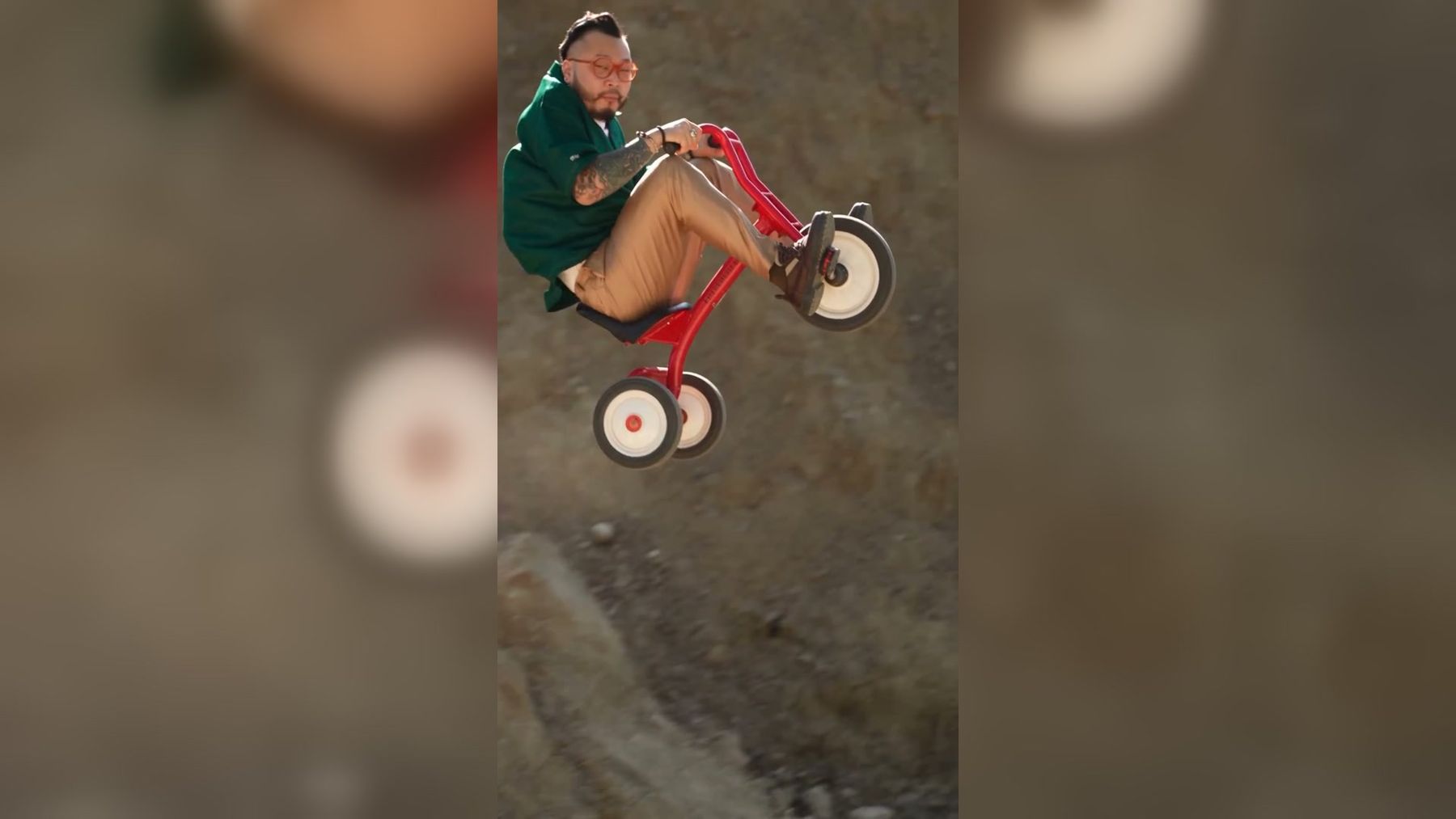
A tricycle stunt video works because it puts an obviously small, slow-looking ride into the visual language of an extreme-sports film. The contrast creates the joke before the rider even leaves the ground.
The Tricycle Dirt Jump workflow on imageat turns one adult portrait into a 15-second vertical clip: the rider rolls down a dirt hill on a tiny red tricycle, launches from a jump, poses in the air, and disappears into a staged crash. If you want to build a related clip with an open video tool, the ideas below provide safer fictional setups, shot structures, and review criteria without asking anyone to attempt a real stunt.
Why the tricycle stunt concept works
A good visual gag usually has a clear setup, a fast reversal, and a readable payoff. The tricycle format supplies all three:
- Setup: an adult rider approaches a serious dirt course with total confidence.
- Reversal: the vehicle is a tiny child-sized tricycle rather than a BMX or motocross bike.
- Payoff: the clip treats an absurdly modest jump like a championship stunt.
Scale is the key. The tricycle must look unmistakably too small for the rider, but the rider still needs to sit, steer, and move in a visually coherent way. The more seriously the camera treats the action, the funnier the contrast becomes.
The concept also fits short-form video. A viewer can understand the premise in the first second, the airborne moment creates a natural replay point, and the ending can cut cleanly into a loop. No long explanation or readable on-screen text is required.
10 tricycle stunt video ideas
1. The serious dirt-jump launch
Open on a low-angle shot of the rider leaning over the tiny handlebars as though preparing for a professional run. Cut to a wide view of the dirt ramp, then hold the airborne moment for just long enough to reveal the full tricycle silhouette.
The joke is strongest when the setting looks credible but the danger remains fictional. Use a generated dirt course, keep bystanders outside the landing zone, and never recreate the action with a real adult on a child-sized vehicle.
2. The slow-motion victory pose
Build the entire clip around one exaggerated mid-air pose: a peace sign, a raised fist, or a calm look toward the camera. Begin at normal speed, slow down at the jump, and return to normal speed before the landing.
Keep at least one hand visually connected to the handlebars. If both hands suddenly leave the tricycle, check whether the rider’s torso, steering column, and front wheel still follow believable motion. The pose should feel bold without turning the rider into a disconnected cutout.
3. The tiny ramp, giant reaction
Use a ramp that is only slightly raised, then film it with dramatic camera shake, a fast push-in, and an oversized crowd reaction. The humor comes from presentation rather than height.
This is a useful variation when you want a playful clip without depicting a large fall. Keep the physical action modest and let editing, sound, and reaction shots create the spectacle.
4. The backyard championship
Stage a fictional competition in a tidy backyard. Add simple course markers, a homemade finish line, and a few friends reacting from a safe distance. Avoid generated sponsor logos, scoreboards, or fake event branding.
A backyard setup gives the clip an intentionally improvised look. It also creates a clear sequence: preparation, launch, landing, celebration. Use approved typography later in an editor if the video needs a team name or event title.
5. The superhero landing
After a short jump, have the rider land in an exaggerated heroic pose beside the tricycle. The edit can cut on impact so the difficult transition happens between shots rather than through one long morphing movement.
Review the rider’s clothing, glasses, tattoos, jewelry, and facial hair on both sides of the cut. A successful transformation preserves identity even when the pose changes dramatically.
6. The perfectly timed photo finish
Place two tiny tricycles side by side and frame the clip as a close race. Use a wide starting shot, a wheel-level tracking shot, and a finish-line freeze frame.
Two-rider scenes are harder to keep consistent, so provide one clear portrait for each person in workflows that support multiple references. If the tool accepts only one photo, keep the second rider fictional and visually distinct rather than implying a real person participated.
7. The cinematic training montage
Turn simple actions into a five-shot montage: tightening a helmet strap, checking a wheel, studying the ramp, gripping the handlebars, and rolling toward the start. End with a deliberately tiny hop.
This format gives the audience enough time to anticipate a huge stunt, making the small payoff funnier. Keep close-up details simple because small tricycle parts, fingers, straps, and spokes are common places for visual errors.
8. The unexpected soft landing
Replace the crash ending with a clearly fictional soft landing into foam blocks, autumn leaves, or an oversized cushion. Show the safe landing area before the jump so the audience understands the setup.
Do not imply that leaves, cardboard, or household cushions make a real stunt safe. They are visual storytelling devices in a generated scene, not safety equipment or instructions.
9. The dramatic replay from three angles
Show one jump, then repeat it from a side view, a wheel-level camera, and a distant telephoto angle. Replays can make a short action feel like a complete sports highlight.
The challenge is continuity. The rider’s outfit, tricycle color, ramp shape, direction of travel, light, and landing position should remain stable. If the model creates three different vehicles, choose the strongest angle instead of forcing inconsistent shots into one edit.
10. The seamless loop
Begin with the tricycle entering from behind a foreground object, complete the jump, then end with a matching obstruction that hides the rider. The final frame can cut back to the opening without a visible reset.
Trees, dirt mounds, fence posts, and spectators can all create natural wipe points. Keep the obstruction broad enough to cover the rider and vehicle completely for a few frames; partial coverage makes continuity errors more obvious.
How to choose the right portrait
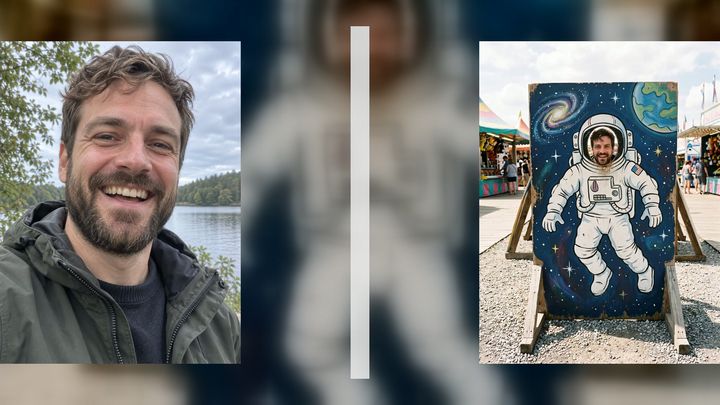
The source photo controls how much identity information the model can preserve. For the imageat template, use one clear photo of one adult with the face visible and well lit. The live page currently accepts JPG, PNG, or WEBP files up to 10 MB.
Choose a portrait with:
- One adult subject and no overlapping faces.
- A front-facing or mild three-quarter head angle.
- Sharp eyes, visible facial contours, and even light.
- Hair, glasses, facial hair, and accessories that are easy to distinguish.
- A clean background with good separation around the head and shoulders.
- No beauty filter that changes the person’s real features.
- Permission from the person shown in the image.
A waist-up portrait can provide useful clothing context, but facial clarity matters more than showing a full body. Avoid distant group photos, screenshots from social apps, motion blur, strong sunglasses, heavy shadows, and hands covering the face.
If the file has unnecessary empty space, prepare a copy with the image resizer. Do not repeatedly save a small JPEG, because every compression pass removes useful detail. Resizing changes dimensions; it does not recover a blurred face.
How the fixed tricycle workflow works
The current imageat workflow is a fixed video template rather than an open prompt box. You upload one adult portrait, choose 480p or 720p, generate, preview, and download an MP4. The result is approximately 15 seconds, uses a vertical 9:16 frame, and follows the source clip’s audio and action.
At the time of this review, the page displayed 102 imageat credits for 480p and 218 credits for 720p. Those are paid generation credits, not a claim that the workflow runs locally or at no cost. Check the Generate button before starting because the live interface is the authoritative price.
Use 480p as a lower-cost draft when you need to test whether the portrait, likeness, and action work. Choose 720p when the composition has already passed review and you need a sharper final result. Higher resolution cannot correct a poor portrait, a changed face, or malformed hands.
The example on the trend page is source reference footage, not proof of how any particular portrait will look after personalization. Generated likeness is not guaranteed, so review the finished result before sharing it as a depiction of a real person.
Build a custom version with an open workflow
A fixed template is useful when you want the established action and camera path. An open image-to-video workflow is more appropriate when you want to control the setting, vehicle, movement, or ending.
Start with a simple three-part plan:
- Opening frame: define the rider, tiny tricycle, environment, wardrobe, light, and camera height.
- Primary action: describe one movement, such as rolling toward a low dirt ramp and making a small hop.
- Ending: choose a stable finish, such as riding out of frame, landing beside foam blocks, or passing behind a tree for a loop.
The broader AI video generator can support text-led and media-led experiments, but exposed models and controls may differ by workflow. Verify the active model, duration, resolution, and credit cost in the live interface rather than assuming every generator offers the fixed template’s 15-second sequence.
Short prompt starters
Keep the first direction concise, then finish the camera and character variables yourself:
- Dirt course: “Adult rider on an obviously tiny red tricycle approaches a low dirt ramp, serious sports cinematography…”
- Backyard race: “Two playful adult riders begin a miniature tricycle race in a bright backyard, low wheel-level camera…”
- Soft landing: “Confident rider makes a small fictional tricycle hop toward a clearly visible foam-block landing area…”
- Seamless loop: “Tiny tricycle rider passes behind a foreground tree, completes a brief jump, then exits behind a matching tree…”
- Training montage: “Close-up sequence of helmet strap, tiny wheel, handlebars, focused face, then a deliberately small hop…”
Add identity-preservation requirements, outfit details, direction of travel, lens choice, motion speed, landing behavior, and safe fictional framing. Avoid naming a living performer, copying a branded stunt, or requesting an exact recreation of copyrighted footage.
Edit the clip for Reels, Shorts, or TikTok
The template already produces a vertical 9:16 video, which matches the full-screen format used by major short-video platforms. Before posting, watch the exported MP4 on a phone rather than judging it only in a desktop preview.
A practical edit can follow this rhythm:
- 0–2 seconds: reveal the tiny tricycle and serious rider.
- 2–6 seconds: approach the ramp with a clear direction of travel.
- 6–9 seconds: hold the airborne pose or key visual gag.
- 9–13 seconds: show the fictional landing or crash payoff.
- 13–15 seconds: reaction, freeze frame, or visual bridge back to the opening.
If a platform needs a different canvas or safe area, use the video resizer after generation. If the file is too large for a delivery channel, the video compressor can reduce it. Compression cannot repair malformed frames, so fix or regenerate visual problems first.
A video upscaler may improve perceived sharpness for a small but otherwise clean result. It cannot restore a changed identity, missing tricycle part, or incorrect hand position. Treat upscaling as finishing, not error correction.
Common problems to check
The face changes during the jump
Compare the opening, airborne moment, and ending at full size. Look at eye spacing, jaw shape, hairline, glasses, facial hair, and distinctive accessories. If identity changes significantly, try a clearer portrait or regenerate; do not hide the problem with aggressive sharpening.
The tricycle changes shape
Track the front fork, handlebar, seat, frame, pedals, and three wheels across the clip. Fast motion can conceal a brief error, but viewers often notice it on replay. A clean silhouette matters more than unnecessary mechanical detail.
The rider and vehicle do not connect
Check both hands on the handlebars, the seat contact, foot placement, and shadows. The rider should not float above the seat or pass through the frame. For a comedy clip, exaggerated scale is welcome; broken contact geometry is not.
The action looks like real stunt advice
Keep the scene clearly fictional and never frame it as a tutorial for attempting a jump. A tiny tricycle is not designed for adult dirt-jump use. Do not add measurements, ramp-building instructions, speed targets, or claims that a generated landing setup is safe.
The ending is too abrupt
A crash can be implied with an obstruction, reaction shot, dust cloud, or cutaway instead of showing impact. This often produces a cleaner result and avoids graphic or distressing imagery.
Generated text or logos appear
Inspect clothing, equipment, signs, and spectators for invented lettering or copied branding. Crop or regenerate accidental marks. Add verified captions and titles in an editing tool, where spelling and placement remain controllable.
A responsible publishing checklist
Before sharing a personalized clip, confirm that:
- The adult shown gave permission for their photo and likeness to be used.
- The result is presented as an AI-generated fictional stunt, not documentary footage.
- The clip does not imply that a real person endorsed a product or performed the action.
- No child is depicted attempting a dangerous stunt.
- The face, clothing, hands, tricycle, and shadows remain coherent.
- The ending is non-graphic and does not encourage imitation.
- Accidental logos, names, or unreadable generated text have been removed.
- Audio, added music, photos, and other source assets are cleared for the intended use.
- The final export was reviewed frame by frame and on the destination device.
For platform-wide rules, review imageat’s responsible-use terms before publishing.
Frequently asked questions
What is the tricycle dirt jump video?
It is a short fictional stunt clip in which an adult rides a tiny tricycle down a dirt hill, launches from a jump, poses in the air, and ends in a staged crash. The mismatch between serious sports cinematography and the undersized vehicle creates the comedy.
Can I make the clip from one photo?
Yes. The imageat Tricycle Dirt Jump template uses one clear adult portrait. The workflow supplies the tricycle, hill, jump, camera movement, and action, but the generated likeness still needs review.
Is the output vertical?
Yes. The current template produces an approximately 15-second 9:16 MP4 intended for vertical short-form viewing. Check current controls on the live page before generating.
Does it cost credits?
Yes. The workflow uses paid imageat generation credits. At review time, the page showed 102 credits for 480p and 218 credits for 720p. Prices can change, so rely on the cost displayed by the Generate button.
Should I try the stunt in real life?
No. The article describes fictional video concepts, not physical stunt instructions. Adults should not use a child-sized tricycle for dirt jumps, and generated props or landing areas should never be treated as real safety guidance.
How can I make the result loop smoothly?
Hide the rider and tricycle behind a broad foreground object at both the beginning and end. Trees, dirt mounds, and fence posts can create a clean visual wipe when they cover the subject completely for several frames.
Make the joke clear and keep the action fictional
The strongest tricycle stunt video has one readable idea: a confident adult, an absurdly small ride, and a camera that treats the moment like a major sports event. Keep the setup simple, preserve identity and vehicle shape, and use editing rather than real risk to create the spectacle.
When you want the established dirt-hill sequence, start with the Tricycle Dirt Jump workflow on imageat. Upload only a portrait you are allowed to use, check the paid credit cost shown in the live interface, and review the complete video before sharing it.