Free Image to JSON Converter for AI Prompts
Turn any reference photo into a detailed, structured JSON prompt—ideal for Nano Banana Pro, Midjourney, DALL·E, Stable Diffusion, and other image models. Upload JPG, PNG, or WebP, analyze with AI vision, then copy, download, or open directly in the imageat generator. No desktop install.
Upload Image
Upload your own image to convert
Tips for Best Results
- •Use high-quality images with clear subjects
- •Images with distinct lighting and composition work best
- •Edit the generated JSON to fine-tune specific details
- •Use the JSON prompt with any AI image generator
JSON Prompt OutputExample
How to Convert Image to JSON
Upload Image
Click inside the file drop area to upload a file or drag & drop your image. You can upload JPG, PNG, WebP and more.
Click Convert
Click the Convert button to start the Image to JSON conversion. This tool works fast - convert images in seconds!
Get JSON Prompt
The image will be analyzed and rendered as a structured JSON. Copy or download the result instantly.
Image to JSON Prompt: Example
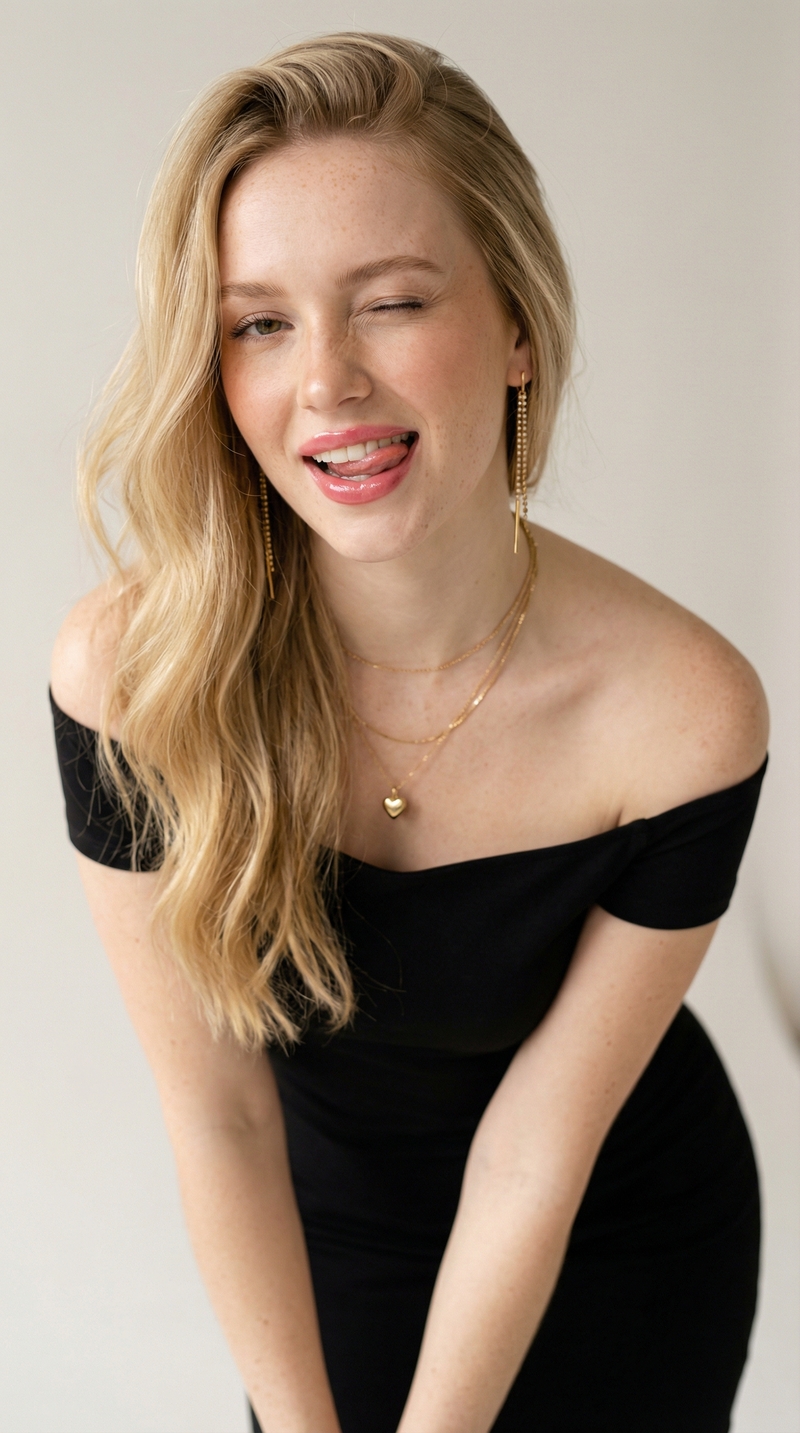
See the full flow: a reference photo becomes a structured JSON prompt you can paste into any AI image generator to recreate the look.
{
  "style": "ultra-realistic studio portrait",
  "subject": {
    "expression": "playful, flirty",
    "hair": { "color": "blonde", "length": "long" },
    "outfit": { "dress": "off-shoulder black dress" }
  },
  "lighting": { "type": "soft diffused studio" },
  "camera": { "lens": "50mm", "aperture": "f/1.8" }
}Why Use Our Image to JSON Converter?
Fast & Easy
Quick and clear way to convert images to JSON prompts. No complex setup required.
Secure & Private
Your images are processed securely. We don't store your uploads permanently.
Works Everywhere
Works from all platforms including Windows, Linux, Mac OS, Android and iOS.
High Quality
Powered by advanced AI for accurate, detailed analysis of your images.
About Image to JSON Converter
Our Image to JSON Converter is a powerful free web application that analyzes any image and generates a sophisticated, extremely detailed JSON prompt optimized for AI image generation tools like Nano Banana Pro, Midjourney, DALL-E, Stable Diffusion, and more. This tool uses advanced AI vision capabilities to understand every aspect of your image - from subject details to lighting, composition, and artistic style.
JSON prompts are a structured way of giving AI models detailed information about an image. They act as a template that makes outputs more repeatable and precise. Instead of writing complex prompts by hand, you can use this tool to automatically generate the template from any reference image, then tweak the details to create variations.
When to Use This Tool
- When you have a reference image you want to recreate or create variations of
- When you want precise control over subject, style, composition and lighting
- When you want to escape AI model defaults by defining details explicitly
- When you need a starting template for complex prompt engineering
No Software Installation Required
You can use our free online Image to JSON converter on any operating system with a web browser. Our application is secure, easy to use, and completely free for registered users. There's no need to download or install any software - just upload your image and get instant results.
Why structured JSON beats a single text prompt
Flat sentences leave room for ambiguity. A JSON prompt splits subject, lighting, camera, wardrobe, and constraints into fields you can edit independently—so iterations are faster and outputs stay closer to your reference. Pair this workflow with community prompts on our prompts library or templates for repeatable styles.
Turn Any Image Into a Prompt for Your Favorite AI Model
An image to prompt workflow saves you from describing a scene from scratch. Upload a reference, get an image to JSON prompt, then adapt it for whichever generator you use. The same structured fields translate cleanly across models—here is how it maps to the popular ones.
Image to Nano Banana prompt
Nano Banana Pro reads structured detail well. Paste the JSON straight into the imageat generator (or hit “Use in Generator” above) to lock subject, lighting, and composition in one shot.
Image to Midjourney prompt
Flatten the JSON into a comma-separated phrase for Midjourney—keep the subject, wardrobe, lighting, and camera fields, then append your --ar and --style flags. The JSON keeps every detail in one place so nothing gets lost in translation.
Image to Stable Diffusion prompt
Use the style, quality, and camera fields as your positive prompt, and move anything you want to avoid into a negative prompt. Structured JSON makes it easy to build repeatable Stable Diffusion templates.
Image to DALL·E and other models
Most modern models accept rich natural language, so you can paste the JSON as-is or summarize it into a sentence. Want ready-made starting points? Browse our prompts library or read prompt-engineering tips on the imageat blog.
Image to JSON: frequently asked questions
Quick answers for people comparing online image-to-JSON tools, OCR extractors, and AI prompt generators.
What is an image to JSON converter?▼
An image to JSON converter uses AI vision to describe what is in a picture—subject, lighting, camera, style, and scene—and outputs that description as structured JSON. That JSON works as a reusable prompt for image models (for example Nano Banana Pro, Midjourney, or Stable Diffusion) so you can recreate or vary the look without rewriting everything by hand.
Is this the same as OCR or data extraction from images?▼
No. OCR tools pull visible text into plain text or tables. This tool is built for creative AI workflows: it produces a rich, hierarchical JSON prompt tuned for image generation, not spreadsheet-style field extraction.
Which image formats can I upload?▼
You can upload common raster formats such as JPG, PNG, and WebP through the browser. Very large files are resized on the client before analysis to keep uploads reliable.
Is the Image to JSON converter free?▼
Yes for registered users—sign in to run conversions. There is no separate desktop install; everything runs in your browser on imageat.
How do I use the JSON with Nano Banana Pro?▼
After conversion, copy or download the JSON, then open imageat’s generator and paste it (or use “Use in Generator” when signed in). The structured fields help the model lock composition, lighting, and subject details.
Do you store my photos?▼
Images are sent for analysis and are not kept as a permanent library for this tool. Use images you have the right to process, and avoid uploading highly sensitive personal data.
Can I edit the JSON after conversion?▼
Yes. The output is a starting template—tweak or delete fields, add constraints, or merge sections before sending the prompt to any compatible AI image tool.