Boom Boom Boom Dance AI Video: Do the Parking Garage Dance From One Photo
Upload your photo and do the Boom Boom Boom dance in the parking garage. Recreate the viral dance with AI.
Source reference footage, not a personalized result
Watch video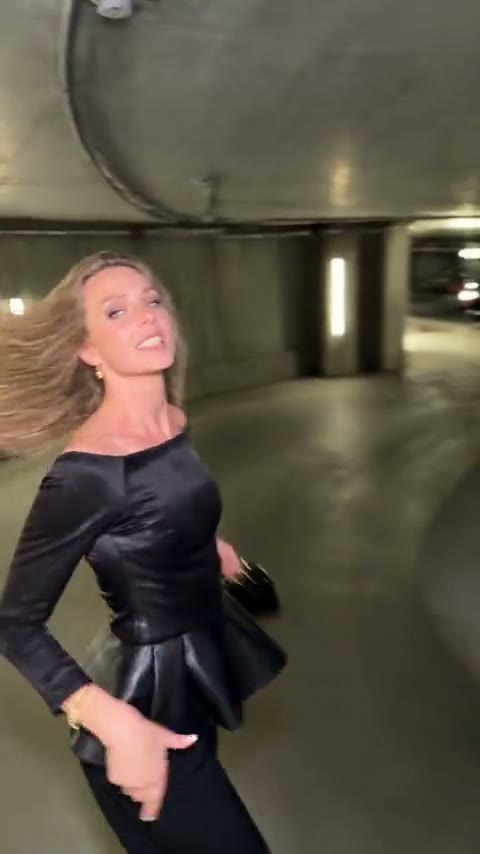
Boom Boom Boom Dance AI
Boom Boom Boom Dance AI
Upload Your Photo
Upload one photo of one person, ideally full body with nothing in front of you and the face sharp and well lit. Your face, skin tone and hair replace the dancer; the outfit, moves, garage and sound come from the clip. Likeness depends on the photo and is not guaranteed.
Resolution
15s · 9:16 · source audio. Higher resolution uses more credits per generation.
15s · 9:16 · source audio
By uploading or generating, you confirm you own these photos or have the person's permission, and you won't impersonate real people or celebrities. Responsible use
Quick answer
To do the Boom Boom Boom Dance trend, upload one clear photo where your face is easy to see, then press generate. imageat places you into the trend's original video, and the video is ready to download when it finishes. One generation costs 205 imageat credits; no prompt writing or editing app is needed.
Boom Boom Boom Dance AI puts you in the viral parking-garage dance. A woman in a black peplum top and black trousers dances down a curved underground ramp: hips and shoulders on the beat, a hair-flip spin, hand gestures and a small black handbag swinging, all followed by a moving camera. Upload one photo and Genjutsu motion transfer swaps her for you while the rest of the take stays as it was. Your photo decides who appears: your face, skin tone and hair. The clip decides everything else: every step, turn and expression with its timing, the camera movement, the garage and the original sound. The outfit and handbag are kept so the routine stays continuous. The video runs 15 seconds in 9:16; choose 480p for a lower-credit draft or 720p for a sharper result.
What is the Boom Boom Boom Dance AI?
Boom Boom Boom Dance is a reference-driven AI video trend. Instead of inventing motion from a still photo, the generator follows a fixed source video and puts the people from your uploads into it. The source take supplies the motion, timing and camera work; your photos supply each person's face, hair, build and outfit.
How to Do the Boom Boom Boom Dance Trend
Here is how to make your own video on imageat:
- 1Upload one clear photo of yourself, ideally full body with the face visible. JPG, PNG or WEBP, up to 10 MB.
- 2Choose 480p or 720p and check the credit cost shown.
- 3Generate the video.
- 4Preview and download your 9:16 Boom Boom Boom dance with the original sound.
What comes from your photo and from the clip
From your photo: face, facial features, skin tone, hairstyle, hair color and facial hair or its absence. From the clip: the black peplum outfit and handbag, the dance routine, spins and gestures, the moving camera, the parking garage and the audio.
Length, resolution and credits
The result follows the original clip: 15 seconds in 9:16, with the original sound. The price depends only on the resolution: 720p is sharper than 480p and costs more. The source footage is low resolution, so 720p does not recover detail that is not in the clip. The exact price is shown before you generate.
About the video on this page
The preview is the source reference footage the template follows, not a personalized result. The dancer spins and moves away from the camera, so likeness can drift for a moment when the face is small or turned. This is an independent AI template; imageat is not affiliated with or endorsed by the person in the source footage, the creator who shared it or the rights holders of the song.
Tips for Best Results
- Use a full-body photo of one person with nothing blocking the body.
- Keep the face sharp and well lit; it carries the likeness through the spins.
- Avoid sunglasses, heavy filters and group photos.
- Only upload faces you own or have permission to use.
Why Choose ImageAt for Boom Boom Boom Dance AI
Fast turnaround
Most generations finish quickly; busy periods can take longer—we deliver your video here the moment processing completes.
Realistic Transformation
Powered by cutting-edge AI algorithms for incredibly realistic transformations.
Social Media Ready
Create shareable content perfect for TikTok, Instagram, and Twitter.
FAQs About Boom Boom Boom Dance AI
Create this trend with imageat
Go beyond the boom boom boom dance ai — generate any AI video from text or an image with Veo, Kling, Seedance and more.