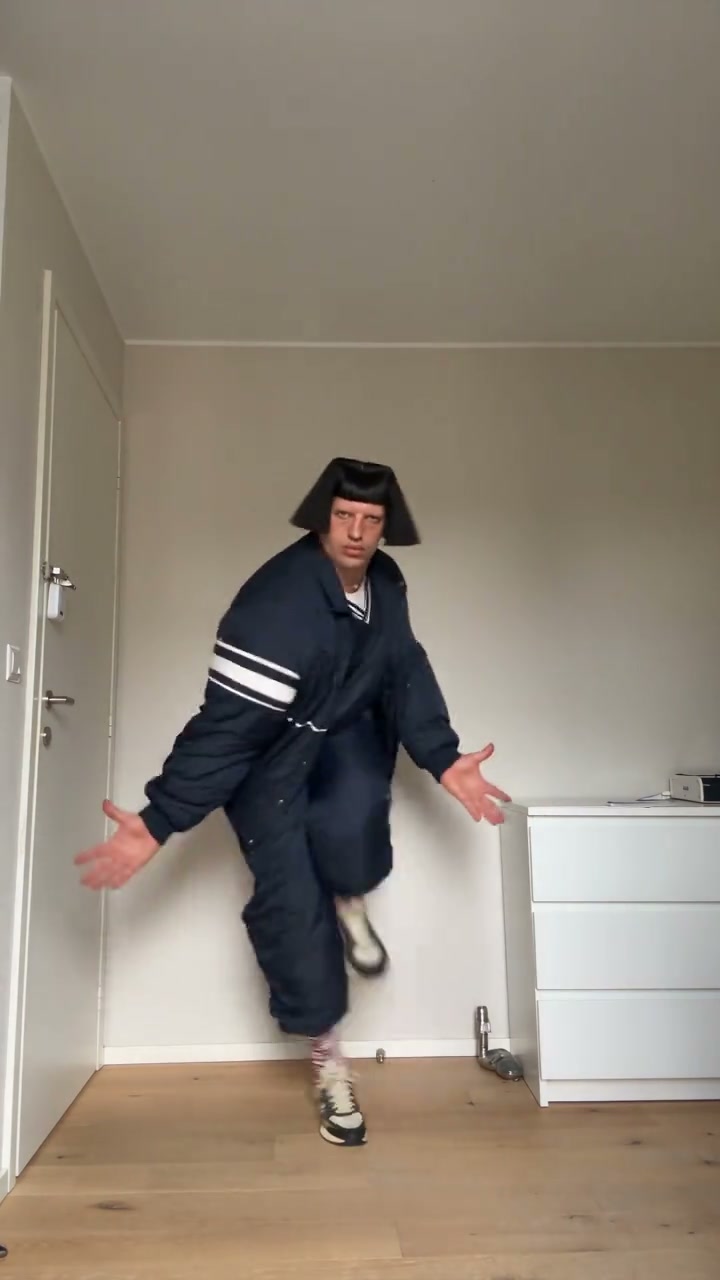
Make the viral Jean Phil dance video from one photo: same moves, room and sound, with your own face, hair and outfit. About 11 seconds, 480p or 720p.

More AI trends

  • Lamine Yamal Dribbling AI Video
  • Caught at the Window
  • Connor Price Slide Dance AI Video Generator
  • Champagne Shoot on G Class
  • Blade Runner Hologram AI Video
  • Don't You Dare Christmas AI Video
  • Vampire Duo Night Dance
  • Mummy Zombie AI Video Generator
imageat
Explore
Create

Features

AI Photo RetakesMy MovieCreate ImageCreate VideoCreate WorkflowGalleryPhoto PacksToolsOld Photo RestorationWorld Cup 2026Edit ToolsRelightAnglesVideo EditAI StylistInpaint
All models →Nano Banana 2.1Google's newest • 4 creditsNano Banana 2Fast & affordable • 4 creditsNano Banana 2 LiteFast draft • 3 creditsNano Banana ProHighest quality • 8 creditsNano BananaBudget friendly • 3 creditsGPT Image 2.5OpenAI's newest • from 3 creditsGPT Image 2.5 SunburstSlower, finer detail • from 3 creditsGPT Image 2OpenAI • 2–10 cr by qualityMidjourney V84 images per run • from 4 creditsSeedream 5.0 ProFlagship ByteDance • 3–5 creditsSeedream 5.0 LiteBytedance model • 3 creditsKrea 2High-fidelity • 3 creditsKrea 2 MediumFast • 2 creditsReve 2.1Text & layout accuracy • 8 credits
ImageVideo
Audio
AI Voice GeneratorAI Song GeneratorAI Lyrics GeneratorAI Instrumental GeneratorLyric Video MakerAI Podcast Generator
MCPAPITrendsSeedance 2.5AI InfluencerPricing
Explore
ImageVideo
MCPAPITrendsSeedance 2.5AI InfluencerPricing
All trends

Jean Phil Dance Video Generator

5.0(181 ratings)

Example results

Watch video
Original footage, not a personalized resultWatch
Jean Phil Dance Video Generator AI photo example 3 created with imageat

Upload Your Photo

Upload one photo of one person, face clear, sharp and well lit. A full-body photo helps keep your outfit and build. Your face, hair and clothes replace the dancer's; the moves, room and sound come from the clip. Likeness depends on the photo and is not guaranteed.

Resolution

About 11s · 9:16 · source audio. Higher resolution uses more credits per generation.

About 11s · 9:16 · source audio

150 credits
Log in to see your credits

By uploading or generating, you confirm you own these photos or have the person's permission, and you won't impersonate real people or celebrities. Responsible use

Jean Phil Dance Video Generator

Jean Phil Dance

Upload Your Photo

Upload one photo of one person, face clear, sharp and well lit. A full-body photo helps keep your outfit and build. Your face, hair and clothes replace the dancer's; the moves, room and sound come from the clip. Likeness depends on the photo and is not guaranteed.

Resolution

About 11s · 9:16 · source audio. Higher resolution uses more credits per generation.

About 11s · 9:16 · source audio

150 credits
Log in to see your credits

By uploading or generating, you confirm you own these photos or have the person's permission, and you won't impersonate real people or celebrities. Responsible use

Quick answer

To do the Jean Phil Dance trend, upload one clear photo where your face is easy to see, then press generate. imageat places you into the trend's original video, and the video is ready to download when it finishes. One generation costs 150 imageat credits; no prompt writing or editing app is needed.

The Jean Phil dance video generator puts you in the viral Jean Phil dance. In a small white room with a wooden floor, a dancer in a black bowl-cut and a navy tracksuit hops, kicks, spins and throws his arms out straight to the camera. Upload one photo and Genjutsu motion transfer swaps the dancer for you while the rest of the take stays as it was. Your photo decides who appears: your face, hair, gender presentation, body proportions and clothing. The clip decides everything else: the choreography, the expressions and timing, the fixed phone camera, the room, the light and the original sound. The bowl-cut and the tracksuit are not copied onto you, and no accessories are added. The video runs about 11 seconds in vertical 9:16; choose 480p for a lower-credit draft or 720p for a sharper result.

What is the Jean Phil Dance Video Generator?

Jean Phil Dance is a reference-driven AI video trend. Instead of inventing motion from a still photo, the generator follows a fixed source video and puts the people from your uploads into it. The source take supplies the motion, timing and camera work; your photos supply each person's face, hair, build and outfit.

How to Do the Jean Phil Dance Trend

Here is how to make your own video on imageat:

  • 1
    Upload one clear photo of one person, ideally full body.
  • 2
    Choose 480p or 720p and check the credit cost shown.
  • 3
    Generate the video of about 11 seconds.
  • 4
    Preview and download your Jean Phil dance with the original audio.

What comes from your photo and from the clip

From your photo: face, hair, gender presentation, build and outfit. From the clip: every hop, kick and spin, the expressions and timing, the camera, the white room, the lighting and the audio. Nothing is added to your look, not even accessories.

About the videos on this page

The featured video is the original Jean Phil TikTok by @leopold.delarue01. The second is the single-dancer clip in the white room that this template follows, so your result looks like that one. Neither is a personalized result. Likeness is a target, not a guarantee, and can drift for a moment during fast spins. Independent AI template; imageat is not affiliated with or endorsed by the creator of the original clip.

Tips for Best Results

  • One person per photo, facing the camera, face sharp and well lit.
  • A full-body photo helps the model keep your outfit and proportions.
  • Avoid sunglasses, heavy filters and group photos.
  • Try 480p first to check the likeness before generating at 720p.

Why Choose ImageAt for Jean Phil Dance Video Generator

Fast turnaround

Most generations finish quickly; busy periods can take longer—we deliver your video here the moment processing completes.

Realistic Transformation

Powered by cutting-edge AI algorithms for incredibly realistic transformations.

Social Media Ready

Create shareable content perfect for TikTok, Instagram, and Twitter.

FAQs About Jean Phil Dance Video Generator

A viral TikTok clip of a dancer in a black bowl-cut and a navy tracksuit hopping, kicking and spinning through a small white room. This template puts you in that dancer's place.
One photo of one person, with the face clear and well lit.
Yes. Your face, hair, gender presentation, build and outfit come from your photo. The bowl-cut and the tracksuit from the clip are not copied, and no accessories are added.
The dance moves, expressions, timing, camera, framing, room, lighting and original audio.
About 11 seconds, vertical 9:16 with the original sound. You choose 480p or 720p.
70 credits at 480p or 150 credits at 720p.
No. The featured video is the original Jean Phil TikTok by @leopold.delarue01, and the second is the single-dancer clip this template follows. Neither was made from someone's photo.
No. This is an independent AI template named after a viral trend, with no affiliation with or endorsement by the creator of the original clip.

Create this trend with imageat

Go beyond the jean phil dance video generator — generate any AI video from text or an image with Veo, Kling, Seedance and more.

Create the Jean Phil Dance Video GeneratorTry the AI Video Generator
imageat

Transform your ideas into photos and videos with imageat. Our agentic AI generates visuals from text descriptions — chain models, add logic, and build production-ready workflows.

Trustpilot

Product

  • AI Image Generator
  • AI Wallpaper Generator
  • AI Image Generators
  • AI Stock Image Generator
  • AI Portrait Director
  • AI Photo Retakes
  • AI Art Generator
  • AI Illustration Generator
  • AI Logo Generator
  • AI Poster Generator
  • AI Book Cover Generator
  • AI QR Code Generator
  • AI Illusion Generator
  • Instagram Post Generator
  • Instagram Story Generator
  • LinkedIn Post Generator
  • AI TikTok Video Generator
  • AI Instagram Reels Generator
  • AI YouTube Shorts Generator
  • AI Photo Generator
  • AI Video Generator
  • Higgsfield Genjutsu
  • Image to Video AI
  • AI Product Photo Generator
  • AI Product Post Generator
  • AI Photo Editor
  • AI Text Remover
  • AI Tattoo Generator
  • AI Relight
  • AI Angles
  • AI Video Edit
  • AI Edit Tools
  • Editor
  • Remove Background
  • AI Avatar
  • Image Upscaler
  • Face Swap Generator
  • AI Dance Video Generator
  • AI Motion Transfer
  • Seedance 2.5 Video Generator
  • Seedance 2.0 Video Generator
  • AI Headshot Generator
  • Headshot Styles
  • Prompt Generator
  • Plastic Surgery AI
  • AI Haircut Generator
  • Wedding Bride Selfie
  • Flash Car Nightlife
  • GTA 6 AI Photo Generator
  • Halloween Backgrounds
  • Halloween AI Photos
  • Renaissance Pet Portrait
  • Vintage Photobooth Strip
  • AI Voice Generator
  • AI Song Generator
  • AI Podcast Generator
  • AI Lip Sync
  • AI UGC Generator
  • Trend Studio
  • AI Infographic Generator
  • AI Influencer Generator
  • AI Influencer Studio
  • Marketing Studio
  • AI Tools

Resources

  • AI Photo Packs
  • Blog
  • Community
  • Explore
  • Characters
  • Trends
  • World Cup 2026 Videos
  • Prompts
  • Templates
  • AI Benchmark
  • Compare

Company

  • Features
  • Pricing
  • Enterprise
  • About
  • Affiliate Program
  • Affiliate Terms
  • API
  • AI Models
  • MCP Server
  • Agent Skill
  • GPT Dots × imageat
  • Image Generation API
  • Video Generation API
  • MCP Image Generator
  • MCP Video Generator
  • Help Center
  • Status
  • Contact

Discover

Free Tools

  • Image Resizer
  • Image Compressor
  • Image Converter
  • Metadata Remover
  • Watermark Remover
  • Image to JSON

Popular Packs

  • AI Dating Photos
  • LinkedIn Headshots
  • CEO Headshots
  • Actor Headshots
  • Instagram Photos
  • AI Selfies
  • Old Money Photos
  • Wedding Photos
  • AI Makeup Try-On

© 2026 imageat, a service operated by INFINITE PHASE LLC. All rights reserved.

INFINITE PHASE LLC, 8 The Green, Suite A, Dover, DE 19901 USA

Only upload photos you own or have permission to use. Don't use imageat to impersonate real people, make deepfakes or clone voices. Responsible use

Help CenterPrivacyTermsRefundResponsible UseSite DirectoryAll systems operational
imageat