Product photography · Shoes
AI Shoe Product Photography
Upload a photo of a sneaker, boot or heel and put it in the scenes footwear listings use — a clean profile on white, a sunlit street kerb, a floating studio shot or a mountain trail.
Your shoe stays the reference · Keeps the angle you shot · Saved to your history
The hard parts
What footwear photography has to get right
Shoe buyers judge silhouette, sole and material — and the generator works from the angle you give it.
You get the angle you shot
The generator keeps the viewpoint of your upload and does not reliably invent a new one. For a side profile, a three-quarter view and a sole shot, photograph the shoe three times.
Soles, stitching and laces
Tread patterns, stitch lines, eyelets and lace count are small repeating details the model may simplify. They are also what buyers zoom in on, so check them closely.
Every material takes light differently
Suede absorbs light, patent leather mirrors it, knit and mesh need side light to show the weave. Naming the material lets the scene light it properly.
One shoe or the pair
If you want the pair in the final image, photograph the pair. The generator will not reliably create a matching second shoe from one.
Scene presets
Shoe scene presets
Each preset sets the scene, background and format in the generator above. Change the example brief to name your shoe's materials.
White Profile
Marketplace main images and size-guide grids
- Background
- Pure white
- Format
- 1:1
Example brief: White leather upper with a gum rubber sole, laces neatly tied
Full prompt sent to the generator
Keep the product from the attached photo exactly as it is — same shape, proportions, colour, material, markings and packaging — and place it unchanged into a new scene, White leather upper with a gum rubber sole, laces neatly tied, shoe in clean side profile, even soft light from both sides, a crisp soft shadow under the sole only, catalogue framing with generous margins, footwear photography, true sole shape and stitching, leather, suede and mesh textures clearly readable, pure white background suitable for a marketplace main image, no added text, no invented logos or labels, no watermark
Street Concrete
Sneaker drops and social posts
- Background
- In context
- Format
- 4:5
Example brief: Black suede high-top resting on the kerb edge, sun from the left
Full prompt sent to the generator
Keep the product from the attached photo exactly as it is — same shape, proportions, colour, material, markings and packaging — and place it unchanged into a new scene, Black suede high-top resting on the kerb edge, sun from the left, on a weathered concrete kerb, hard late-afternoon sun casting a long graphic shadow, urban wall softly out of focus behind, warm grey and concrete palette, footwear photography, true sole shape and stitching, leather, suede and mesh textures clearly readable, real environment behind the product, softly out of focus, no added text, no invented logos or labels, no watermark
Floating
Ad creative that needs to stop a scroll
- Background
- Colour gradient
- Format
- 4:5
Example brief: Knit running shoe floating over a cobalt to tangerine backdrop
Full prompt sent to the generator
Keep the product from the attached photo exactly as it is — same shape, proportions, colour, material, markings and packaging — and place it unchanged into a new scene, Knit running shoe floating over a cobalt to tangerine backdrop, floating slightly above the floor at a gentle tilt, crisp shadow on the ground directly below, bold flat colour backdrop, clean even studio light, footwear photography, true sole shape and stitching, leather, suede and mesh textures clearly readable, smooth two-tone colour gradient background, no added text, no invented logos or labels, no watermark
Outdoor Trail
Hiking boots, trail runners and outdoor brands
- Background
- In context
- Format
- 3:2
Example brief: Brown leather hiking boot with a lugged sole, a little dust on the toe
Full prompt sent to the generator
Keep the product from the attached photo exactly as it is — same shape, proportions, colour, material, markings and packaging — and place it unchanged into a new scene, Brown leather hiking boot with a lugged sole, a little dust on the toe, on a rocky mountain trail with dust and small pebbles around the sole, crisp morning light, mountain landscape softly out of focus behind, footwear photography, true sole shape and stitching, leather, suede and mesh textures clearly readable, real environment behind the product, softly out of focus, no added text, no invented logos or labels, no watermark
Made with imageat
Shoes styling, generated with imageat
These images were generated from the text prompts shown, to illustrate light and styling. They were not made from a customer's uploaded product — your results start from your own photo.
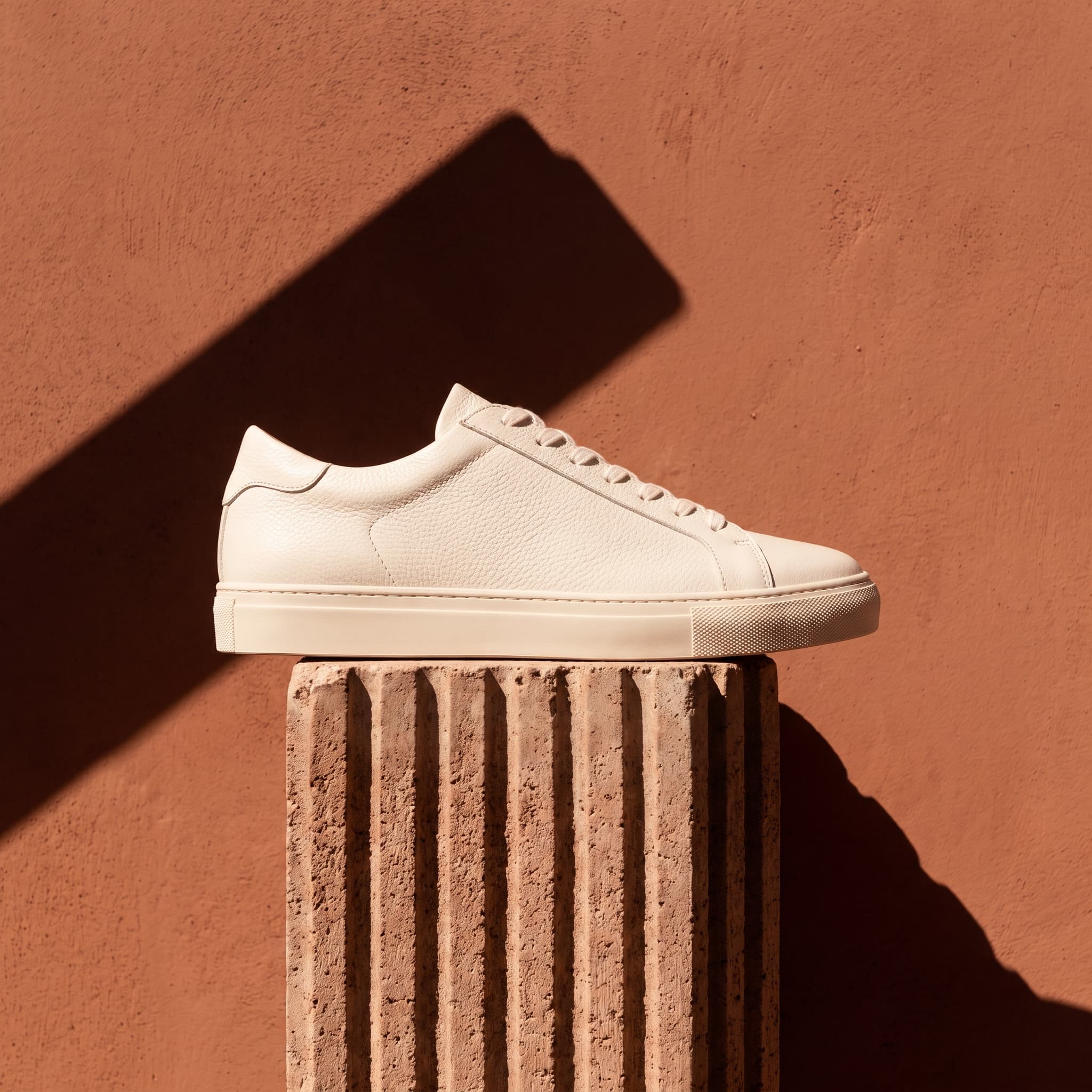
Sneaker in Hard Sun
Generated with imageat from the prompt shown
Prompt
A plain white leather sneaker with no branding resting on a ribbed concrete block against a warm terracotta wall, hard midday sunlight casting a sharp graphic shadow, saturated terracotta and off-white palette, editorial product photography, strong contrast, no text, no logos, no watermark
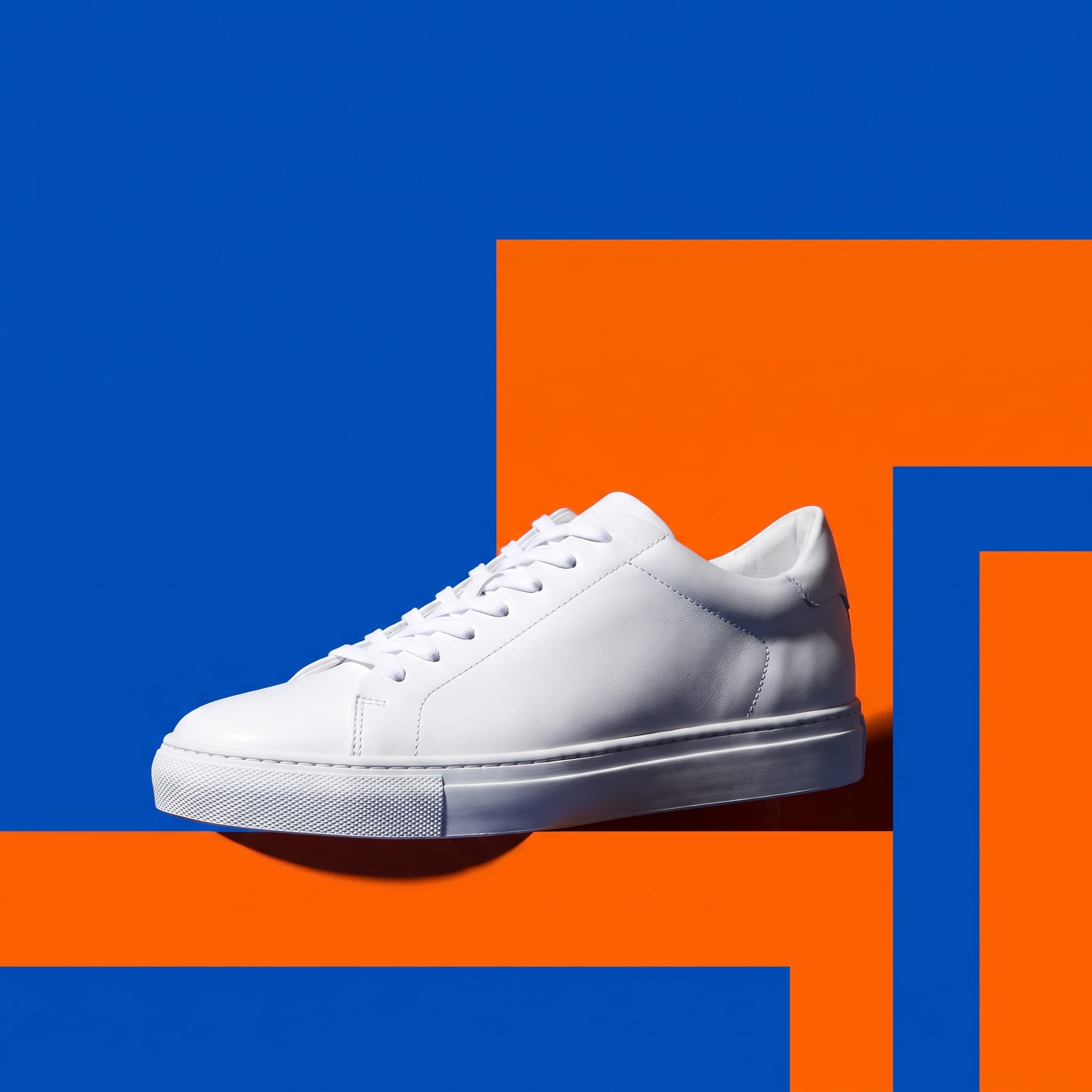
Sale Colour Block
Generated with imageat from the prompt shown
Prompt
A plain white leather sneaker with no branding against bold graphic colour blocking in cobalt and tangerine, hard punchy studio light, strong saturated contrast, upper-left corner kept completely clear for a discount badge, bold retail campaign photography, no text, no logos, no watermark
Prompt guide
Writing a shoe brief
Name the materials part by part, and state how the shoe is standing.
Name materials part by part
“White leather upper, suede toe cap, gum rubber sole” beats “white sneaker”. Each part gets lit for what it is.
Say how the shoe is standing
“Resting on the kerb edge”, “heel lifted slightly” or “laid on its side to show the sole” keeps the placement believable. Match it to the angle of your upload.
Clean the shoe before you shoot
Scuffs, dust and loose threads in the upload tend to stay in the result. Wipe the sole edges, tie the laces neatly, and stuff the shoe so it holds its shape.
Ask for a shadow where it touches
A shoe that casts no shadow looks pasted in. “Soft contact shadow under the sole” grounds it; the Floating preset deliberately moves that shadow below.
How it works
From a phone photo to a footwear listing image
- 01
Shoot each angle you need
Photograph the shoe in side profile at shoe height, then again for any other angle you want, in even daylight on a plain floor. Stuff it with paper so it holds its shape.
- 02
Pick a shoe scene and name the materials
Choose White Profile, Street Concrete, Floating or Outdoor Trail above, and describe the upper, toe and sole materials in the description box.
- 03
Check the sole and laces, then download
Compare tread pattern, stitching, eyelets and lace count with your original. If the silhouette or sole has drifted, generate again, then download the PNG.
FAQ
Questions about AI shoe photos
Can it create other angles of my shoe from one photo?
Not reliably. The generator keeps the viewpoint of the photo you upload. A side-profile photo gives side-profile results; for a three-quarter view, a top view or the sole, photograph the shoe from that angle and upload it separately.
Should I upload one shoe or the pair?
Upload exactly what you want to see. A single shoe works best for profile and catalogue shots. If you want the pair in the image, photograph the pair together — the generator will not reliably invent a matching second shoe.
Will it keep the sole tread and stitching?
The silhouette usually holds, but tread patterns, stitch lines, eyelets and small logos can be simplified or redrawn. Check them against the original, and use your own photo for close-up detail shots where accuracy matters.
Does it work for boots, heels and sandals?
Yes. Boots and heels work the same way as sneakers. Sandals and strappy heels have thin straps and gaps, which are harder to keep exactly, so shoot them against a plain contrasting background and check each strap in the result.
Which format should I use for a marketplace or for social?
White Profile is set to 1:1, the common square for marketplace grids. Street Concrete and Floating use 4:5, a tall format for feeds, and Outdoor Trail uses 3:2 for banners. Any preset can be switched to another format in the panel before you generate.
Generation uses the same credits as the AI product photo generator, and the panel shows the cost before you run it. To cut the product out of a messy photo first, use the AI background remover; to turn a finished shot into a campaign post, use the AI product post generator.
More product types
Scene presets for other products
Each product type has its own lighting problems. These pages carry presets written for them.
- AI Jewelry Product PhotographyRings, necklaces, earrings and watches on velvet, marble and macro sets lit for metal and stones.
- AI Skincare Product PhotographySerums, creams, tubes and pump bottles on bathroom shelves, water, texture swatches and botanicals.
- AI Perfume Product PhotographyFragrance bottles on dark plinths, still water and silk, with props chosen from the scent's notes.
- AI Food Product PhotographyPackaged food, drinks and plated dishes on kitchen counters, table spreads, ice and picnics.
- All scenes in the product photo generatorOpens the main generator with shoes already selected as the product type, plus the general studio, lifestyle and seasonal scenes.
Shoot the drop without the studio day
Upload each angle once, pick a shoe scene, and check the sole and laces before the listing goes live.