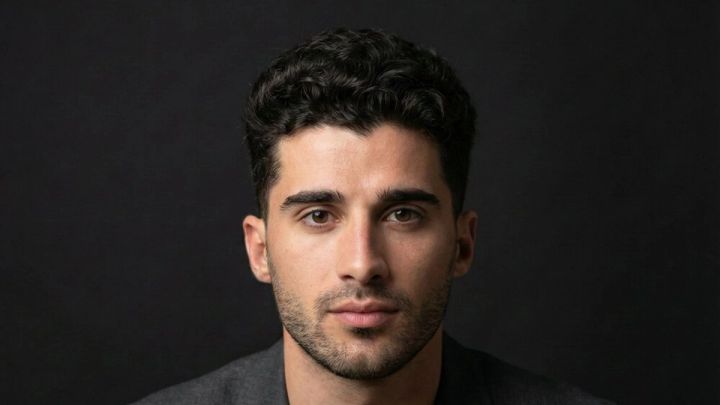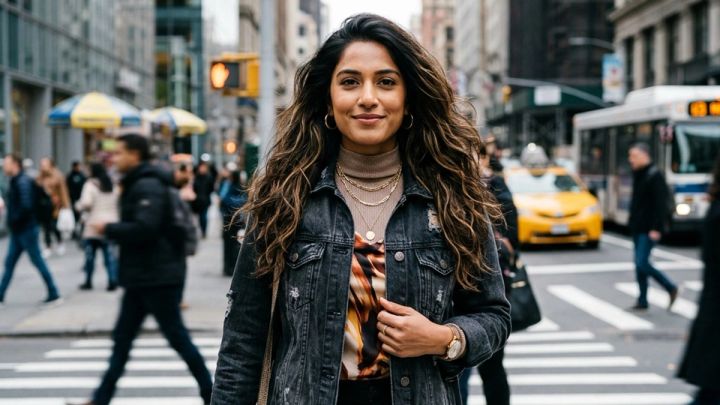
A startup photoshoot should produce five core image groups: founder and employee headshots, team portraits, office lifestyle scenes, product-in-use photos, and event or press images. Plan those shots around real marketing channels, capture wide and tight crops, and prioritize the hardest group setups before people return to work.
The goal is not a folder of interchangeable office photos. It is a reusable visual library for your pitch deck, LinkedIn, press requests, careers page, product launches, and investor updates. If the session leaves a few gaps, imageat can help create consistent startup founder headshots, startup team portraits, and supporting AI photos from clear source images.
Startup photoshoot ideas: the MVP shot list
An MVP shot list is the smallest set that can support a launch, fundraising announcement, website refresh, and hiring campaign. Capture these five categories before optional creative concepts.
| Priority | Shot category | Essential frames | Main uses |
|---|---|---|---|
| 1 | Individual headshots | Founder, cofounders, leadership, customer-facing team | Pitch deck, LinkedIn, speaker profiles, press kit |
| 2 | Team group shots | Full team, leadership group, department pairs or trios | About page, careers page, investor updates |
| 3 | Office and lifestyle | Working sessions, conversations, arrival, whiteboard, coffee break | Homepage, recruiting, social posts, editorial stories |
| 4 | Product in use | Real user flow, hands on hardware, screen context, customer outcome | Product pages, launch posts, sales materials |
| 5 | Event and press | Founder interview, panel, demo, audience interaction, announcement portrait | Media requests, newsroom, conference pages |
Treat the list as coverage, not a sequence. The most efficient shooting order depends on the number of people, room access, daylight, and whether your product needs preparation.
1. Individual founder and team headshots
Photograph every person with the same basic visual rules: similar camera height, face size, light direction, background intensity, and wardrobe formality. Consistency matters more than identical poses. A leadership page looks intentional when portraits belong to one system, even if expressions and body angles vary.
Capture at least three versions per person:
- A direct head-and-shoulders portrait with a calm expression
- A warmer variation with a natural smile
- A wider vertical portrait with room around the shoulders and hands
Leave enough space for circular and square crops. If one founder needs a more editorial option for press or a pitch-day profile, use the detailed startup founder headshot guide to plan expression, outfit, and background.
2. Team group photos
Take one dependable group portrait before attempting playful arrangements. Put faces on slightly different levels, keep everyone visible, and shoot several frames because blinks multiply with every additional person.
Your minimum team set should include:
- The full team facing the camera
- Founders or leadership together
- Small functional groups, such as product, sales, or creative
- One horizontal composition with negative space for a headline
- One relaxed frame that still shows every face clearly
Avoid placing the tallest person automatically in the center or arranging everyone in a rigid line. A shallow arc, seated-and-standing mix, or two-row setup can feel more natural while remaining easy to crop.
3. Office and lifestyle brand photos
Office photos should show how the company works without pretending an ordinary meeting is a historic moment. Build scenes around real actions: reviewing a prototype, discussing a customer problem, preparing a demo, sketching a workflow, or checking a shipment.
Useful office frames include:
- Two people in a focused conversation
- A small team around a table or whiteboard
- A founder moving through the workspace
- Over-the-shoulder product development
- Detail shots of hands, materials, notebooks, and tools
- A wide establishing photo of the office
- A quiet candid moment between formal setups
Remove confidential information before shooting. Blur or replace sensitive screens during preparation rather than relying on retouching later. Do not stage fake metrics, customer logos, funding news, or product interfaces.
4. Product-in-use photos
Show the product doing something meaningful. For software, include the person, device, environment, and believable task instead of filling every frame with a close-up screen. For physical products, photograph setup, use, detail, and the outcome.
Capture four levels:
- A wide scene that establishes context
- A medium shot connecting the person to the product
- A tight detail of the important interaction
- A reaction or outcome that explains why the product matters
Screens can flicker, reflect lights, or become unreadable at an angle. Test them early. If the final interface will be composited later, shoot a clean device angle and record the intended screen content separately.
5. Event and press photos
Startups often discover this gap when a journalist asks for an image on deadline. Build a small press set before you need it:
- Founder speaking or answering a question
- Product demonstration with a clear subject
- A neutral announcement portrait with negative space
- Candid audience or customer interaction, with consent
- A horizontal image suitable for a news header
- A vertical portrait for conference and podcast pages
Avoid fabricated stages, awards, crowds, or branded backdrops. A simple, truthful office portrait is more credible than an image that implies an event never happened.
Build a visual brief before the shoot
A useful visual brief fits on one page. It should tell the photographer what the company does, who the images must persuade, and where the photos will appear. It should not be a mood board with no production decisions.
Include:
- Brand traits: choose three, such as precise, optimistic, and practical.
- Audience: investors, customers, candidates, partners, or press.
- Primary channels: pitch deck, LinkedIn, newsroom, careers page, product launch.
- Visual rules: warm or cool light, formal or relaxed styling, clean or lived-in backgrounds.
- Must-have people: founders, leadership, key operators, customer-facing roles.
- Must-have locations: reception, meeting room, work area, lab, shop floor, or exterior.
- Product moments: the real actions that explain value.
- Avoid list: confidential screens, visible client data, unapproved logos, empty desks, forced celebrations.
Share the brief, call sheet, and example crops before shoot day. If you need broader portrait references, browse headshot styles and the entrepreneur photoshoot ideas guide, then translate the useful elements into your own company context.
Startup photoshoot schedule and shot order
For a small team, a focused two-hour session can cover the MVP list if the space and people are ready. Larger teams should allow more time or split headshots and lifestyle coverage.
A practical two-hour schedule
| Time | Setup | Output |
|---|---|---|
| 0:00–0:15 | Lighting and test frames | Exposure, background, first crop check |
| 0:15–0:50 | Individual headshots | Founders, leadership, priority team members |
| 0:50–1:10 | Team groups | Full team, founders, departments |
| 1:10–1:40 | Office and product use | Meetings, demos, workflows, details |
| 1:40–1:55 | Press and announcement portraits | Horizontal and vertical hero options |
| 1:55–2:00 | Gap check | Missing people, crops, expressions, product details |
Shoot the full group while attendance is highest. Move next to founders and executives with hard calendar constraints. Lifestyle scenes come later because they need fewer people and benefit from the team being more comfortable with the camera.
Prepare the office before the camera arrives
Clear clutter, but do not erase all evidence of work. Keep a few real tools, notebooks, prototypes, or materials that make the company recognizable. Clean reflective surfaces, hide cables where practical, and test whether windows create harsh mixed light.
Create a private holding area for bags and coats. Put water, lint rollers, blotting paper, a mirror, and simple grooming supplies nearby. Ask everyone to arrive camera-ready rather than using the booked photography time for wardrobe decisions.
Plan crops for every channel
A photo library fails when every frame works only in its original orientation. Tell the photographer which crops matter before composing the shot.
Pitch deck
Use clean, consistent founder and leadership portraits. Faces must remain clear when the slide is viewed on a laptop. Keep background detail quiet, align eye levels across the team, and save both square and 4:5 versions. For a five-person team slide, consistency has more impact than individual visual drama.
Profile photos appear inside a circle, so keep hair, chin, and shoulders away from the crop edge. Company-page and post images need wider alternatives. Compare the LinkedIn headshot generator when you need a profile-specific treatment from a clear portrait.
Press and media
Prepare one high-resolution vertical portrait, one horizontal founder or team image, and one product-in-use photo. Add accurate filenames, captions, names, roles, photographer credit, and usage notes. Journalists should not have to guess who appears in a frame.
Careers page
Use a mix of team, office, and real-work images. Show different roles, spaces, and interactions rather than repeating staged laptop scenes. Ask permission before publishing identifiable employee photos and keep releases organized.
Website and social channels
Deliver landscape, square, and vertical options. Leave intentional negative space in several frames so a designer can place a headline without covering a face or product. If a crop exposes distracting edges, use the AI photo editor carefully and keep edits truthful.
Wardrobe, color, and consistency
Ask people to dress one step more polished than a normal workday. Solid colors and subtle textures usually reproduce better than tiny patterns, reflective fabric, oversized logos, or very bright white shirts under office lighting.
Do not force everyone into matching outfits. Instead, coordinate the level of formality and a limited color family. Founders can bring a second layer—such as a blazer, overshirt, cardigan, or jacket—to create variety without a full wardrobe change.
Check clothing against the background. A dark sweater can disappear into a charcoal wall; a pale shirt can lose definition beside a bright window. The goal is separation, not a company-uniform effect.
How to fill missing startup photos with imageat
AI images are most useful for filling specific gaps, not replacing documentation of real people, offices, products, or events. Start by labeling each missing asset: headshot, team-page portrait, editorial founder image, generic office visual, or product-supporting composition.
Fill a missing founder portrait
Use the startup founder headshot generator when one clear portrait is available but the founder missed the session or needs an additional pitch, press, or office direction. The current pack offers Creative office, Pitch-day portrait, and Editorial founder styles in a 4:5 output.
Create a consistent team-page portrait
For an employee who joined after shoot day, the startup team headshot generator provides Clean studio, Workplace portrait, and Editorial profile directions. Match the original library’s background brightness, face scale, crop, and wardrobe formality. Do not present separate AI portraits as one real group photo.
Explore more professional headshot styles
The AI headshot generator offers a larger style library and optional custom instructions. Its current page says it is powered by Nano Banana 2, which supports image editing with references and multiple aspect ratios. Use a sharp, front-facing source photo and review identity, hands, clothing edges, glasses, and background details before publishing.
Repair crops and technical issues
Use background removal for a clean cutout, AI relighting for controlled lighting corrections, camera-angle editing only when the new perspective remains believable, and the image upscaler when an approved image needs a larger delivery size.
Browsing tools and styles may be free, but generation and editing use paid credits. Review the cost shown in the interface before each run. For realistic prompt structure and quality checks, see the AI photoshoot prompts guide.
Quality-control checklist before delivery
Review the photos in their real destinations, not only at full size.
- Every required person appears and is named correctly.
- Headshots share a consistent crop, eye line, and visual tone.
- The full team photo has no blinks or hidden faces.
- Product scenes show a believable task and current interface.
- Screens contain no private data or accidental notifications.
- Hands, glasses, jewelry, clothing edges, and reflections look natural.
- Horizontal, square, and vertical crops are available.
- LinkedIn portraits survive a circular crop.
- Press files have captions, credits, and usage notes.
- Every web image has descriptive alt text.
- AI-assisted images are not used to imply a real event, customer, office, or team gathering.
- Final files are backed up with the untouched originals.
You can browse additional imageat photo packs for role-specific portrait directions. For a more formal real-estate or client-facing reference, the realtor headshot ideas guide shows how pose, wardrobe, and background choices change professional perception.
Frequently asked questions
What photos should a startup have?
A startup should have current founder and team headshots, one dependable full-team photo, office lifestyle images, product-in-use scenes, and a small press set with horizontal and vertical options. Those five categories cover most pitch deck, website, LinkedIn, recruiting, launch, and media needs.
How long should a startup photoshoot take?
A small, prepared team can capture an MVP library in about two hours. Add time for more than ten headshots, multiple locations, complex products, wardrobe changes, customer participation, or video. Schedule the full group early and reserve the final minutes for a gap check.
What should founders wear for a startup photoshoot?
Choose solid colors, matte fabrics, and a level of formality that matches the company and audience. Bring one optional layer for variety. Avoid tiny patterns, large logos, reflective materials, and clothes that blend into the background.
Which photos belong in a pitch deck?
Use consistent founder and leadership headshots on the team slide, plus a real product-in-use or customer-context image when it supports the story. Keep faces recognizable at small size and avoid busy backgrounds, invented traction visuals, or decorative photos that do not explain the business.
How should startup team photos be cropped?
Deliver landscape, square, and vertical versions. Keep a wide group frame for the website, a tighter crop for social posts, and negative-space options for headlines. Individual portraits should also be tested inside LinkedIn’s circular profile crop.
Can imageat create missing startup headshots?
Yes. imageat offers founder, startup-team, LinkedIn, and general AI headshot workflows that can create additional portraits from clear source images. Generation uses paid credits. Match the existing library’s crop, background brightness, face scale, and wardrobe formality, then review identity and small details before use.
Should AI create a full team group photo?
Use a real group photo whenever the image is meant to document the actual team. AI can help make separate, consistent team-page portraits, but it should not imply that people attended the same session, event, office, or announcement when they did not.
How often should a startup update its photo library?
Refresh the core library after major leadership changes, a rebrand, a move, a meaningful product redesign, or rapid hiring. Otherwise, review it every 12 to 18 months and replace outdated headshots or product screens as needed.
Turn one shoot into a reusable startup photo library
Begin with the five MVP categories, organize the day around people and access constraints, and capture every important scene in more than one crop. A small, truthful, consistent library will outperform a large folder of disconnected images.
If the physical shoot leaves a portrait gap, use imageat to create a founder or team-page option from a clear source photo, then match it carefully to the approved visual system. Start with the startup founder headshot generator or startup team headshot generator, and keep real team, office, product, and event photography clearly grounded in what actually happened.