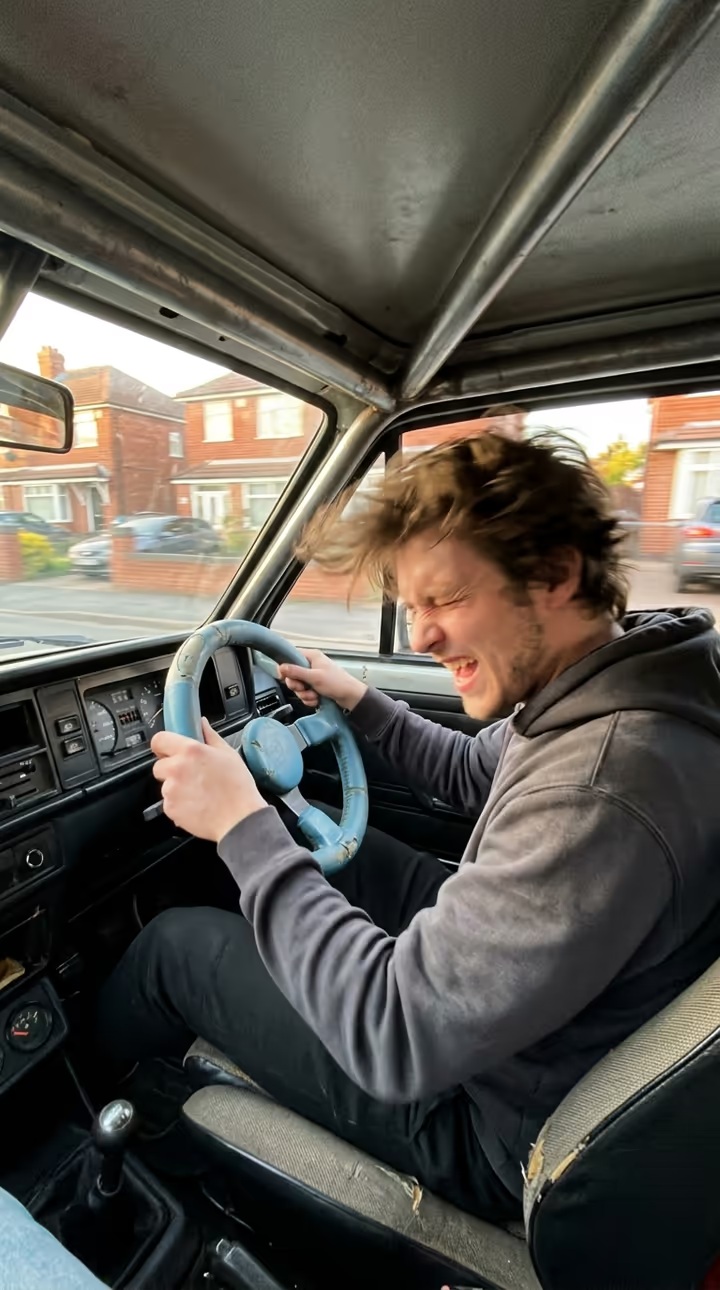
Get behind the blue wheel in the Ali G driving scene meme: upload one photo and AI puts your face on the driver, steering swings and glances included.

imageat
Explore
Create

Features

AI Photo RetakesMy MovieCreate ImageCreate VideoCreate WorkflowGalleryPhoto PacksToolsOld Photo RestorationWorld Cup 2026Edit ToolsRelightAnglesVideo EditAI StylistInpaint
All models →Nano Banana 2.1Google's newest • 4 creditsNano Banana 2Fast & affordable • 4 creditsNano Banana 2 LiteFast draft • 3 creditsNano Banana ProHighest quality • 8 creditsNano BananaBudget friendly • 3 creditsGPT Image 2.5OpenAI's newest • from 3 creditsGPT Image 2.5 SunburstSlower, finer detail • from 3 creditsGPT Image 2OpenAI • 2–10 cr by qualityMidjourney V84 images per run • from 4 creditsSeedream 5.0 ProFlagship ByteDance • 3–5 creditsKrea 3Krea's newest • from 4 creditsKrea 2High-fidelity • 3 creditsKrea 2 MediumFast • 2 credits
ImageVideo
Audio
AI Voice GeneratorAI Song GeneratorAI Lyrics GeneratorAI Instrumental GeneratorAI Music Video GeneratorAI Dance VideoPhoto KaraokeLyric Video MakerAI Podcast Generator
MCPAPITrendsSeedance 2.5AI InfluencerPricing
Explore
ImageVideo
MCPAPITrendsSeedance 2.5AI InfluencerPricing
All trends

Ali G Driving Scene Meme: Get Behind the Blue Wheel From One Photo

Put yourself behind the blue wheel in the driving-scene meme.

4.8Be the first to rate

Preview

Watch video
Source reference footage, not a personalized resultWatch
Ali G Driving Scene illustrative style exampleIllustrative style example

Upload Your Photo

Upload one photo of one person, face and shoulders clear, sharp and well lit. Your face, skin tone and hair replace the driver; the car, clothes and moves come from the clip. The result is silent. Likeness depends on the photo and is not guaranteed.

Resolution

5.6s · 9:16 · no audio. Higher resolution uses more credits per generation.

5.6s · 9:16 · no audio

82 credits
Log in to see your credits

By uploading or generating, you confirm you own these photos or have the person's permission, and you won't impersonate real people or celebrities. Responsible use

Ali G Driving Scene

Ali G Driving Scene

Upload Your Photo

Upload one photo of one person, face and shoulders clear, sharp and well lit. Your face, skin tone and hair replace the driver; the car, clothes and moves come from the clip. The result is silent. Likeness depends on the photo and is not guaranteed.

Resolution

5.6s · 9:16 · no audio. Higher resolution uses more credits per generation.

5.6s · 9:16 · no audio

82 credits
Log in to see your credits

By uploading or generating, you confirm you own these photos or have the person's permission, and you won't impersonate real people or celebrities. Responsible use

Quick answer

To do the Ali G Driving Scene trend, upload one clear photo where your face is easy to see, then press generate. imageat places you into the trend's original video, and the video is ready to download when it finishes. One generation costs 82 imageat credits; no prompt writing or editing app is needed.

Ali G Driving Scene puts you behind the wheel of the close-up driving meme. The camera sits right in front of the driver, who grips a small blue steering wheel, swings it hard, bobs and throws glances out of the window in bright daylight. Upload one face photo and Genjutsu motion transfer swaps the driver for you while the car, the moves and the timing stay as they were. Your photo decides who appears: your face, skin tone and hair. The clip decides everything else: the steering, head movements and glances, the framing, the car interior, the light and the clothing. The video runs 5.6 seconds in 9:16 and has no sound, so add your own track before posting. Choose 480p for a lower-credit draft or 720p for a sharper result.

What is the Ali G Driving Scene?

The Ali G driving scene is a meme format that borrows the car scene from the Ali G film: a driver filmed up close behind a small steering wheel, swinging it with full commitment. Creators recreate it with their own faces and pair it with music. This page recreates one of those clips with you as the driver from one photo; the result is silent so you can choose the sound.

How to Do the Ali G Driving Scene Trend

Here is how to make your own video on imageat:

  • 1
    Upload one clear face-and-shoulders photo of one person. JPG, PNG or WEBP, up to 10 MB.
  • 2
    Choose 480p or 720p and check the credit cost shown.
  • 3
    Generate the video.
  • 4
    Download the silent 9:16 clip and add your sound in TikTok, Reels or your editor.

What comes from your photo and from the clip

From your photo: face, facial features, skin tone, hairstyle, hair color and facial hair or its absence. From the clip: the steering, head movements and glances with their timing, the close framing, the blue wheel, the car interior, the daylight and the clothing. The clip has no audio, so neither does the result.

About the media on this page

The video is the source reference footage the template follows, and the still image is an illustrative style example. Neither is a result made from someone's upload on imageat. Quick head turns and the wheel passing in front of the face can make likeness drift for a moment. Ali G Driving Scene is an independent AI template; imageat is not affiliated with or endorsed by the film, its makers or the person in the source footage.

Tips for Best Results

  • One person per photo, face and shoulders in frame, sharp and well lit.
  • Hair is taken from your photo, so a photo that shows your hairstyle clearly works best.
  • Avoid sunglasses, heavy filters and group photos.
  • Only upload faces you own or have permission to use.

Ali G Driving Scene at a Glance

What to upload

Your photo — one person, face and shoulders clear.

What you get

An AI video (5.6s · 9:16 · no audio) that follows the trend's original take, ready to download and post on TikTok, Reels or Shorts.

What it costs

82 imageat credits per video at 720p. The price is shown before you generate, and a failed generation is refunded.

FAQs About Ali G Driving Scene

It is a meme format named after the car scene from the Ali G film, recreated by creators who film themselves up close behind a small blue steering wheel, swinging it and glancing around. This template follows one of those clips and puts your face on the driver. imageat is not affiliated with the film or its creators.
No. The reference clip has no audio track, so your video is silent. Add the song or sound you want in TikTok, Reels or your editor before posting.
One clear face-and-shoulders photo of one person. The reference clip is built in; you do not upload a video or write a prompt.
No. Your photo supplies your own face, skin tone and hair. The template does not turn you into the film character or into the original driver.
5.6 seconds in 9:16, silent. You choose 480p or 720p.
39 credits at 480p or 82 credits at 720p, shown before you generate. If the generation fails, the credits are refunded.
No. The video is the source reference footage the template follows and the still is an illustrative style example. Neither was made from someone's upload on imageat.

Create this trend with imageat

Go beyond the ali g driving scene — generate any AI video from text or an image with Veo, Kling, Seedance and more.

Create the Ali G Driving SceneTry the AI Video Generator
imageat

Transform your ideas into photos and videos with imageat. Our agentic AI generates visuals from text descriptions — chain models, add logic, and build production-ready workflows.

Trustpilot

Product

  • AI Image Generator
  • AI Wallpaper Generator
  • AI Image Generators
  • AI Stock Image Generator
  • AI Portrait Director
  • AI Photo Retakes
  • AI Art Generator
  • AI Illustration Generator
  • AI Logo Generator
  • AI Poster Generator
  • AI Book Cover Generator
  • AI QR Code Generator
  • AI Illusion Generator
  • Instagram Post Generator
  • Instagram Story Generator
  • LinkedIn Post Generator
  • AI TikTok Video Generator
  • AI Instagram Reels Generator
  • AI YouTube Shorts Generator
  • AI Photo Generator
  • AI Video Generator
  • Higgsfield Genjutsu
  • Image to Video AI
  • AI Product Photo Generator
  • AI Product Post Generator
  • AI Photo Editor
  • AI Text Remover
  • AI Tattoo Generator
  • AI Relight
  • AI Angles
  • AI Video Edit
  • AI Edit Tools
  • Editor
  • Remove Background
  • AI Avatar
  • Image Upscaler
  • Face Swap Generator
  • AI Dance Video Generator
  • AI Motion Transfer
  • Seedance 2.5 Video Generator
  • Seedance 2.0 Video Generator
  • AI Headshot Generator
  • Headshot Styles
  • Prompt Generator
  • Viral AI Photo Prompts
  • Plastic Surgery AI
  • AI Haircut Generator
  • Wedding Bride Selfie
  • Flash Car Nightlife
  • GTA 6 AI Photo Generator
  • Halloween Backgrounds
  • Halloween AI Photos
  • Renaissance Pet Portrait
  • Vintage Photobooth Strip
  • AI Voice Generator
  • AI Song Generator
  • AI Music Video Generator
  • Photo Karaoke
  • AI Podcast Generator
  • AI Lip Sync
  • AI UGC Generator
  • Trend Studio
  • AI Infographic Generator
  • AI Influencer Generator
  • AI Influencer Studio
  • Marketing Studio
  • AI Tools

Resources

  • AI Photo Packs
  • Blog
  • Community
  • Explore
  • Characters
  • Trends
  • World Cup 2026 Videos
  • Prompts
  • Templates
  • AI Benchmark
  • Compare

Company

  • Features
  • Pricing
  • Enterprise
  • About
  • Affiliate Program
  • Affiliate Terms
  • API
  • AI Models
  • MCP Server
  • Agent Skill
  • GPT Dots × imageat
  • Image Generation API
  • Video Generation API
  • MCP Image Generator
  • MCP Video Generator
  • Help Center
  • Status
  • Contact

Discover

Free Tools

  • Image Resizer
  • Image Compressor
  • Image Converter
  • Metadata Remover
  • Watermark Remover
  • Image to JSON
  • Video to Prompt

Popular Packs

  • AI Dating Photos
  • LinkedIn Headshots
  • CEO Headshots
  • Actor Headshots
  • Instagram Photos
  • AI Selfies
  • Old Money Photos
  • Wedding Photos
  • AI Makeup Try-On

© 2026 imageat, a service operated by INFINITE PHASE LLC. All rights reserved.

INFINITE PHASE LLC, 8 The Green, Suite A, Dover, DE 19901 USA

Only upload photos you own or have permission to use. Don't use imageat to impersonate real people, make deepfakes or clone voices. Responsible use

Help CenterPrivacyTermsRefundResponsible UseSite DirectoryAll systems operational
imageat
  • Celebrity Autograph
  • Electric Shock Pet Filter
  • Anime Eye Trend
  • Nunca Ando Sola
  • C-Walk
  • ABCDEFG I Need Money
  • Transmission 5 Dance AI
  • Say It Right Trio Dance AI