Anime Eye Trend: Add a Star Anime Eye and Stickers of Your Anime Twin
Add a star-shaped anime eye and stickers of your own anime twin.
Preview
Preview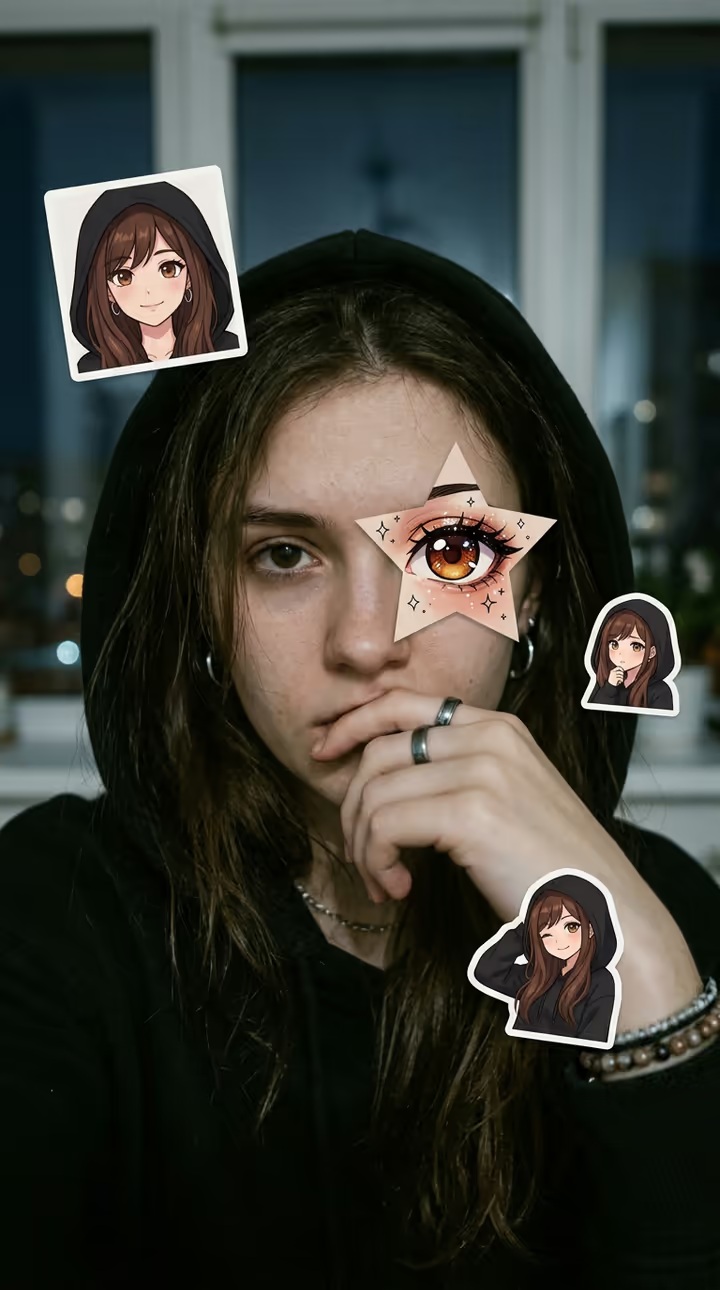 Illustrative style example
Anime Eye Trend
Anime Eye Trend
Upload Your Photo
Anime style for your twin (optional)
By uploading or generating, you confirm you own these photos or have the person's permission, and you won't impersonate real people or celebrities. Responsible use
Quick answer
To do the Anime Eye Trend, upload one clear photo where your face is easy to see, then press generate. imageat recreates your photo in the trend's look, and the image is ready to download when it finishes. One generation costs 3 imageat credits; no prompt writing or editing app is needed.
The anime eye trend turns a close selfie into a collage: one of your real eyes is covered by a star-shaped paper cutout holding an anime version of that eye, and small white-bordered stickers of your anime twin sit around your face. Upload one selfie and the AI draws an original anime character from your own hair, eye color and outfit, places the star over your eye and adds three or four stickers. Everything else, your face, skin, lighting and background, stays a photo. Optionally describe the anime style you want for the twin.
What is the Anime Eye Trend?
The anime eye trend is a selfie edit that mixes photo and anime: a star cutout with an anime eye placed over a real eye, plus sticker versions of the person's anime self. It spread on TikTok and Instagram as a quick way to show your anime twin next to the real you. This page makes the edit from one selfie, with an original character based on you rather than an existing anime character.
How to Do the Anime Eye Trend
Here is how to make your own version on imageat:
- 1Upload one close selfie with at least one eye clearly visible.
- 2Optionally describe the anime style for your twin, for example soft pastel or bold shonen.
- 3Generate, then download your 9:16 anime eye image.
What stays and what is added
Your face, pose, skin texture, lighting, clothing and background stay photographic. The AI adds one star-shaped anime eye over a real eye and three or four stickers of an original anime twin drawn from your hairstyle, hair color, eye color and outfit.
About the image on this page
The image on this page is an illustrative style example, not a result made from someone's upload on imageat. Your result is a new 9:16 image; the star, the stickers and the twin's look change from run to run.
Tips for Best Results
- Use a close selfie, face filling much of the frame, eyes open and sharp.
- Even light on the face helps the star line up with your eye.
- Keep the style note short and visual: pastel, retro 90s, bold lines.
- Only upload faces you own or have permission to use.
Best Prompts for Anime Eye Trend
Want more control over the look? Copy one of these prompts and use it in our AI image generator to fine-tune the anime eye trend style.
Anime Eye Trend look as a clean studio portrait, even softbox lighting, neutral background, crisp skin texture
Anime Eye Trend style during golden hour, warm backlight, lens flare, natural skin tones, bokeh background
Anime Eye Trend aesthetic as a fashion magazine cover, bold styling, sharp detail, professional color grade
Anime Eye Trend effect with vintage 35mm film grain, faded colors, light leaks, nostalgic mood
Anime Eye Trend at a Glance
What to upload
Your selfie — close up, at least one eye clearly visible.
What you get
An AI image, ready to download and post on TikTok, Reels or Shorts.
What it costs
3 imageat credits per image. The price is shown before you generate, and a failed generation is refunded.
FAQs About Anime Eye Trend
Create this trend with imageat
Create unlimited variations beyond the anime eye trend with imageat's AI image generator.