Central Cee Doja AI Video Generator
Become the main performer in a Central Cee Doja video. Add optional photos for different supporting characters. Choose the opening 15 or 30 seconds and generate your video at 480p or 720p.
Example results
Watch video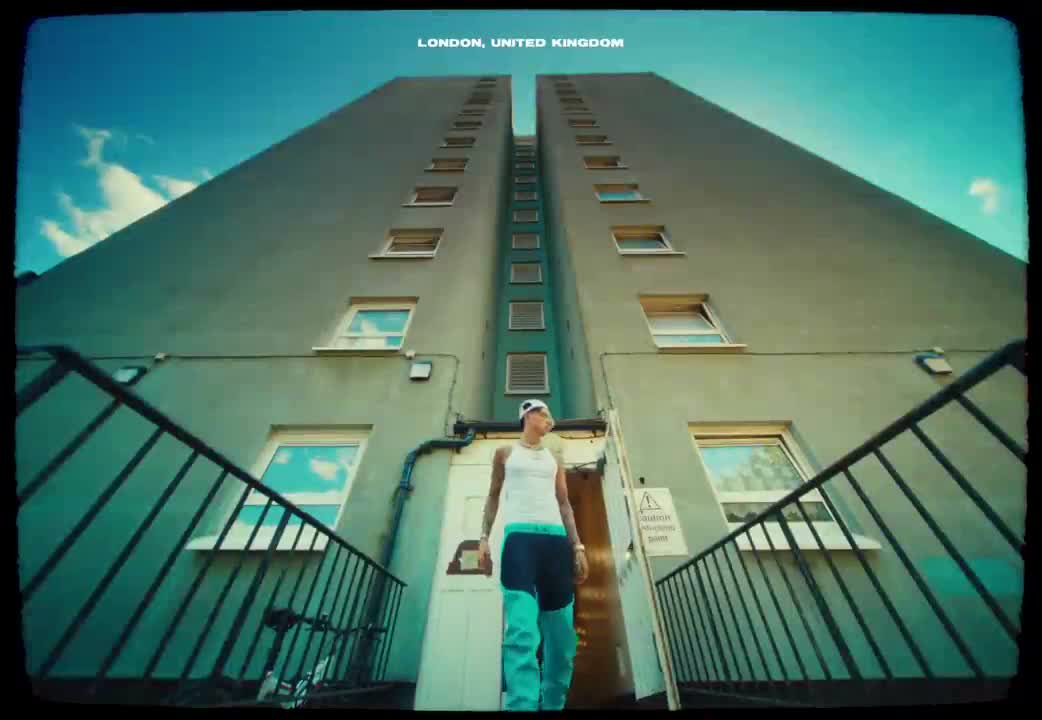
Central Cee Doja AI Video Generator
Central Cee Doja
Upload Your Photo
For the best likeness: one person per photo, face clearly visible from the front, good light, nothing covering the face (phone, sunglasses, hand). Upload the original photo, not a screenshot.
Video length
Longer videos use more credits per generation.
Resolution
Higher resolution uses more credits per generation.
By uploading or generating, you confirm you own these photos or have the person's permission, and you won't impersonate real people or celebrities. Responsible use
Quick answer
To do the Central Cee Doja trend, upload 1 to 8 clear photos of the people you want in it, then press generate. imageat places the people from your photos into the trend's original video, and the video is ready to download when it finishes. One generation costs 205 imageat credits; no prompt writing or editing app is needed.
Create a Central Cee Doja AI video with one required main-character photo and up to seven optional supporting-character photos with Imageat. This template uses the opening of the supplied Doja music video as its motion reference, so you can recreate the performance with your own appearance without filming a new take. Choose the first 15 seconds for a shorter edit or the first 30 seconds for a longer sequence. Both versions begin at the start of the reference video, with the DOJA title-card and director-credit scenes removed and subsequent footage used to keep the selected duration. AI motion transfer uses two inputs for different purposes: your photo provides the replacement character, while the reference clip provides the movement, camera work and sequence of shots. The workflow is designed to preserve the original timing, environment and synchronized audio while replacing the main performer. The first upload always replaces the main performer. Additional uploads replace distinct supporting people in their order of first appearance in the selected clip, using left-to-right order when they appear together. Keep optional uploads in that order. People without a supplied reference stay unchanged; extra references do not add people who are absent from the clip. A clear portrait or Character Sheet helps the model maintain a recognizable face, hairstyle and outfit across changing angles. Results can vary where the performer turns away, moves quickly or is partially hidden. Choose 480p for a lower-credit preview or 720p for a higher-resolution version. Resolution and duration are separate settings: you can create a 15-second or 30-second video at either quality. Review your result before downloading and sharing it. This is an independent AI template and is not an official Central Cee product or endorsement.
What is the Central Cee Doja AI Video Generator?
The Central Cee Doja AI Video Generator is a video trend based on British rapper Central Cee's 2022 single "Doja" and its music video directed by Cole Bennett. In the video, the lead performer walks out of a London apartment high-rise under a steep low-angle camera and performs the opening bars against urban backdrops. Fans and creators share these scenes on TikTok and Instagram to place themselves into the UK drill music aesthetic. On imageat, you upload a portrait to replace the main performer inside a recreation template, matching the camera movement, timing, and source clip's sound.
How to Do the Central Cee Doja Trend
Here is how to make your own video on imageat:
- 1Upload a clear photo or Character Sheet for the main character in the first slot.
- 2Optionally add up to seven different supporting characters, in order of their first appearance in the chosen cut (left to right if they appear together).
- 3Choose the opening 15-second or 30-second cut.
- 4Select 480p or 720p and check the displayed credit cost.
- 5Generate, review and download your Doja AI video.
Tips for Best Results
- Use a sharp, well-lit reference showing one person in each upload.
- Keep the first upload for the main performer and use separate people for optional supporting references. Unfilled supporting roles stay unchanged.
- A Character Sheet with portrait and full-body views can help communicate your outfit and proportions.
- The template follows the reference clip; it does not create new choreography.
- Start with 15 seconds at 480p to evaluate your reference before choosing a longer or higher-resolution version.
Central Cee Doja AI Video Generator at a Glance
What to upload
Main character — required; Supporting character 1 — optional, in order of first appearance; Supporting character 2 — optional, in order of first appearance; Supporting character 3 — optional, in order of first appearance; Supporting character 4 — optional, in order of first appearance; Supporting character 5 — optional, in order of first appearance; Supporting character 6 — optional, in order of first appearance; Supporting character 7 — optional, in order of first appearance.
What you get
An AI video that follows the trend's original take, ready to download and post on TikTok, Reels or Shorts.
What it costs
205 imageat credits per video at 720p. The price is shown before you generate, and a failed generation is refunded.
FAQs About Central Cee Doja AI Video Generator
Create this trend with imageat
Go beyond the central cee doja ai video generator — generate any AI video from text or an image with Veo, Kling, Seedance and more.