Singing Pet AI Video: Your Dog or Cat on the Mic
Your dog or cat steps up to the mic and sings its heart out, from one photo of your pet.
Source reference footage, not a personalized result
Watch video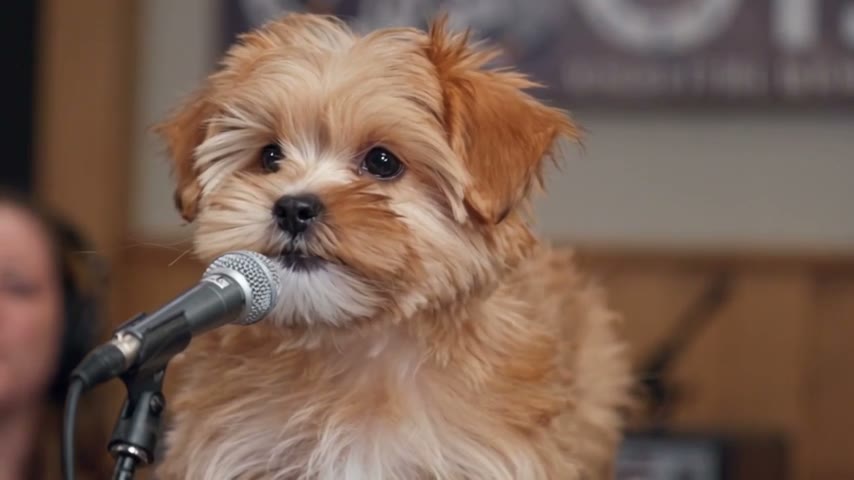
Singing Pet
Singing Pet
Upload Your Photo
Upload one clear photo of one pet, face fully visible and well lit. Your pet's look comes from the photo; the microphone, venue, singing, camera and sound come from the clip. Likeness depends on the photo and is not guaranteed.
Resolution
15s · 16:9 · source audio. Higher resolution uses more credits per generation.
15s · 16:9 · source audio
By uploading or generating, you confirm you own these photos or have the person's permission, and you won't impersonate real people or celebrities. Responsible use
Quick answer
To do the Singing Pet trend, upload one clear photo where your face is easy to see, then press generate. imageat places you into the trend's original video, and the video is ready to download when it finishes. One generation costs 211 imageat credits; no prompt writing or editing app is needed.
Singing Pet turns your dog or cat into a lounge singer. A fluffy puppy sits behind a stage microphone in a warm, wood-panelled venue and sings into it, tilting its head between the notes. Upload one photo of your pet and the template swaps it in. Your photo first becomes a reference sheet, so your pet's coat color, markings, ears and eyes stay its own while its mouth moves with the song. The clip keeps everything else: the microphone, the venue, the warm light, the camera and the original sound. The video runs about 15 seconds in 16:9; choose 480p for a lower-credit draft or 720p for a sharper result.
What is the Singing Pet?
The Singing Pet is a short landscape clip of a puppy singing into a stage microphone. This page recreates it with your own pet at the mic, from a single photo.
How to Do the Singing Pet Trend
Here is how to make your own video on imageat:
- 1Upload one clear photo of one pet, face fully visible. JPG, PNG or WEBP, up to 10 MB.
- 2Choose 480p or 720p and check the credit cost shown.
- 3Generate the video.
- 4Preview and download your 16:9 clip with the source sound.
What comes from your photo and from the clip
From your photo: species, breed look, head shape, ears, eyes, fur length, coat color and markings. From the clip: the microphone, the venue and banner, the warm light, the camera, every mouth movement, head tilt and glance with its timing, and the audio.
Length, resolution and credits
About 15 seconds in 16:9 with the source sound. The price depends only on the resolution, includes the reference sheet, and is shown before you generate. Failed generations are refunded.
About the video on this page
The preview is the source reference footage, not a personalized result. Long fur and fast head movements can briefly soften likeness. The result keeps the source sound; imageat does not supply rights to the music. Singing Pet is an independent AI template; imageat is not affiliated with or endorsed by the creator of the source footage.
Tips for Best Results
- A sharp photo of your pet's face, looking toward the camera, works best.
- Show the whole head, ears included, in good light.
- One animal per photo, no people or other pets.
Singing Pet at a Glance
What to upload
Your pet — one animal, face clearly visible.
What you get
An AI video (15s · 16:9 · source audio) that follows the trend's original take, ready to download and post on TikTok, Reels or Shorts.
What it costs
211 imageat credits per video at 720p. The price is shown before you generate, and a failed generation is refunded.
FAQs About Singing Pet
Create this trend with imageat
Go beyond the singing pet — generate any AI video from text or an image with Veo, Kling, Seedance and more.