Storm Crowd AI Video Generator
Upload your photo to stand at the centre of the masked crowd while it bows in perfect synchronization around you — the 30-second cinematic take, recast with your face.
Example results
Watch video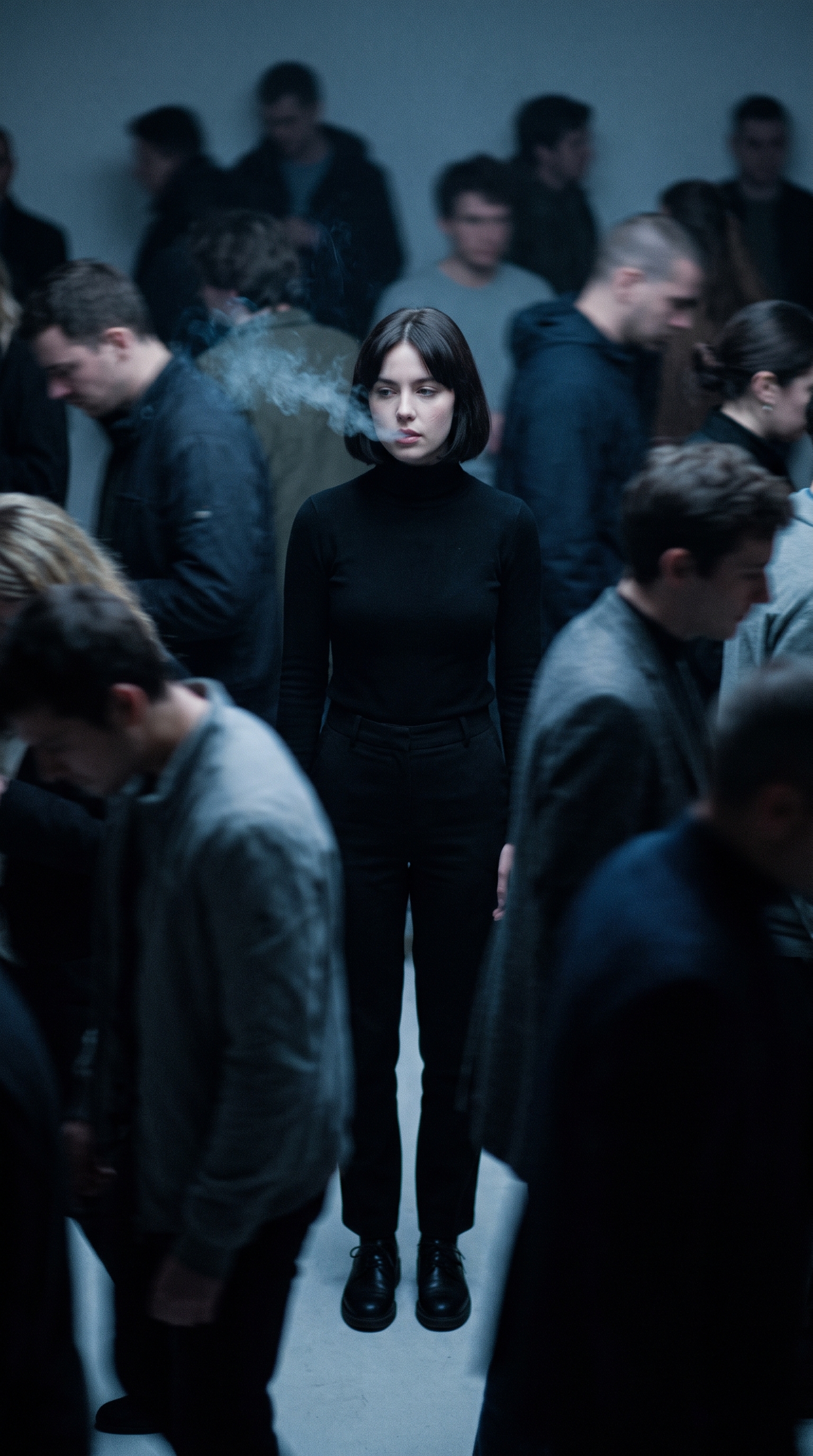
Storm Crowd AI Video Generator
Storm Crowd
Upload Your Photo
For the best likeness: one person per photo, face clearly visible from the front, good light, nothing covering the face (phone, sunglasses, hand). Upload the original photo, not a screenshot.
Resolution
Higher resolution uses more credits per generation.
By uploading or generating, you confirm you own these photos or have the person's permission, and you won't impersonate real people or celebrities. Responsible use
Quick answer
To do the Storm Crowd trend, upload 1 to 2 clear photos of the people you want in it, then press generate. imageat places the people from your photos into the trend's original video, and the video is ready to download when it finishes. One generation costs 246 imageat credits; no prompt writing or editing app is needed.
This is the masked-crowd clip you have seen on your feed, rebuilt around your own face. The choreography is not improvised: the original 30-second take supplies every frame of movement, the set, the camera push and the timing, and Seedance 2.5 recasts the person standing at its centre as you. First your photo becomes an identity sheet — the same face from six angles — which is what holds your likeness steady across the full half minute instead of drifting from shot to shot. Then the crowd of masked figures in black coats bows, folds and snaps upright in unison around you while you stay locked in place, exactly as in the source. Upload a second photo and that crowd becomes a hundred identical copies of whoever you choose; leave it empty and the masks stay as they are. The trend's own soundtrack is laid over the finished cut.
What is the Storm Crowd AI Video Generator?
The Storm Crowd trend is an AI crowd dance meme inspired by the synchronized group choreography from the music video for STORM by GENER8ION and Yung Lean. On TikTok, Instagram Reels, and YouTube Shorts, creators share clips where a single lead figure stands completely motionless while a surrounding crowd in dark coats bows and moves in robotic unison. The video contrasts the still person at the center against the sweeping, rhythmic wave of the figures around them. This imageat page builds your custom video by casting your uploaded photo as the central figure across the entire 30-second take while keeping the choreography and camera motion intact.
Storm Crowd AI Video Generator on TikTok
Popular posts of the trend, credited to their creators. The videos play from TikTok.
How to Do the Storm Crowd Trend
Here is how to make your own video on imageat:
- 1Upload a clear photo of yourself — front-facing, with the face well lit and unobstructed.
- 2Optionally add a second photo: that person becomes every masked figure in the crowd. Skip it and the crowd stays as it is.
- 3An identity sheet is built from your photo, then the 30-second take is recast around it.
- 4Preview the clip and download it, or run it again for a slightly different pass.
Tips for Best Results
- Works with any subject — the video follows the face, hair and build in your photo, not a fixed look.
- A sharp, evenly lit, front-facing photo gives the identity sheet the most to work with; sunglasses, heavy shadow and extreme angles cost likeness.
- The choreography, the set and the camera move are fixed by the source clip, so every run gives you the same iconic take with your face in it.
- Head-and-shoulders photos are enough — the sheet reconstructs the rest of the figure.
- Add a second photo only if you want the crowd recast; a clean portrait works far better there than a group shot.
- Your outfit is replaced by the centre figure's black coat, so what you wear in the photo barely matters.
Best Prompts for Storm Crowd AI Video Generator
Want more control over the motion? Copy one of these prompts and use it in our AI video generator to fine-tune the storm crowd ai video generator style.
Grade the scene colder and more desaturated, with deep blue shadows and a harder rim light on the masked crowd.
Grade the scene warmer, with soft golden light catching the masks and a shallower, hazier falloff into the background.
Add fine 35mm film grain and a gentle halation on the highlights, keeping the movement and framing untouched.
Keep the centre character in the outfit from the uploaded reference photo instead of the black coat, matching the scene's lighting and shadows to it.
Storm Crowd AI Video Generator at a Glance
What to upload
Upload a clear photo of yourself (front-facing works best); Optional: a face to replace the masked crowd.
What you get
An AI video that follows the trend's original take, ready to download and post on TikTok, Reels or Shorts.
What it costs
246 imageat credits per video at 720p. The price is shown before you generate, and a failed generation is refunded.
FAQs About Storm Crowd AI Video Generator
Create this trend with imageat
Go beyond the storm crowd ai video generator — generate any AI video from text or an image with Veo, Kling, Seedance and more.