Wedding Dance Floor: Put Yourself on the Reception Dance Floor From One Photo
Upload one photo and dance across a glowing wedding reception, surrounded by the guests, with the party sound kept.
Example results
Watch video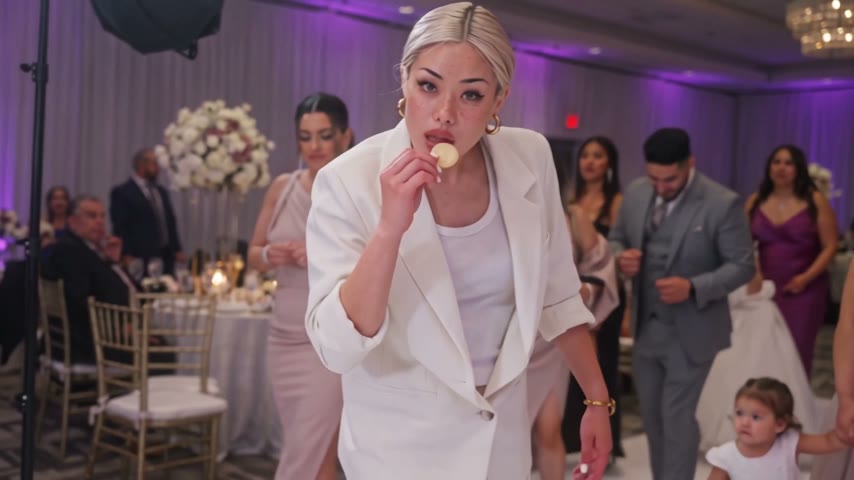
Wedding Dance Floor
Wedding Dance Floor
Upload Your Photo
Upload one full-body photo of one person, facing the camera and well lit. Your face, hair and outfit come from your photo; the dance, the reception hall, the guests and the sound come from the clip.
Output
10 seconds · 16:9 · source audio
By uploading or generating, you confirm you own these photos or have the person's permission, and you won't impersonate real people or celebrities. Responsible use
Quick answer
To do the Wedding Dance Floor trend, upload one clear photo where your face is easy to see, then press generate. imageat turns your photo into the trend's AI video, and the video is ready to download when it finishes. One generation costs 12 imageat credits; no prompt writing or editing app is needed.
Wedding Dance Floor turns one photo into a 10-second 16:9 party clip. The built-in reception footage supplies the moves, the hall, the other guests, the camera and the sound; your photo supplies who is dancing: face, hair, body and outfit. It is made for the classic 'me at every wedding' post. Upload a full-body photo in the outfit you want to be seen in, generate, and share the clip with friends, the couple or your feed.
What is the Wedding Dance Floor?
The Wedding Dance Floor trend drops you into a real-looking wedding reception: chandeliers, purple uplighting, round tables and guests in their best clothes, while one guest dances confidently across the floor and through the crowd. This page swaps that dancer for you from a single photo.
How to Do the Wedding Dance Floor Trend
Here is how to make your own video on imageat:
- 1Upload one full-body photo of one person, facing the camera, outfit visible.
- 2Check the credit cost on the button.
- 3Generate the video.
- 4Preview and download your 16:9 MP4 with the party sound.
What comes from your photo and from the clip
From your photo: face, hairstyle, skin tone, body proportions, outfit and accessories. From the clip: the dance moves and timing, the reception hall and its lighting, the other guests, the camera movement and the audio.
Length, resolution and credits
Every result is 10 seconds in 16:9 at 480p with the original party sound. The price is fixed and shown on the button before you generate; failed generations are refunded.
Photo tips
A sharp full-body photo with one person gives the cleanest result. Fast turns can soften the face for a few frames; a bright, front-facing photo holds the likeness best.
Tips for Best Results
- Full body, head to feet, facing the camera.
- Wear the outfit you want to dance in.
- Only upload photos of people who agreed to it.
Best Prompts for Wedding Dance Floor
Want more control over the motion? Copy one of these prompts and use it in our AI video generator to fine-tune the wedding dance floor style.
Wedding Dance Floor, smooth controlled camera movement, realistic motion, cinematic lighting, stable composition, natural depth
Wedding Dance Floor, immediate visual hook, smooth motion, clear centered subject, polished 9:16 social video
Wedding Dance Floor, gradual movement, atmospheric depth, elegant pacing, wide cinematic reveal
Wedding Dance Floor, energetic camera movement, strong parallax, dramatic scale, crisp detail
Wedding Dance Floor at a Glance
What to upload
Your photo — one person, full body, face and outfit visible.
What you get
An AI video (10 seconds · 16:9 · source audio), ready to download and post on TikTok, Reels or Shorts.
What it costs
12 imageat credits per video. The price is shown before you generate, and a failed generation is refunded.
FAQs About Wedding Dance Floor
Create this trend with imageat
Go beyond the wedding dance floor — generate any AI video from text or an image with Veo, Kling, Seedance and more.