AI Flying Car: Fly Your Own Car Over Traffic
Upload your car photo and watch it fly above traffic.
Style reference, not a personalized result
Watch video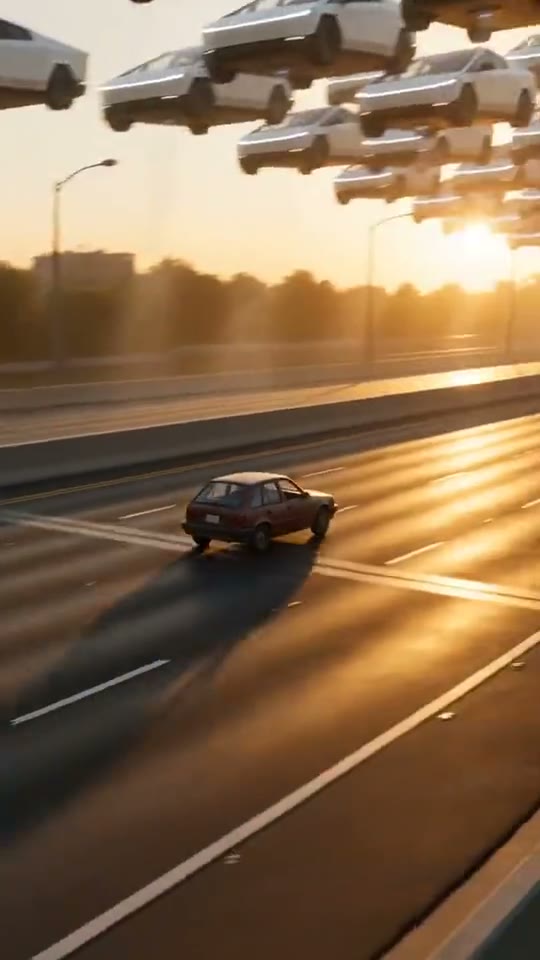
AI Flying Car
AI Flying Car
Upload Your Photo
Upload two photos. Your car: the whole car in frame, sharp and well lit, ideally from behind at an angle. You: one person, face clear and well lit; you drive the car. The car's shape, colour and wheels and your face are kept. Likeness depends on the photos and is not guaranteed.
Resolution
10s · 9:16 · with sound. Higher resolution uses more credits per generation.
10s · 9:16 · with sound
By uploading or generating, you confirm you own these photos or have the person's permission, and you won't impersonate real people or celebrities. Responsible use
Quick answer
To do the AI Flying Car trend, upload 2 clear photos of the people you want in it, then press generate. imageat places the people from your photos into the trend's original video, and the video is ready to download when it finishes. One generation costs 83 imageat credits; no prompt writing or editing app is needed.
AI Flying Car turns your own car into a flying car. Stuck in a traffic jam, you grin back at the camera from the driver's seat; a soft burst of white vapor appears under the car, it rises above the traffic, glides over the stuck cars and lands on the open road ahead, all filmed on a phone from the car behind. Upload two photos: your car and yourself. First the AI places your car, with you at the wheel, in a realistic traffic jam, keeping its body shape, paint colour, wheels and lights. Then Seedance 2.5 animates the takeoff, flight and landing as one continuous 10-second vertical shot with sound. Choose 480p for a lower-credit draft or 720p for a sharper result.
What is the AI Flying Car?
The AI Flying Car trend is a series of viral videos on TikTok, Instagram Reels, and YouTube Shorts showing everyday vehicles lifting off the road to escape gridlocked traffic. Inspired by viral demonstrations of rocket-assisted vehicles and commuter memes, creators share clips of ordinary sedans, trucks, and sports cars floating high above stuck commuters. In each clip, a car stuck in traffic vents white vapor beneath its chassis, rises into the air, and cruises over the gridlock toward an open road. On imageat, you can join the trend by uploading a photo of your car and a photo of your face to generate a 10-second takeoff video.
AI Flying Car on TikTok
Popular posts of the trend, credited to their creators. The videos play from TikTok.
How to Do the AI Flying Car Trend
Here is how to make your own video on imageat:
- 1Upload your car: one clear photo of the whole car, ideally from behind at an angle. JPG, PNG or WEBP, up to 10 MB.
- 2Upload yourself: one clear, well-lit photo of your face. You drive the car.
- 3Choose 480p or 720p and check the credit cost on the button.
- 4Generate: the AI first places your car in traffic, then films it taking off. Preview and download the MP4.
Two stages, one generation
First a start image puts your car, with you at the wheel, in a traffic jam, seen from the car behind. Then that image is animated into the 10-second takeoff, flight and landing. Both stages run as one generation with one price, and a failure in either is refunded.
Photo tips
For the car, show the whole car in good light, ideally from behind at an angle, without people or other cars blocking it. For yourself, use a sharp, front-facing photo of one person. Avoid heavy filters and group photos.
Limitations
The flight is generated, so details such as badges, rims or the license plate can change, and the car may look slightly different in some frames. The video model may decline photos of public figures or children. 720p is the highest resolution it renders. The preview on this page is a style reference, not a result.
Tips for Best Results
- A rear three-quarter photo of the car matches the camera angle best.
- Pick a car photo with even daylight and no strong reflections.
- Start at 480p to check the result, then make the 720p version.
- Only upload photos you own or have permission to use.
AI Flying Car at a Glance
What to upload
Your car — the whole car, ideally from behind at an angle; You — the driver.
What you get
An AI video (10s · 9:16 · with sound) that follows the trend's original take, ready to download and post on TikTok, Reels or Shorts.
What it costs
83 imageat credits per video at 720p. The price is shown before you generate, and a failed generation is refunded.
FAQs About AI Flying Car
Create this trend with imageat
Go beyond the ai flying car — generate any AI video from text or an image with Veo, Kling, Seedance and more.