Blade Runner Hologram AI Video: Face Your Own Giant Hologram
Upload two photos and recast the giant-hologram scene from Blade Runner 2049: one person looks up in magenta light on a foggy platform while the other becomes the huge pink hologram leaning in and reaching for them. 11 seconds, 16:9.
Example results
Watch video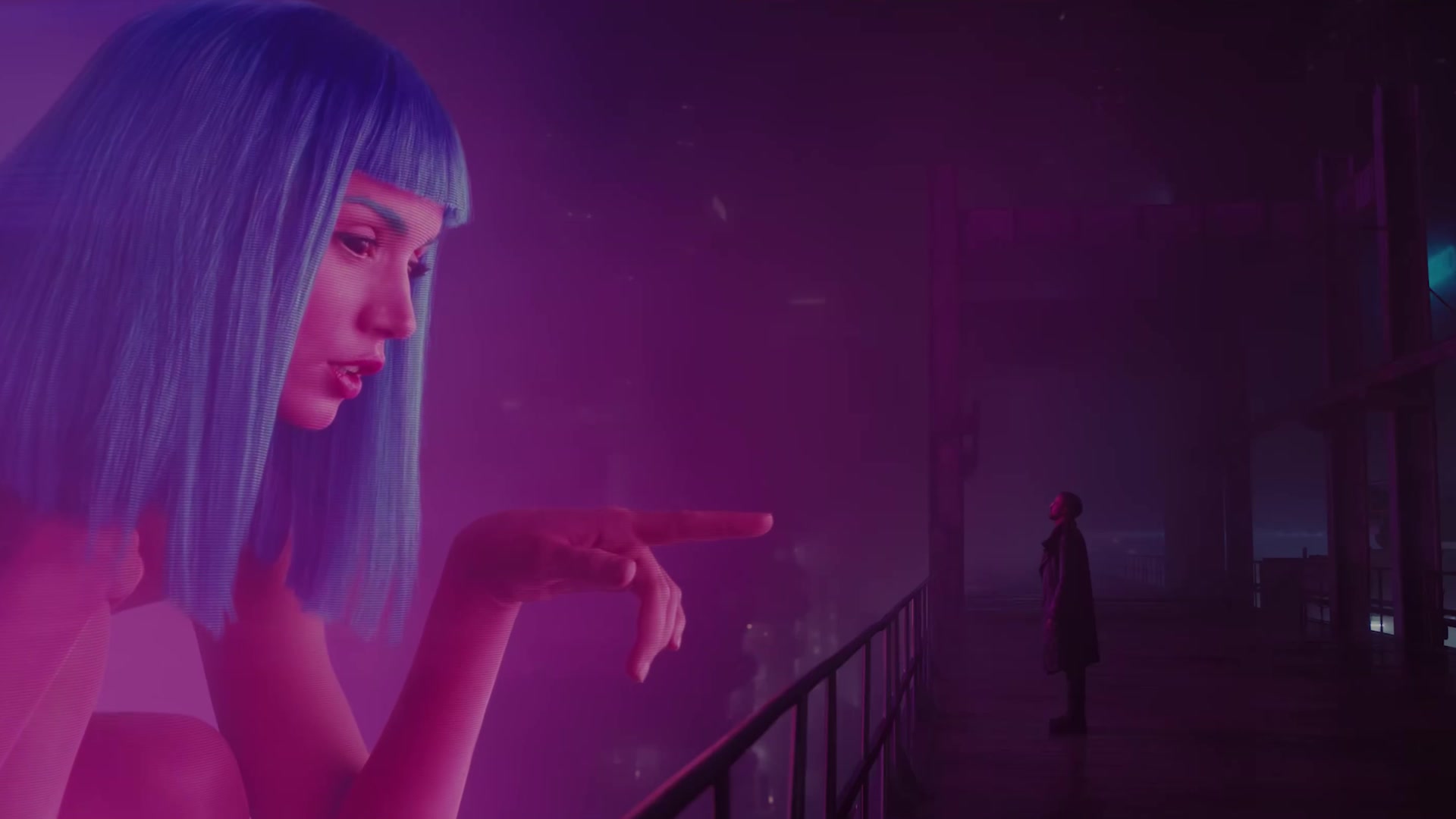
Blade Runner Hologram AI Video
Blade Runner Hologram AI Video
Upload Your Photo
Both photos are required: one person each, face clear and well lit, two different people. The person plays the one looking up in the close-ups and standing on the platform, with their own face, hair and clothes. The giant hologram becomes the huge pink hologram leaning in from the left in the wide shot. Likeness depends on the photos and is not guaranteed.
Resolution
11s · 16:9 · source audio. Higher resolution uses more credits per generation.
11s · 16:9 · source audio
By uploading or generating, you confirm you own these photos or have the person's permission, and you won't impersonate real people or celebrities. Responsible use
Quick answer
To do the Blade Runner Hologram trend, upload 2 clear photos of the people you want in it, then press generate. imageat places the people from your photos into the trend's original video, and the video is ready to download when it finishes. One generation costs 150 imageat credits; no prompt writing or editing app is needed.
Blade Runner Hologram AI recasts the giant-hologram scene from Blade Runner 2049 with two people. In a close-up the first looks up in strong magenta light; in the wide shot the second, as a huge pink hologram, leans in from the left through the fog and reaches toward the first, standing small on a wet platform; then the close-up returns. Upload two photos: the person in the close-ups and on the platform, and the person who becomes the hologram, such as you and your partner or a friend. Your photos supply each face, hair and outfit; the scene keeps its shots, cuts, camera, fog, neon light and the original sound. The video runs 11 seconds in 16:9, at 480p or 720p.
What is the Blade Runner Hologram AI Video?
The Blade Runner hologram AI video trend recreates the scene from the 2017 sci-fi film Blade Runner 2049, where Officer K stands on a rainy walkway looking up at a towering purple hologram. On TikTok and Instagram, couples and friends share edits of this neon encounter to set a moody cyberpunk tone or recast the famous cinematic moment. The sequence alternates between close-ups illuminated by magenta city light and a wide shot of the giant glowing figure leaning forward through the fog. On imageat, you can make your own Blade Runner hologram AI video by uploading two photos to step into both roles.
How to Do the Blade Runner Hologram Trend
Here is how to make your own video on imageat:
- 1Upload the person: a clear, well-lit photo of the person who looks up in the close-ups and stands on the platform. JPG, PNG or WEBP, up to 10 MB.
- 2Upload the hologram: a second photo of the person who becomes the giant pink hologram in the wide shot.
- 3Choose 480p or 720p: 480p is the default and costs less; 720p is sharper and holds faces better in the close-ups. The length and frame are fixed: 11 seconds, 16:9.
- 4Generate and download: the AI casts both people into the scene in its neon light. Check the faces, then download the MP4.
Who plays whom
Photo 1, the person, is the figure in both close-ups and the small figure on the platform, looking up at the hologram. Photo 2, the hologram, is the huge, glowing pink figure leaning in from the left, in the wide shot only. Anyone can play either part, whatever their gender: each keeps their own face, hair and clothes.
What comes from your photos and from the scene
From your photos: every face, hair, body and outfit, for both people. From the scene: the three shots and their cuts, the camera, the fog and platform, the magenta and blue-green light and grade, the hologram glow, and every pose, gaze and gesture with its timing. The original audio is kept as it is; no music or new voice is added.
Format, length and resolution
The reference is the full 11-second scene in 16:9 with the original sound. You choose 480p or 720p. The reference runs 10.8 seconds and is billed as 11 input seconds, so the cost depends only on the resolution and is shown before you generate.
Photo tips for a better result
Use one person per photo, facing the camera, face sharp and well lit. Use two different photos of two different people. Avoid heavy filters, strong backlight and group photos.
Likeness in the neon light
Keeping each face recognizable and in step with the scene are generation targets, not guarantees. The strong magenta light and the hologram glow tint everyone, and likeness can drift for a moment in the fog. Check the result before you share it.
About the videos on this page
The sample output is a real result of this template at 720p, made with two AI-generated faces of fictional people. The source preview and poster are the reference footage the template follows, not a generated result. Blade Runner Hologram AI Video is an independent AI template; imageat is not affiliated with or endorsed by the makers of Blade Runner 2049, the people in the source footage or the creator who shared it.
Tips for Best Results
- One person per photo, facing the camera, face sharp and well lit.
- Put the person in slot 1 and the hologram in slot 2.
- Start at 480p to check your photos, then step up to 720p for sharper close-ups.
- Only upload faces you own or have permission to use.
Blade Runner Hologram AI Video at a Glance
What to upload
The person — close-ups and the platform; The giant hologram.
What you get
An AI video (11s · 16:9 · source audio) that follows the trend's original take, ready to download and post on TikTok, Reels or Shorts.
What it costs
150 imageat credits per video at 720p. The price is shown before you generate, and a failed generation is refunded.
FAQs About Blade Runner Hologram AI Video
Create this trend with imageat
Go beyond the blade runner hologram ai video — generate any AI video from text or an image with Veo, Kling, Seedance and more.