Celebrity Walk Out Trend Video Generator
Transform your photos with our celebrity walk out trend video generator AI effect. Create viral-worthy content in seconds.
Example results
Watch video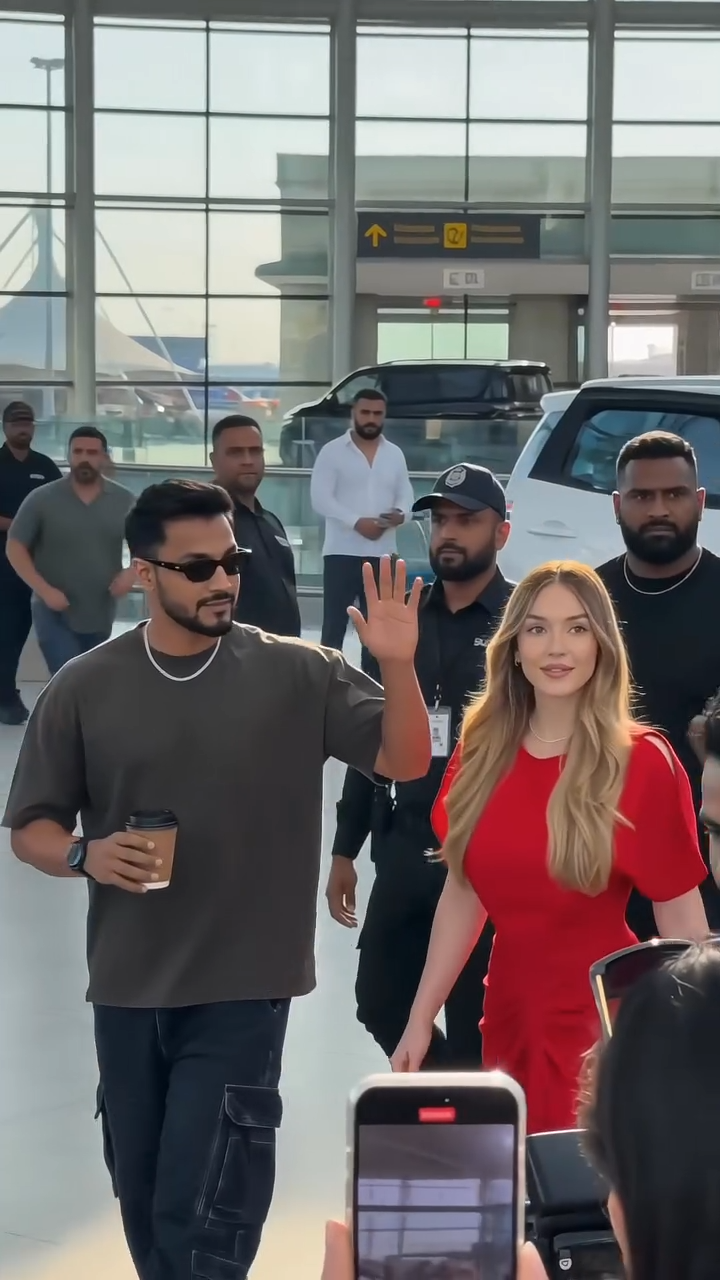
Celebrity Walk Out Trend Video Generator
Celebrity Walk Out Trend
Upload Your Photo
For the best likeness: one person per photo, face clearly visible from the front, good light, nothing covering the face (phone, sunglasses, hand). Upload the original photo, not a screenshot.
By uploading or generating, you confirm you own these photos or have the person's permission, and you won't impersonate real people or celebrities. Responsible use
Quick answer
To do the Celebrity Walk Out Trend, upload one clear photo where your face is easy to see, then press generate. imageat turns your photo into the trend's AI video, and the video is ready to download when it finishes. One generation costs 90 imageat credits; no prompt writing or editing app is needed.
The finished video puts you in the center of a high-profile VIP arrival scene outside a modern airport terminal. Crowds of fans and paparazzi raise their smartphones and flashing camera lenses to record you. Security guards in black escort you through the commotion as you stroll past luxury SUVs and sports cars, giving a casual wave to the onlookers. Your single uploaded picture provides your facial features and expression. The generator builds the rest of the scene, adding realistic motion, shouting onlookers, bodyguards, and a handheld camera perspective. The result is an AI-generated video ready for social sharing.
What is the Celebrity Walk Out Trend Video Generator?
The celebrity walk out trend is a viral format on TikTok, Instagram Reels, and YouTube Shorts that places everyday people into high-profile paparazzi scenes. In these clips, a person exits an airport terminal or venue surrounded by bodyguards while eager crowds hold up phones, cameras flash, and bystanders call their name. The look mimics real viral paparazzi videos of musicians, actors, and athletes heading to their luxury rides. imageat lets you create your own celebrity walk out video by turning a single portrait into a realistic VIP arrival clip.
How to Do the Celebrity Walk Out Trend
Here is how to make your own video on imageat:
- 1Upload a clear, front-facing photo of yourself with good lighting.
- 2Start the generation to turn your photo into the paparazzi arrival scene.
- 3Preview your finished celebrity walk out video.
- 4Download the video file and share it on TikTok, Instagram, or YouTube Shorts.
Tips for Best Results
- Use high-quality photos for best results
- Good lighting makes a big difference
- Try different angles and poses
- Experiment with various styles
- Share your creations on social media
Best Prompts for Celebrity Walk Out Trend Video Generator
Want more control over the motion? Copy one of these prompts and use it in our AI video generator to fine-tune the celebrity walk out trend video generator style.
Celebrity Walk Out Trend Video Generator, smooth controlled camera movement, realistic motion, cinematic lighting, stable composition, natural depth
Celebrity Walk Out Trend Video Generator, immediate visual hook, smooth motion, clear centered subject, polished 9:16 social video
Celebrity Walk Out Trend Video Generator, gradual movement, atmospheric depth, elegant pacing, wide cinematic reveal
Celebrity Walk Out Trend Video Generator, energetic camera movement, strong parallax, dramatic scale, crisp detail
Celebrity Walk Out Trend Video Generator at a Glance
What to upload
One clear photo with the face easy to see.
What you get
An AI video, ready to download and post on TikTok, Reels or Shorts.
What it costs
90 imageat credits per video. The price is shown before you generate, and a failed generation is refunded.
FAQs About Celebrity Walk Out Trend Video Generator
Create this trend with imageat
Go beyond the celebrity walk out trend video generator — generate any AI video from text or an image with Veo, Kling, Seedance and more.