Drake Burning Bridges AI Video Generator
Upload one photo and take the centre spot in the Burning Bridges party scene: the same gestures, waves and silver cup in the chandelier-lit banquet hall, with the original sound. Choose 15 or 29 seconds.
Source reference footage, not a personalized result
Watch video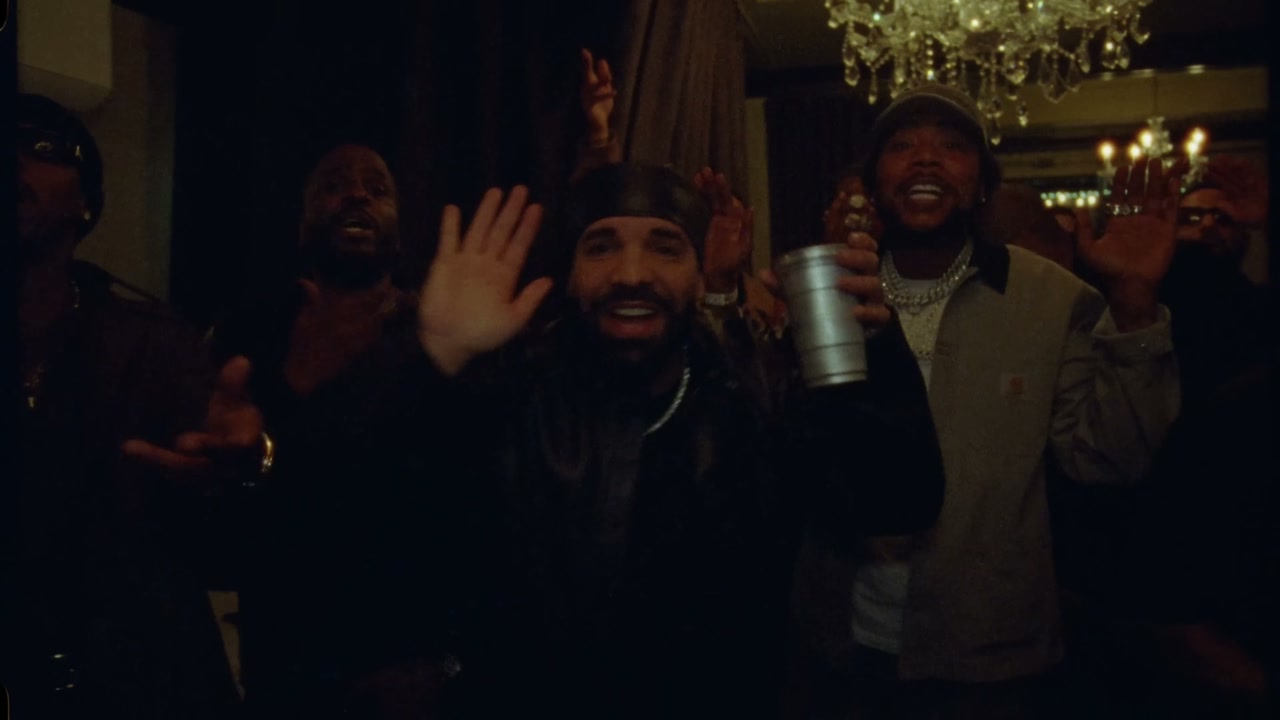
Drake Burning Bridges AI Video Generator
Drake Burning Bridges
Upload Your Photo
Upload one photo of one person, face clear, sharp and well lit. Your face, skin tone and build replace the man at the centre; the durag, leather jacket, chain, cup, moves and sound come from the clip. Likeness depends on the photo and is not guaranteed.
Video length
Longer videos use more credits per generation.
Resolution
15s or 29s · 16:9 · source audio. Higher resolution uses more credits per generation.
15s or 29s · 16:9 · source audio
By uploading or generating, you confirm you own these photos or have the person's permission, and you won't impersonate real people or celebrities. Responsible use
Quick answer
To do the Drake Burning Bridges trend, upload one clear photo where your face is easy to see, then press generate. imageat places you into the trend's original video, and the video is ready to download when it finishes. One generation costs 205 imageat credits; no prompt writing or editing app is needed.
The Drake Burning Bridges AI video generator puts you at the centre of the party scene that took over social feeds. In a banquet hall lit by crystal chandeliers, a bearded man in a black durag and leather jacket holds a silver cup, gestures to the camera, laughs, points and waves while a crowd of guests cheers around him. Upload one photo and Genjutsu motion transfer swaps him for you while the rest of the take stays as it was. Your photo decides who appears: your face, skin tone, facial hair or its absence, and build. The clip decides everything else: the gestures and timing, the hand-held camera, the guests, the warm low light and the original sound. The durag, leather jacket, chain and silver cup are kept so the scene stays continuous. Pick 15 seconds for the opening or 29 seconds for almost the whole take. Both start at the first frame, in the original 16:9 format, and the longer option is a longer performance, not a slowed-down one. Choose 480p for a lower-credit draft or 720p for a sharper result; the credits follow the length and resolution you select. This is an independent AI template and is not an official Drake product or endorsement.
What is the Drake Burning Bridges AI Video Generator?
The Drake Burning Bridges AI Video Generator is a video trend based on the celebration scene set to Drake's track Burning Bridges. Across platforms like TikTok, Instagram Reels, and YouTube Shorts, people share clips of someone holding court in a dimly lit banquet hall under glowing crystal chandeliers. Dressed in a black durag and dark leather jacket with a silver cup in hand, the person at the center gestures to the camera, points, laughs, and toasts while guests dance nearby. On imageat, you can enter the room by uploading one photo to replace the lead figure with your likeness, preserving the performance and the source clip's sound.
How to Do the Drake Burning Bridges Trend
Here is how to make your own video on imageat:
- 1Upload one clear, well-lit photo of one person with the face visible.
- 2Choose 15 or 29 seconds and 480p or 720p, then check the credit cost shown.
- 3Generate the video.
- 4Preview and download your 16:9 Burning Bridges clip with the original sound.
What comes from your photo and from the clip
From your photo: face, skin tone, facial hair or its absence, and build. From the clip: the durag, leather jacket, chain and silver cup, every gesture and wave, the hand-held camera, the other guests, the banquet hall, the light and the audio.
Length, resolution and credits
Both lengths start at the beginning of the scene and are exactly 15 or 29 seconds long. Motion transfer is billed on the length of the reference, so 29 seconds costs about twice as much as 15. 720p is sharper than 480p and costs more. The exact price for your selection is shown before you generate.
About the video on this page
The preview is the source reference footage the template follows, not a personalized result. The scene is dark and the camera moves, so likeness can drift for a moment. Independent AI template; imageat is not affiliated with or endorsed by Drake, his label or the makers of the video.
Tips for Best Results
- One person per photo, facing the camera, face sharp and well lit.
- The scene is dim, so a bright, high-contrast face photo holds up best.
- Avoid sunglasses, heavy filters and group photos.
- Start with 15 seconds at 480p to check the likeness before making a 29-second or 720p version.
Drake Burning Bridges AI Video Generator at a Glance
What to upload
Your photo — replaces the man at the centre of the party.
What you get
An AI video (15s or 29s · 16:9 · source audio) that follows the trend's original take, ready to download and post on TikTok, Reels or Shorts.
What it costs
205 imageat credits per video at 720p. The price is shown before you generate, and a failed generation is refunded.
FAQs About Drake Burning Bridges AI Video Generator
Create this trend with imageat
Go beyond the drake burning bridges ai video generator — generate any AI video from text or an image with Veo, Kling, Seedance and more.