Become the Skydiver Jumping from a Hot Air Balloon
Jump from a hot air balloon above the clouds with one photo. Free fall, flip and open the parachute in a 17-second vertical skydiving video that follows the original motion and audio.
Source reference footage, not a personalized result
Watch video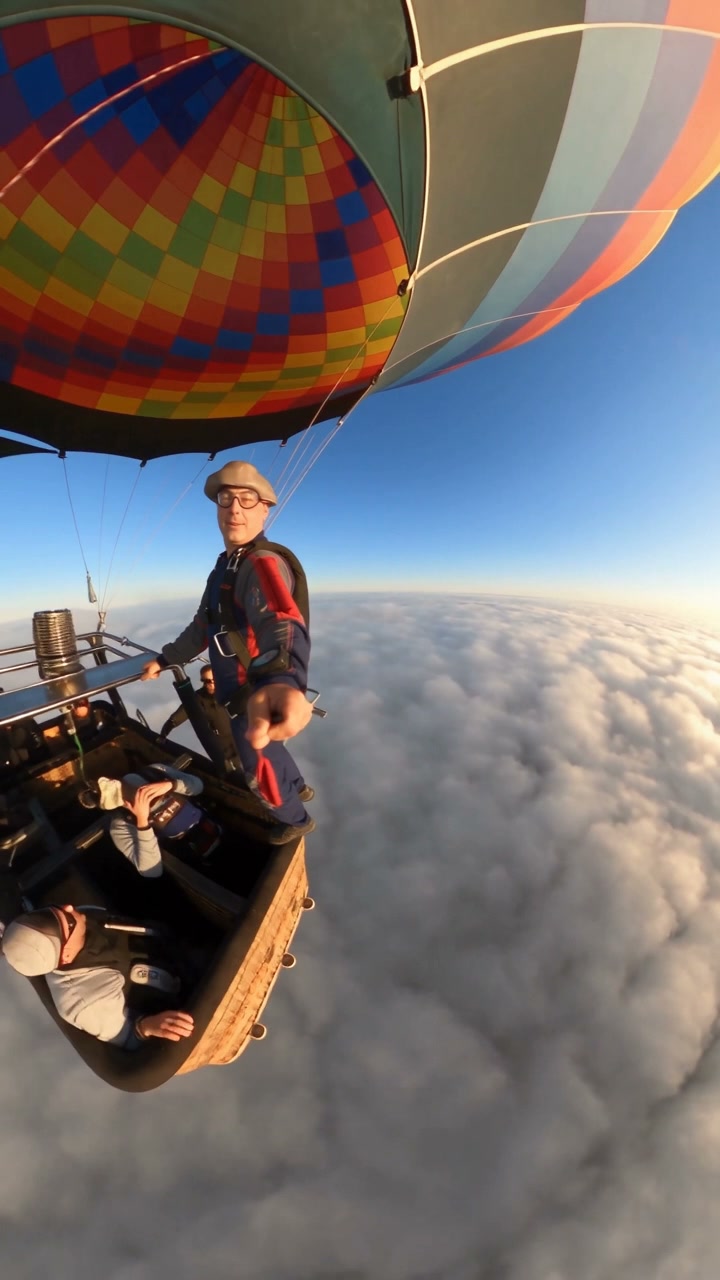
Skydiving AI Video
Skydiving AI Video
Upload Your Photo
Upload one clear, well-lit photo of one person with the face fully visible. You will wear skydiving goggles in the video, so a sharp face and hairstyle help keep you recognizable.
Resolution
About 17 seconds · 9:16 · source audio. Higher resolution uses more credits per generation.
About 17 seconds · 9:16 · source audio
By uploading or generating, you confirm you own these photos or have the person's permission, and you won't impersonate real people or celebrities. Responsible use
Quick answer
To do the Skydiving trend, upload one clear photo where your face is easy to see, then press generate. imageat places you into the trend's original video, and the video is ready to download when it finishes. One generation costs 246 imageat credits; no prompt writing or editing app is needed.
The Skydiving AI Video puts you into a 360-camera skydive with one photo. The built-in reference starts on the edge of a hot air balloon basket above a sea of clouds at sunrise. The skydiver steps off, flips and free-falls past the balloon, drops below the clouds over farmland, then opens the parachute. Upload one photo to replace the skydiver. Your photo supplies the face and recognizable features, and you wear skydiving goggles throughout. The source supplies the jump, body movement, poses, timing, camera movement, framing, lighting, scenery and audio. The output follows the full 17-second vertical reference; choose 480p or 720p.
What is the Skydiving AI Video?
A reference-driven skydiving template that uses AI motion transfer to recast the skydiver in a fixed balloon-jump video with the person from your photo.
How to Do the Skydiving Trend
Here is how to make your own video on imageat:
- 1Upload one clear photo of the person who should become the skydiver.
- 2Choose 480p or 720p and check the credit cost.
- 3Generate your 17-second vertical skydiving video.
- 4Check your face through the flips and close-ups, then download the MP4.
Your face, the original jump
Your photo supplies the face and identity. The reference supplies the balloon exit, flips, free fall, parachute opening, 360-camera movement, scenery and timing. Skydiving goggles are added for a realistic look.
About the preview
The page video is the source reference footage, shown with the camera brand mark blurred. It is not a personalized example. Your result follows the same jump with you as the skydiver.
Tips and limitations
Use a sharp, front-facing photo with even light. Fast spins, upside-down shots and wind-blown hair can reduce likeness in some frames, and the goggles cover part of the face. Only upload photos you own or have permission to use.
Tips for Best Results
- Use a sharp, well-lit photo with your face fully visible.
- Use a photo of one person only.
- Avoid sunglasses or heavy filters; the template adds skydiving goggles.
- Try 480p first to check your likeness across the flips.
Skydiving AI Video at a Glance
What to upload
Your photo — replaces the skydiver.
What you get
An AI video (About 17 seconds · 9:16 · source audio) that follows the trend's original take, ready to download and post on TikTok, Reels or Shorts.
What it costs
246 imageat credits per video at 720p. The price is shown before you generate, and a failed generation is refunded.
FAQs About Skydiving AI Video
Create this trend with imageat
Go beyond the skydiving ai video — generate any AI video from text or an image with Veo, Kling, Seedance and more.