Create the 1960s Witchcore Trend Video with Your Photo
Example results
Watch video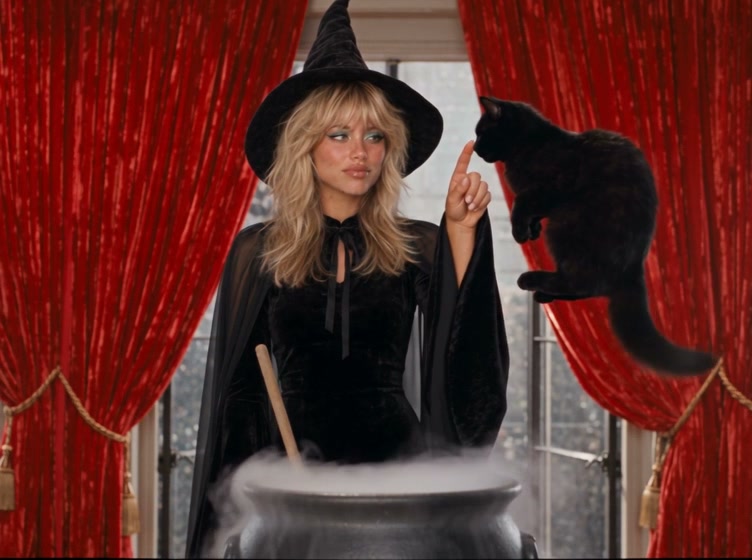
Witchcore AI Video Generator
Witchcore
Upload Your Photo
Upload one clear photo of one person with the face visible. Women become a witch and men a wizard; your face and hair come from the photo.
Resolution
20 seconds · 4:3 · voice and music. Higher resolution uses more credits per generation.
20 seconds · 4:3 · voice and music
The Witchcore AI Video Generator turns one photo into a 20-second 1960s witch film. First it builds a character sheet of you in costume: a witch with a pointed hat, bell-sleeve maxi dress, chiffon cape and turquoise 60s eyeliner, or a wizard in a velvet robe and pointed hat. Your face, hair and build stay the same. The video then plays out in a dark-red parlor full of potion bottles and candles. You hang up a cream rotary phone, stir a cauldron that throws golden sparks, and watch your black cat dive in and fly back out. It ends with you booping the cat's nose. The clip has your spoken line, a groovy late-60s instrumental and sound effects.
What is the Witchcore AI Video Generator?
Witchcore is the moody, vintage-witch aesthetic: pointed hats, black bell sleeves, candles, potion shelves and a black cat. This trend turns it into a 1960s technicolor TV scene. You turn down a call with "No, sorry. I have plans today. Bye.", stir a bubbling cauldron, and your cat dives in and floats back out flying.
How to Create Your Witchcore AI Video Generator Video
Creating your own witchcore ai video generator video is simple:
- 1Upload one clear photo of one person with the face visible.
- 2Choose 480p or 720p. Length and 4:3 framing are fixed.
- 3Check the credit cost on the button, then generate.
- 4Preview the result and download the MP4.
Witch or wizard
The costume follows the person in the photo: a witch with turquoise eyeshadow and winged liner for women, a wizard in a black velvet robe for men. The hat sits on your own hairstyle, which keeps its color and length.
Photo tips
Use a sharp, well-lit photo of one person. Avoid sunglasses, covered faces and heavy filters. Group photos make it unclear who should star in the scene.
Limitations
The cat, sparks and fast cuts are generated, so hands, the phone cord or the cat can look off in some frames. Photos of public figures and children are declined by the video model. Only upload photos you own or have permission to use.
Tips for Best Results
- Use a front-facing photo with even light.
- Keep the face fully visible.
- Try 480p first, then 720p for the version you post.
Best Prompts for Witchcore AI Video Generator
Want more control over the motion? Copy one of these prompts and use it in our AI video generator to fine-tune the witchcore ai video generator style.
Witchcore AI Video Generator, smooth controlled camera movement, realistic motion, cinematic lighting, stable composition, natural depth
Witchcore AI Video Generator, immediate visual hook, smooth motion, clear centered subject, polished 9:16 social video
Witchcore AI Video Generator, gradual movement, atmospheric depth, elegant pacing, wide cinematic reveal
Witchcore AI Video Generator, energetic camera movement, strong parallax, dramatic scale, crisp detail
Why Choose ImageAt for Witchcore AI Video Generator
Fast turnaround
Most generations finish quickly; busy periods can take longer—we deliver your video here the moment processing completes.
Realistic Transformation
Powered by cutting-edge AI algorithms for incredibly realistic transformations.
Social Media Ready
Create shareable content perfect for TikTok, Instagram, and Twitter.
FAQs About Witchcore AI Video Generator
Create this trend with imageat
Go beyond the witchcore ai video generator — generate any AI video from text or an image with Veo, Kling, Seedance and more.