Product photography · Perfume
AI Perfume Product Photography
Upload a photo of a fragrance bottle and stage it in the moody, reflective and ingredient-led scenes perfume is sold with — with prompts written for refracting glass, coloured liquid and lacquered caps.
Your bottle stays the reference · Scenes written for glass · Saved to your history
The hard parts
Why perfume bottles are hard to light
A fragrance bottle is a lens full of coloured liquid, and the thing it sells cannot be seen at all.
Glass shows everything behind it
The background refracts through the bottle and bends. A busy backdrop turns into distorted shapes inside the glass, so the presets use dark, plain or deliberately soft surroundings.
The liquid colour is part of the product
Pale gold, amber, blush or clear — warm light shifts all of them. Name the liquid colour in the brief and compare it with the bottle in your hand.
The scent is invisible
Props stand in for the notes: citrus, petals, woods, spices. Choose props from the fragrance's real notes — a bergamot slice beside a woody, smoky scent sends the wrong message.
Caps and facets multiply highlights
Metal and lacquered caps mirror the room, and faceted glass repeats every light source. Fewer, well-placed lights read as luxury; many lights read as clutter.
Scene presets
Perfume scene presets
Each preset sets the scene, background and format in the generator above. Swap the example brief for your bottle's glass, liquid colour and notes.
Dark Plinth
Hero images and premium product pages
- Background
- Deep black
- Format
- 4:5
Example brief: Heavy clear glass bottle with pale gold liquid, black lacquered cap
Full prompt sent to the generator
Keep the product from the attached photo exactly as it is — same shape, proportions, colour, material, markings and packaging — and place it unchanged into a new scene, Heavy clear glass bottle with pale gold liquid, black lacquered cap, on a dark polished stone plinth, single hard key light from behind and above so the glass edges glow, deep shadows, faint reflection on the plinth surface, near-black background, fragrance bottle photography, clean glass edges, controlled refraction and reflections, liquid colour reading true, deep near-black background, no added text, no invented logos or labels, no watermark
Ingredient Still Life
Explaining the notes on a product page or in an ad
- Background
- Warm sand
- Format
- 4:5
Example brief: Beside sliced bergamot, a sprig of fresh mint and a few pink peppercorns
Full prompt sent to the generator
Keep the product from the attached photo exactly as it is — same shape, proportions, colour, material, markings and packaging — and place it unchanged into a new scene, Beside sliced bergamot, a sprig of fresh mint and a few pink peppercorns, surrounded by a few raw ingredients that match the fragrance notes, soft side light, shallow depth of field, ingredients kept smaller than the bottle and placed around its base, fragrance bottle photography, clean glass edges, controlled refraction and reflections, liquid colour reading true, warm sand and ivory background, no added text, no invented logos or labels, no watermark
Water Reflection
Stories, Reels covers and vertical ads
- Background
- Deep black
- Format
- 9:16
Example brief: Frosted rectangular bottle with blush pink liquid, silver cap
Full prompt sent to the generator
Keep the product from the attached photo exactly as it is — same shape, proportions, colour, material, markings and packaging — and place it unchanged into a new scene, Frosted rectangular bottle with blush pink liquid, silver cap, standing on a still dark water surface with a clean mirror reflection beneath, a few slow ripples spreading from the base, cool rim light outlining the glass, clear space above the bottle, fragrance bottle photography, clean glass edges, controlled refraction and reflections, liquid colour reading true, deep near-black background, no added text, no invented logos or labels, no watermark
Silk & Shadow
Warm editorial images for social and launches
- Background
- In context
- Format
- 1:1
Example brief: Amber glass bottle on ivory silk, late afternoon sun from the right
Full prompt sent to the generator
Keep the product from the attached photo exactly as it is — same shape, proportions, colour, material, markings and packaging — and place it unchanged into a new scene, Amber glass bottle on ivory silk, late afternoon sun from the right, resting on draped silk fabric, warm low sunlight casting a long shadow, light passing through the glass projecting soft coloured caustic patterns onto the silk, fragrance bottle photography, clean glass edges, controlled refraction and reflections, liquid colour reading true, real environment behind the product, softly out of focus, no added text, no invented logos or labels, no watermark
Made with imageat
Perfume styling, generated with imageat
These images were generated from the text prompts shown, to illustrate light and styling. They were not made from a customer's uploaded product — your results start from your own photo.
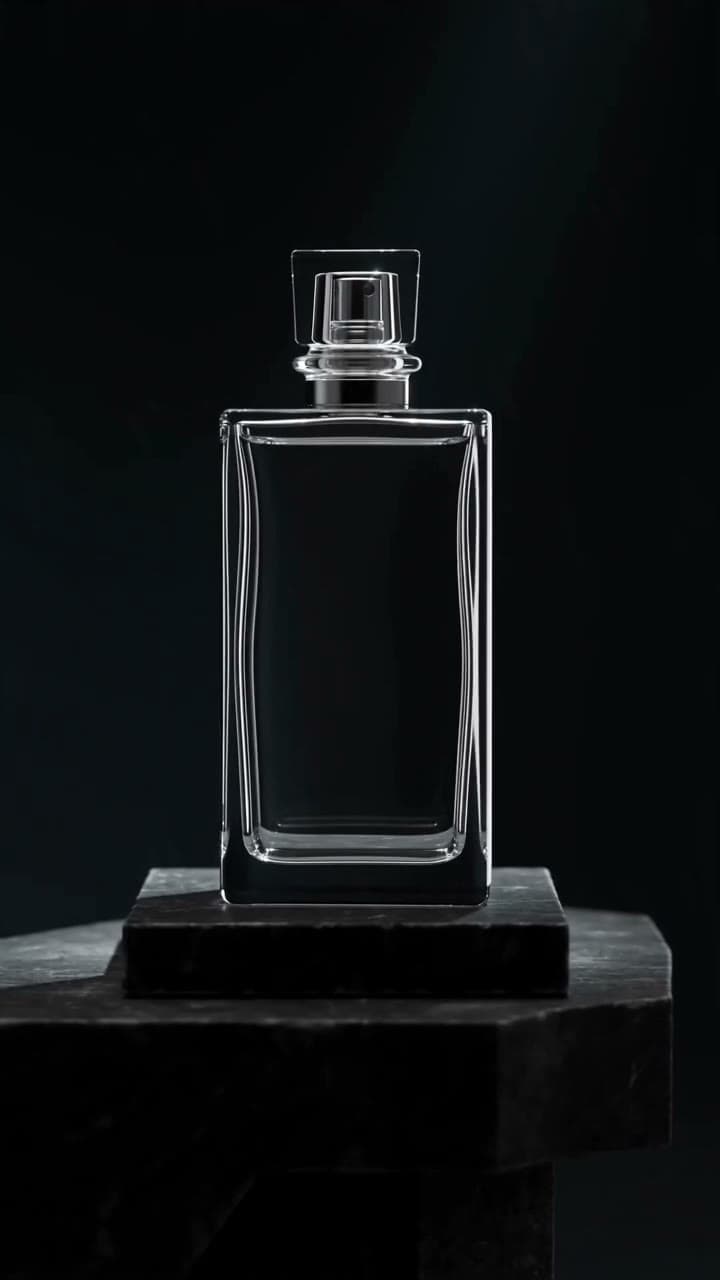
Glass and Light
Still frame from an imageat-generated Reels video; the prompt shown is the video prompt
Prompt
An unbranded glass perfume bottle rotating slowly on a stone plinth, light sweeping across the glass and refracting, premium styling with deep shadows and polished surfaces, slow controlled camera, vertical full-screen composition with the subject centred, the lower third and right edge kept visually calm where the caption and action buttons sit, no text overlays, no logos, no watermark
Prompt guide
Writing a perfume brief
Describe the glass, the liquid and the light that passes through them.
Name the bottle and its glass
“Heavy faceted clear glass”, “frosted rectangular flacon” or “round amber bottle with a gold collar” tells the model what to refract and where highlights belong.
Name the liquid colour
Write it out — “pale straw gold”, “deep amber”, “clear”. Without it, warm light tends to push every fragrance towards the same honey colour.
Ask for rim light
“Glass edges defined by rim light from behind” separates a clear bottle from a dark background. Front light alone flattens glass.
Use the real notes as props
Pick two or three ingredients from the fragrance pyramid and keep them smaller than the bottle. More than that turns a still life into a fruit bowl.
How it works
From a phone photo to a fragrance campaign image
- 01
Photograph the bottle against something plain
Stand the bottle in front of a plain wall or card, light it from the side, and keep your own reflection out of the glass. Clean the glass and cap first — smudges show.
- 02
Pick a perfume scene and name the liquid
Choose Dark Plinth, Ingredient Still Life, Water Reflection or Silk & Shadow above, then describe the glass, liquid colour and any notes you want shown as props.
- 03
Check the glass, label and colour, then download
Compare the bottle shape, cap, label and liquid colour against the original. Refraction can bend lettering, so read the brand name closely before you download the PNG.
FAQ
Questions about AI perfume photos
Will the brand name on the bottle stay correct?
Not always. Printed or engraved names sit behind or on curved glass, and refraction gives the model a distorted view of them. Large lettering tends to survive better than fine print. Read the name closely on every result, and use your own photo where exact branding is required.
How do I keep the colour of the liquid accurate?
Name it in the brief — “pale gold liquid” or “clear liquid” — and choose cooler scenes for pale fragrances. Warm scenes such as Silk & Shadow push colours towards amber, so compare the result with the real bottle before publishing.
Which props should I use for my fragrance notes?
Use two or three ingredients from the fragrance's actual notes: citrus slices for a fresh top note, petals for a floral heart, wood or resin for a warm base. The Ingredient Still Life preset places them around the base and keeps them smaller than the bottle.
Can I make vertical images for stories and launches?
Yes. Water Reflection is set to 9:16 with space above the bottle, and every preset can be switched to another format in the panel. To add launch copy and a campaign layout to a finished shot, use the AI product post generator.
Why does the background look warped inside the bottle?
That is refraction: glass bends whatever sits behind it, and the model reproduces that. Plain or dark backgrounds keep it subtle. If a result looks odd, simplify the scene in the brief or generate again.
Generation uses the same credits as the AI product photo generator, and the panel shows the cost before you run it. To cut the product out of a messy photo first, use the AI background remover; to turn a finished shot into a campaign post, use the AI product post generator.
More product types
Scene presets for other products
Each product type has its own lighting problems. These pages carry presets written for them.
- AI Jewelry Product PhotographyRings, necklaces, earrings and watches on velvet, marble and macro sets lit for metal and stones.
- AI Skincare Product PhotographySerums, creams, tubes and pump bottles on bathroom shelves, water, texture swatches and botanicals.
- AI Shoe Product PhotographySneakers, boots and heels in white profile, street, floating and trail scenes.
- AI Food Product PhotographyPackaged food, drinks and plated dishes on kitchen counters, table spreads, ice and picnics.
- All scenes in the product photo generatorOpens the main generator with perfume already selected as the product type, plus the general studio, lifestyle and seasonal scenes.
Light the bottle you already have
Upload one photo of the fragrance, pick a scene, and keep the glass, liquid and name true to the real bottle.