Create Your Connor Price Slide Dance AI Video
Upload two photos to star in the Connor Price slide dance: the first carries the boombox on the left, the second sings to the camera on the right. Choose 15 or 30 seconds with the original audio, at 480p or 720p.
Example results
Watch video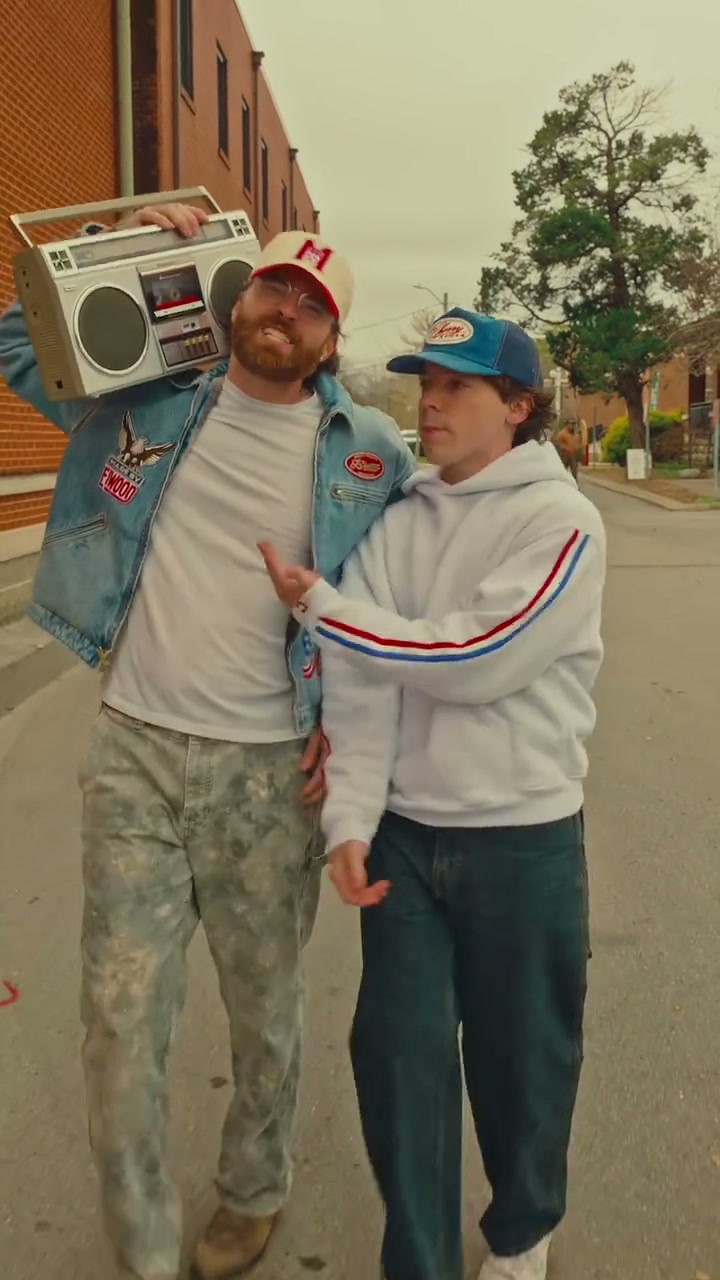
Connor Price Slide Dance AI Video Generator
Connor Price Slide Dance
Upload Your Photo
Both photos are required: one person each, face clear and well lit, two different people. Photo 1 carries the boombox on the left; photo 2 sings to the camera on the right. Each keeps their own face, hair, body and outfit. Likeness depends on the photos and is not guaranteed.
Video length
Longer videos use more credits per generation.
Resolution
15s or 30s · 9:16 · source audio. Higher resolution uses more credits per generation.
15s or 30s · 9:16 · source audio
By uploading or generating, you confirm you own these photos or have the person's permission, and you won't impersonate real people or celebrities. Responsible use
Quick answer
To do the Connor Price Slide Dance trend, upload 2 clear photos of the people you want in it, then press generate. imageat places the people from your photos into the trend's original video, and the video is ready to download when it finishes. One generation costs 205 imageat credits; no prompt writing or editing app is needed.
The Connor Price slide dance AI video generator puts you and a friend into the street duo clip. Two performers move down a quiet street lined with red-brick buildings: one carries a silver boombox on their shoulder, the other sings straight into the camera while both slide and step to the beat. Upload two photos and Genjutsu motion transfer swaps both performers while the rest of the take stays as it was. Each input has its own job. Your photos decide who appears: face, hair, gender presentation, body proportions, clothing and accessories. The reference clip decides everything else: the choreography, the hand-held camera, the street, the boombox, the overcast light, the timing and the original soundtrack. Photo 1 always becomes the boombox carrier on the left and photo 2 always becomes the singer on the right, and the two identities are kept apart for the whole video. Pick 15 seconds for a quick share or 30 seconds for the longer run. Both cuts start at the first frame of the clip in the original vertical format, and each length has its own reference, so 30 seconds is a longer performance rather than a slowed-down one. Choose 480p for a lower-credit draft or 720p for a sharper result; the credits follow the length and resolution you select. This is an independent AI template and is not an official Connor Price product or endorsement.
What is the Connor Price Slide Dance AI Video Generator?
The Connor Price slide dance trend comes from a Connor Price music video. In the clip, two friends glide down a quiet street between brick buildings while stepping and sliding in sync to the beat. One performer hoists a classic boombox onto their shoulder, while the other delivers lyrics directly into the camera. Social media creators frequently share recreations of the side-by-side routine across TikTok and Instagram Reels. On imageat, you can star in your own vertical video of the routine by uploading two photos to replace both street performers.
How to Do the Connor Price Slide Dance Trend
Here is how to make your own video on imageat:
- 1Upload a clear photo of the person who should carry the boombox on the left.
- 2Upload a clear photo of the person who should sing to the camera on the right.
- 3Choose 15 or 30 seconds and 480p or 720p, then check the credit cost shown.
- 4Generate, preview and download your vertical slide dance video with the original audio.
Who plays whom
Photo 1 replaces the performer on the left who carries the boombox. Photo 2 replaces the performer on the right who sings to the camera. The roles stay fixed for the whole clip, including the opening second when the singer steps closest to the lens. Anyone can play either part: each person keeps their own face, hair, body and clothes.
What comes from your photos and from the clip
From your photos: both faces, hairstyles, body proportions, outfits and accessories. From the clip: the slide steps and gestures, the moving camera, the brick-lined street, the boombox, the daylight and colour, the timing and the original audio. No new music or voice is added.
Length, resolution and credits
Both lengths start at the beginning of the clip and are exactly 15 or 30 seconds long. Motion transfer is billed on the length of the reference, so 30 seconds costs about twice as much as 15. 720p is sharper than 480p and costs more. The exact price for your selection is shown before you generate.
About the videos on this page
The sample output is a real 480p result of this template, made with two AI-generated faces of fictional people. The source preview and the cover image are the reference footage the template follows, not a generated result. Imageat is not affiliated with or endorsed by Connor Price, the people in the source footage or its creators.
Tips for Best Results
- Use one person per photo; group shots make it harder to keep each identity on the right performer.
- Sharp, well-lit photos that show the face and the outfit work best. A full-body shot helps the model match body proportions and clothing.
- Keep the upload order: photo 1 is the boombox carrier on the left, photo 2 is the singer on the right.
- Your photos control appearance only. Choreography, camera, street, boombox and audio come from the original clip.
- Start with 15 seconds at 480p to check your photos before making a 30-second or 720p version.
Connor Price Slide Dance AI Video Generator at a Glance
What to upload
Photo 1 — replaces the LEFT performer (carries the boombox); Photo 2 — replaces the RIGHT performer (sings to the camera).
What you get
An AI video (15s or 30s · 9:16 · source audio) that follows the trend's original take, ready to download and post on TikTok, Reels or Shorts.
What it costs
205 imageat credits per video at 720p. The price is shown before you generate, and a failed generation is refunded.
FAQs About Connor Price Slide Dance AI Video Generator
Create this trend with imageat
Go beyond the connor price slide dance ai video generator — generate any AI video from text or an image with Veo, Kling, Seedance and more.