Make the Viral Frozen Dance Video with Your Own Photo
Upload one photo and star in the viral Frozen dance video: you dance through a glowing ice palace, throwing frost and snowflakes from your hands with the original moves and music.
Example results
Watch video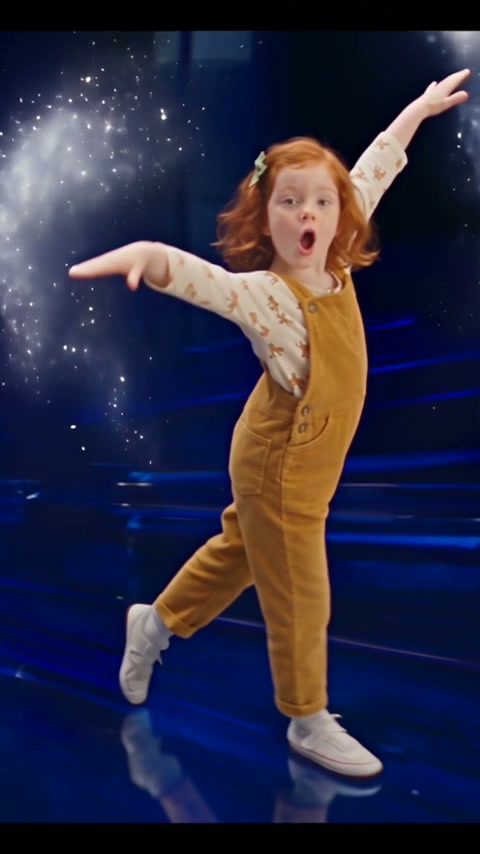
Frozen Dance Video
Frozen Dance Video
Upload Your Photo
For the best likeness: one person per photo, face clearly visible from the front, good light, nothing covering the face (phone, sunglasses, hand). Upload the original photo, not a screenshot.
By uploading or generating, you confirm you own these photos or have the person's permission, and you won't impersonate real people or celebrities. Responsible use
Quick answer
To do the Frozen Dance trend, upload one clear photo where your face is easy to see, then press generate. imageat turns your photo into the trend's AI video, and the video is ready to download when it finishes. One generation costs 31 imageat credits; no prompt writing or editing app is needed.
The Frozen dance video is the ice-magic dance clip trending on TikTok and Reels: a dancer spins through a glowing blue ice palace, flicks frost from their fingertips, throws snowflake bursts across the floor and hits the big, dramatic power poses of the choreography. This generator puts you — or anyone you choose — in the dancer's place. Upload one clear photo and the person in it takes over the whole dance: the same moves, hand gestures, expressions and timing, the same ice palace, the same frost and snow effects, while their own face, hair and outfit stay exactly as in the photo. The trend's music is laid over the finished vertical video, so it is ready to post as soon as it renders.
What is the Frozen Dance Video?
The Frozen Dance Video is a dance trend inspired by the ice castle choreography associated with Disney's Frozen. On TikTok, Instagram Reels, and YouTube Shorts, creators share clips of a solo dancer moving across an illuminated blue ice palace floor, throwing bursts of frost and sparkling snowflakes from their hands to the beat. People recast the routine with their kids, friends, family members, or themselves to create playful winter dance videos. imageat lets you make your own Frozen dance video by placing one person from a single photo directly into the performance.
How to Do the Frozen Dance Trend
Here is how to make your own video on imageat:
- 1Upload one clear photo of the dancer — ideally the whole body, facing the camera.
- 2Generate. The person takes over the full Frozen dance, move for move, inside the ice palace.
- 3Preview the vertical video and download it for TikTok, Instagram Reels or YouTube Shorts.
Tips for Best Results
- A full-body photo gives the best result — the dance shows the whole body, legs and feet included.
- Sharp, well-lit, front-facing photos keep the face recognisable through the spins and the close-ups.
- Whatever the person wears in the photo is what they dance in, so pick the outfit you want on screen.
- One person per photo works best. Crop out anyone else so only one dancer appears.
- Avoid sunglasses, heavy filters and hats that hide the face.
- For the funny version, try your dad, your grandma, your boss or your best friend.
Best Prompts for Frozen Dance Video
Want more control over the motion? Copy one of these prompts and use it in our AI video generator to fine-tune the frozen dance video style.
Frozen Dance Video, smooth controlled camera movement, realistic motion, cinematic lighting, stable composition, natural depth
Frozen Dance Video, immediate visual hook, smooth motion, clear centered subject, polished 9:16 social video
Frozen Dance Video, gradual movement, atmospheric depth, elegant pacing, wide cinematic reveal
Frozen Dance Video, energetic camera movement, strong parallax, dramatic scale, crisp detail
Frozen Dance Video at a Glance
What to upload
The dancer — one clear photo, whole body visible if possible.
What you get
An AI video, ready to download and post on TikTok, Reels or Shorts.
What it costs
31 imageat credits per video. The price is shown before you generate, and a failed generation is refunded.
FAQs About Frozen Dance Video
Create this trend with imageat
Go beyond the frozen dance video — turn any idea or photo into a video with imageat's video generator.