Become a Giant Walking Through the City
Turn one full-body image into a giant walking through the city. Tower over taxis and running pedestrians, wave from beside the skyscrapers and keep the original motion and audio in a vertical clip of about 10 seconds.
Source reference footage, not a personalized result
Watch video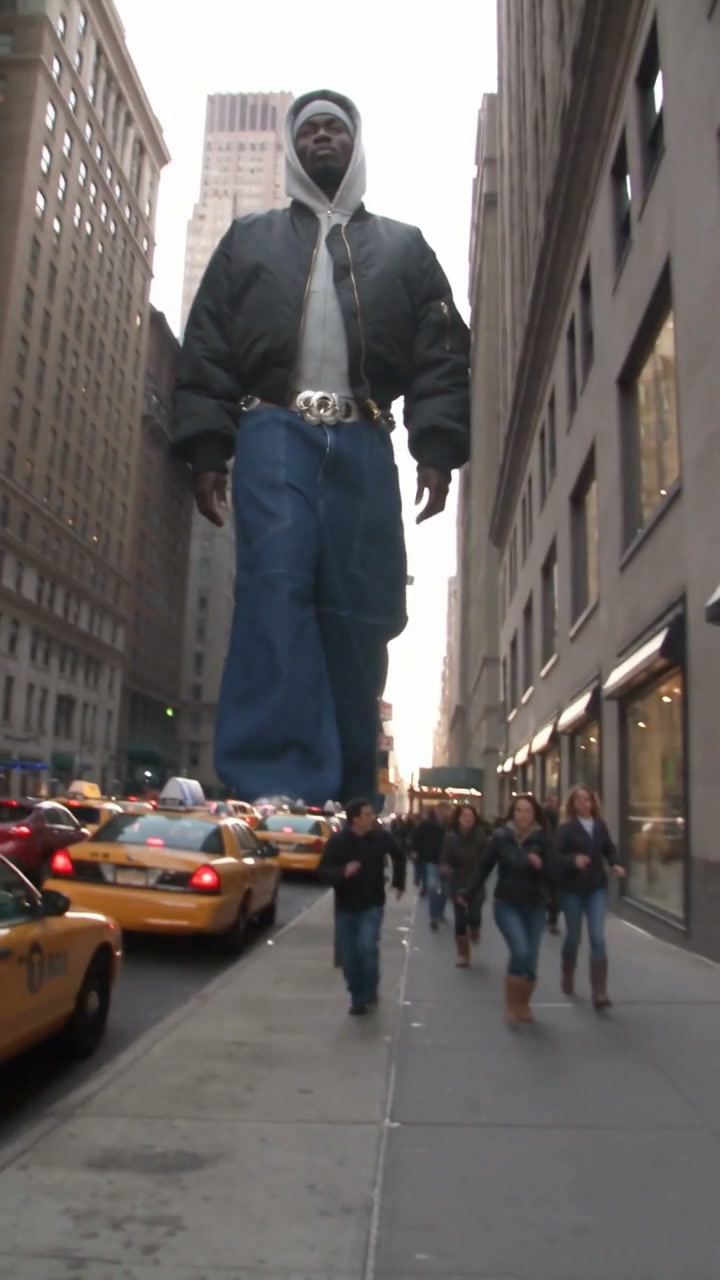
Giant City Walk
Giant City Walk
Upload Your Photo
Upload one clear, full-body image of one person or character, standing and facing the camera. Your image sets the giant's face, hair, outfit and colors.
Resolution
About 10 seconds · 9:16 · source audio. Higher resolution uses more credits per generation.
About 10 seconds · 9:16 · source audio
By uploading or generating, you confirm you own these photos or have the person's permission, and you won't impersonate real people or celebrities. Responsible use
Quick answer
To do the Giant City Walk trend, upload one clear photo where your face is easy to see, then press generate. imageat places you into the trend's original video, and the video is ready to download when it finishes. One generation costs 150 imageat credits; no prompt writing or editing app is needed.
Giant City Walk turns one image into a towering figure striding through a busy city. The built-in reference opens at street level: the giant walks toward the camera between tall buildings while yellow taxis fill the road and pedestrians run past. The next shot looks out through a helicopter window as the giant stands among glass towers and waves. The clip ends on a low-angle view from the street, with helicopters circling above and taxis at the giant's feet. Upload one full-body image of a person or character to replace the giant. Your image supplies the face or head design, hairstyle, clothing, colors and proportions. The source supplies the scale, walking motion, footsteps, wave, camera movement, scene cuts, city, traffic, pedestrians and audio. Only the giant changes; the people and vehicles around them stay as they are. The output follows the full vertical reference of about 10 seconds; choose 480p or 720p.
What is the Giant City Walk?
A reference-driven AI video template that uses motion transfer to recast the giant in a fixed city-walk clip with the person or character from your image.
How to Do the Giant City Walk Trend
Here is how to make your own video on imageat:
- 1Upload one clear, full-body image of the person or character who should become the giant.
- 2Choose 480p or 720p and check the credit cost.
- 3Generate your vertical Giant City Walk video of about 10 seconds.
- 4Check the likeness across all three shots, then download the MP4.
Your look, giant scale
Your image defines who the giant is: face or head design, hairstyle, outfit and colors. The template keeps the giant's scale, steps and wave, so the buildings, taxis and crowd still look small beside them.
About the preview
The page video is the source reference footage. It is not a personalized example. Your result follows the same walk, shots and timing with your character as the giant.
Tips and limitations
Full-body images work best, because the giant is shown head to toe. Very wide costumes, extra limbs or non-human body shapes can follow the walking motion less closely, and small faces in the helicopter shot may lose some detail. Only upload images you own or have permission to use.
Tips for Best Results
- Use a sharp, well-lit image that shows the whole body, including the shoes.
- Show one person or character only, ideally standing and facing the camera.
- Choose an outfit you want to see at giant scale; it replaces the source clothing.
- Try 480p first to check the likeness across all three shots.
Giant City Walk at a Glance
What to upload
Your full-body image — becomes the giant.
What you get
An AI video (About 10 seconds · 9:16 · source audio) that follows the trend's original take, ready to download and post on TikTok, Reels or Shorts.
What it costs
150 imageat credits per video at 720p. The price is shown before you generate, and a failed generation is refunded.
FAQs About Giant City Walk
Create this trend with imageat
Go beyond the giant city walk — generate any AI video from text or an image with Veo, Kling, Seedance and more.