Turn Into a Mummy Zombie Mid-Video with One Photo
Upload one photo and turn into a mummy zombie mid-video: run in scared at night, whip around, and come back in bandages and mummy makeup doing the zombie dance.
Example results
Watch video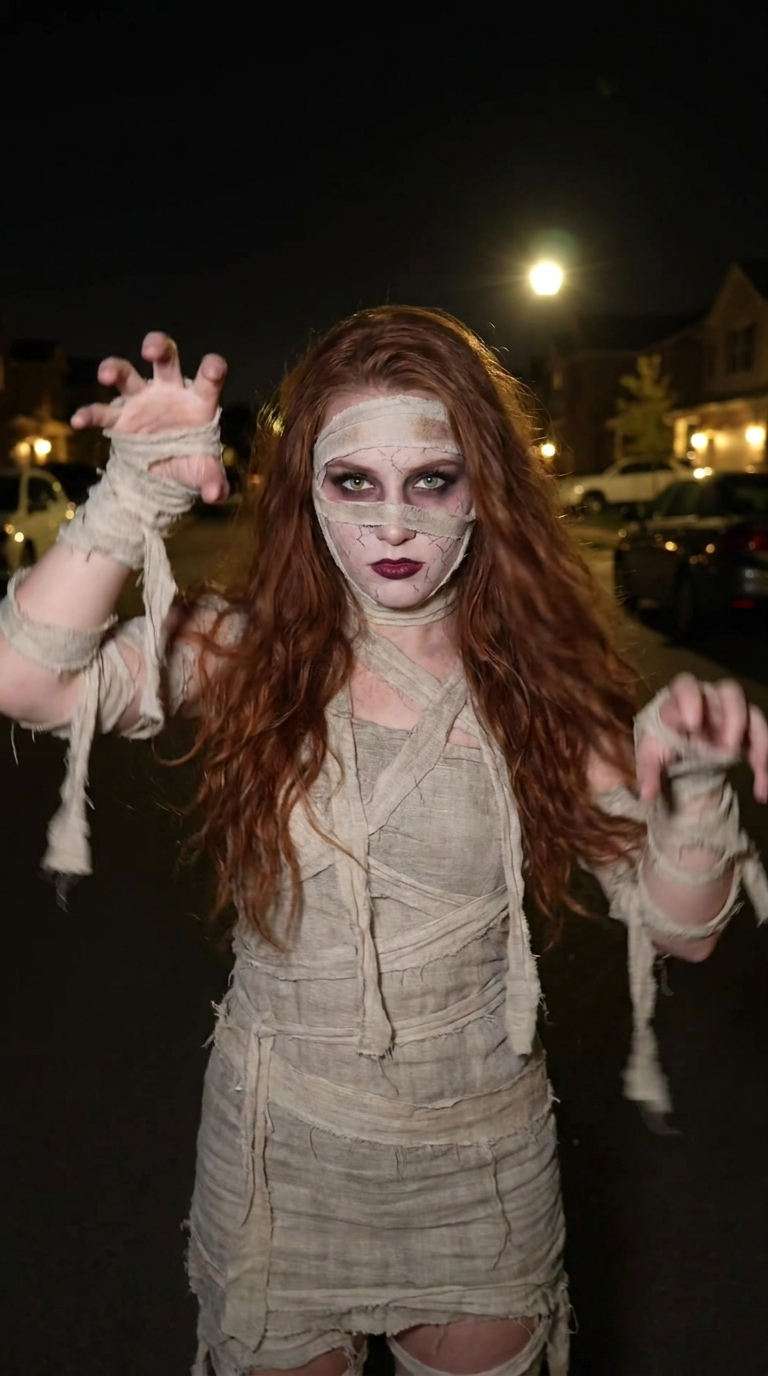
Mummy Zombie AI Video Generator
Mummy Zombie
Upload Your Photo
Upload one clear photo of one person with the face visible. You appear as yourself first, then as a mummy zombie with your own face, eyes and hair.
Resolution
About 15 seconds · 9:16 · with music. Higher resolution uses more credits per generation.
About 15 seconds · 9:16 · with music
By uploading or generating, you confirm you own these photos or have the person's permission, and you won't impersonate real people or celebrities. Responsible use
Quick answer
To do the Mummy Zombie trend, upload one clear photo where your face is easy to see, then press generate. imageat places you into the trend's original video, and the video is ready to download when it finishes. One generation costs 86 imageat credits; no prompt writing or editing app is needed.
The Mummy Zombie AI Video Generator turns one photo into a 15-second vertical Halloween transformation. The first half shows you as you are, in your own outfit, running down a dark street and mouthing the song into the lens. After the whip turn you come back as a mummy zombie: dirty linen bandages over your forehead, one eye and jaw, pale cracked mummy makeup, smoky eyes and dark lips, with your own hair and eyes kept. The moves, timing and street come from a built-in clip, and the song is added at the end so the video is ready to post.
What is the Mummy Zombie AI Video Generator?
The mummy zombie trend is a Halloween transformation clip shot at night on a phone: someone runs at the camera, sings along in a scared selfie close-up, spins away, and the camera whips back to find them wrapped as a mummy zombie doing the zombie dance. This generator does the whole transformation with your photo.
Mummy Zombie AI Video Generator on TikTok
Popular posts of the trend, credited to their creators. The videos play from TikTok.
How to Do the Mummy Zombie Trend
Here is how to make your own video on imageat:
- 1Upload one clear photo of one person with the face visible.
- 2Choose 480p or 720p. Length and vertical framing follow the built-in clip.
- 3Check the credit cost on the button, then generate.
- 4Preview the result and download the MP4.
Before and after
Two looks are built from your photo: you in your own outfit for the first half, and you as a mummy zombie after the turn. Your face, eye color and hair stay the same in both.
The mummy makeup
Frayed beige-grey bandages cross the forehead, one eye, the jaw and neck and wrap the whole body. The skin turns pale and cracked like old parchment, with smoky makeup around your own eyes and dark wine lips. No blood or gore.
Photo tips
Use a sharp, well-lit photo of one person with the face visible. Avoid sunglasses, hats and heavy filters so the face carries through both looks.
Limitations
The whip turn, running and dance can blur faces or hands in some frames, and lip sync may drift slightly. Photos of public figures and children are declined by the video model. Only upload photos you own or have permission to use.
Tips for Best Results
- Use a front-facing photo with even light.
- Wear the outfit you want in the first half of the video.
- Try 480p first, then 720p for the version you post.
Mummy Zombie AI Video Generator at a Glance
What to upload
Your photo.
What you get
An AI video (About 15 seconds · 9:16 · with music) that follows the trend's original take, ready to download and post on TikTok, Reels or Shorts.
What it costs
86 imageat credits per video at 720p. The price is shown before you generate, and a failed generation is refunded.
FAQs About Mummy Zombie AI Video Generator
Create this trend with imageat
Go beyond the mummy zombie ai video generator — generate any AI video from text or an image with Veo, Kling, Seedance and more.