Put Your Face on the Viral Human-Headed Pigeon
Put your face on the human-headed pigeon in this viral street clip. Upload one clear portrait for a realistic city scene with tougher-looking pigeons, following the original motion and audio.
Reference video
Watch video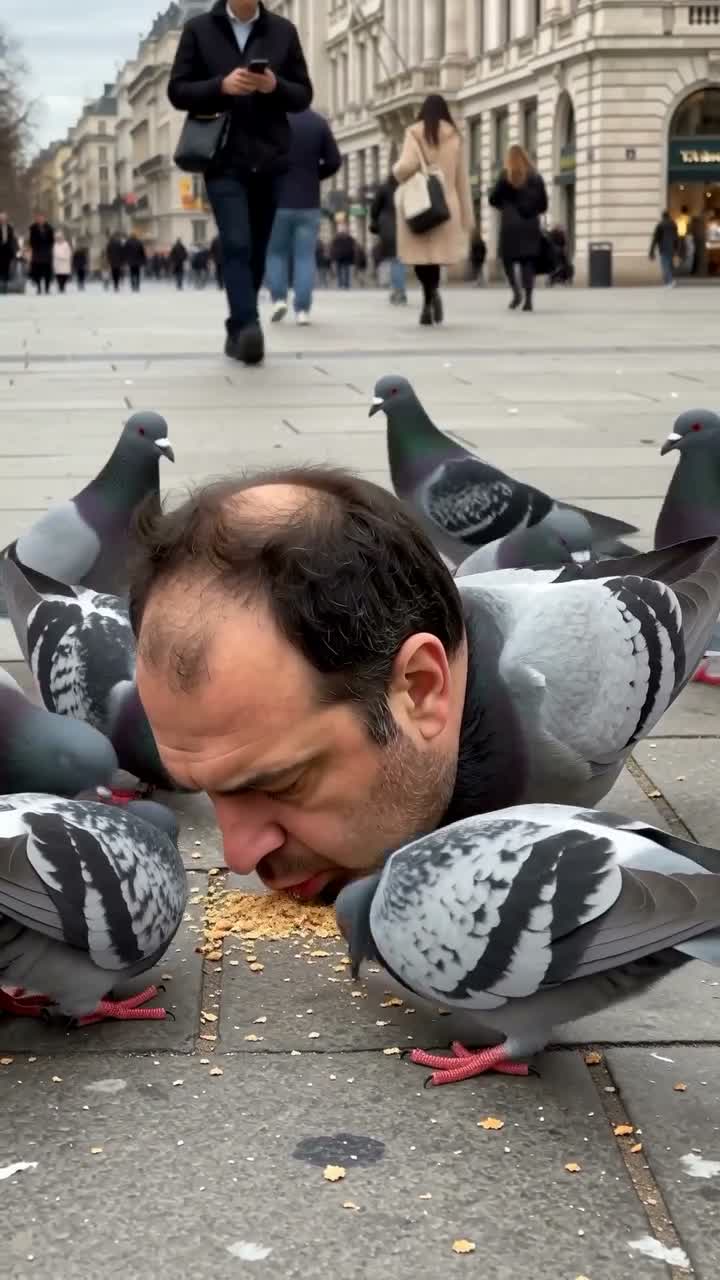
Pigeon Head Swap AI Video
Pigeon Head Swap AI Video
Upload Your Photo
Upload one clear, front-facing portrait of a single person (JPG, PNG or WEBP). It replaces only the human head on the main pigeon; the pigeon's body, the other pigeons and the pedestrians keep their roles. Hair and facial hair in the photo carry over to the result.
Resolution
≈15.2s · 9:16. Higher resolution uses more credits per generation.
≈15.2s · 9:16
By uploading or generating, you confirm you own these photos or have the person's permission, and you won't impersonate real people or celebrities. Responsible use
Quick answer
To do the Pigeon Head Swap trend, upload one clear photo where your face is easy to see, then press generate. imageat places you into the trend's original video, and the video is ready to download when it finishes. One generation costs 218 imageat credits; no prompt writing or editing app is needed.
Pigeon Head Swap AI Video puts your face on the viral human-headed pigeon. In the original vertical clip, a pigeon with a human head bobs and pecks at seeds among a flock of pigeons in a busy European-style city square. Upload one portrait and AI replaces that head with yours, keeping it naturally attached to the pigeon's body with matching scale, perspective and shadows. Higgsfield Genjutsu Motion Transfer uses the built-in source clip for the motion and your portrait for the identity. It keeps the head bobbing, pecking, camera movement, shot transitions and original audio, makes the street more photorealistic and gives the surrounding pigeons a tougher, more alert look. The result is a 9:16 vertical video of about 15.2 seconds at 480p or 720p. The preview on this page is the original source clip, not a generated result.
What is the Pigeon Head Swap AI Video?
The Pigeon Head Swap trend is a surreal, funny short-form clip of a pigeon with a human head feeding with other pigeons on a city street, widely reposted as a TikTok and Reels meme. On imageat it is a one-photo template: you upload a portrait and the human-headed pigeon gets your face, while every movement and sound follows the original video.
How to Do the Pigeon Head Swap Trend
Here is how to make your own video on imageat:
- 1Upload one clear, front-facing photo in the Your portrait slot.
- 2Choose 480p or 720p and check the credit cost for that resolution.
- 3Generate your video; the length and 9:16 format follow the source clip.
- 4Preview your pigeon video and download it to share.
What gets replaced
Only the human head on the main pigeon receives your face, including your facial proportions, skin tone, hairstyle, hair color and facial hair. The pigeon stays a pigeon from the neck down, and the background pedestrians are not replaced.
How the scene changes
The workflow makes the street more photorealistic, with natural daylight, detailed pavement, believable buildings and realistic shadows, and gives the other pigeons sharper eyes, alert posture and detailed feathers. The location, layout, camera framing, timing and audio stay as in the source clip.
How to pick the best portrait
Use one person per photo, facing the camera, in even light, with the whole head visible. Avoid hats, sunglasses, heavy filters, screenshots and group shots. A photo that shows the hairline and any beard clearly helps the face stay consistent through head turns and close-ups.
Uses for a pigeon face swap video
The 9:16 format fits TikTok, Instagram Reels, YouTube Shorts and stories. Use it as a birthday prank, a group chat meme, a reaction clip or a quick way to join a viral trend without filming anything.
Limitations
Fast pecking, wing flaps and other pigeons crossing the frame can briefly reduce how closely the face matches your photo. Only use faces you own or have permission to use. Pigeon Head Swap AI Video is an independent imageat template and is not affiliated with Higgsfield.
Tips for Best Results
- Use a sharp, front-facing portrait with the whole head visible.
- Choose even lighting without strong shadows or colored light.
- Start at 480p to check a portrait before generating at 720p.
- Only upload faces you own or have permission to use.
Pigeon Head Swap AI Video at a Glance
What to upload
Your portrait.
What you get
An AI video (≈15.2s · 9:16) that follows the trend's original take, ready to download and post on TikTok, Reels or Shorts.
What it costs
218 imageat credits per video at 720p. The price is shown before you generate, and a failed generation is refunded.
FAQs About Pigeon Head Swap AI Video
Create this trend with imageat
Go beyond the pigeon head swap ai video — generate any AI video from text or an image with Veo, Kling, Seedance and more.