Transmission 5 Dance AI Video: Join the Duo Routine From One Photo
Upload your photo and join the Transmission 5 duo dance in the parking lot. Recreate the viral routine with AI.
Source reference footage, not a personalized result
Watch video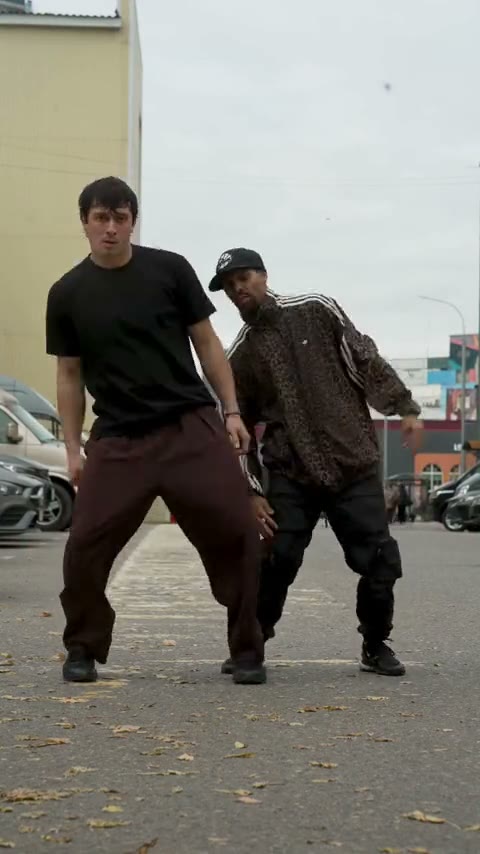
Transmission 5 Dance AI
Transmission 5 Dance AI
Upload Your Photo
Upload one photo of one person, ideally full body with nothing in front of you and the face sharp and well lit. You replace the left dancer only; the outfit, moves, partner, parking lot and sound come from the clip. Likeness depends on the photo and is not guaranteed.
Resolution
23s · 9:16 · source audio. Higher resolution uses more credits per generation.
23s · 9:16 · source audio
By uploading or generating, you confirm you own these photos or have the person's permission, and you won't impersonate real people or celebrities. Responsible use
Quick answer
To do the Transmission 5 Dance trend, upload one clear photo where your face is easy to see, then press generate. imageat places you into the trend's original video, and the video is ready to download when it finishes. One generation costs 314 imageat credits; no prompt writing or editing app is needed.
Transmission 5 Dance AI puts you in the viral duo routine. In a parking lot on an overcast day, two dancers perform side by side: sharp footwork, hand gestures and moves that answer each other. Upload one photo and Genjutsu motion transfer swaps the dancer on the left, in the black T-shirt and brown trousers, for you while his partner and the rest of the take stay as they were. Your photo decides who appears: your face, skin tone and hair. The clip decides everything else: every step and gesture with its timing, the spacing between the two dancers, the parking lot, the camera framing and the original sound. The video runs 23 seconds in 9:16; choose 480p for a lower-credit draft or 720p for a sharper result.
What is the Transmission 5 Dance AI?
The Transmission 5 dance trend is a viral two-person street-dance routine. Dancers and creators film themselves performing the synchronized choreography, which features sharp arm locks, fast hand passes, and rhythmic footwork outdoors in urban settings like parking lots and streets. Clips of the routine circulate widely across TikTok, Instagram Reels, and YouTube Shorts as duo dance challenges. imageat lets you join the routine by uploading one photo to replace the dancer on the left while keeping the partner, parking-lot setting, choreography, and source clip's sound intact.
How to Do the Transmission 5 Dance Trend
Here is how to make your own video on imageat:
- 1Upload one clear photo of yourself, ideally full body with the face visible. JPG, PNG or WEBP, up to 10 MB.
- 2Choose 480p or 720p and check the credit cost shown.
- 3Generate the video.
- 4Preview and download your 9:16 Transmission 5 dance with the original sound.
What comes from your photo and from the clip
From your photo: the left dancer's face, facial features, skin tone, hairstyle, hair color and facial hair or its absence. From the clip: the black T-shirt and brown trousers, the choreography, the partner in the cap and track jacket, the parking lot, the framing and the audio.
Length, resolution and credits
The result follows the original clip: 23 seconds in 9:16, with the original sound. The price depends only on the resolution: 720p is sharper than 480p and costs more. The source footage is low resolution, so 720p does not recover detail that is not in the clip. The exact price is shown before you generate.
About the video on this page
The preview is the source reference footage the template follows, not a personalized result. The dancers are filmed full body, so faces are small in frame and likeness can drift for a moment during fast moves. This is an independent AI template; imageat is not affiliated with or endorsed by the people in the source footage, the creator who shared it or the rights holders of the music.
Tips for Best Results
- Use a full-body photo of one person with nothing blocking the body.
- Keep the face sharp and well lit; it is small in this wide shot.
- Avoid sunglasses, heavy filters and group photos.
- Only upload faces you own or have permission to use.
Transmission 5 Dance AI at a Glance
What to upload
Your photo — one person, ideally full body with the face clear.
What you get
An AI video (23s · 9:16 · source audio) that follows the trend's original take, ready to download and post on TikTok, Reels or Shorts.
What it costs
314 imageat credits per video at 720p. The price is shown before you generate, and a failed generation is refunded.
FAQs About Transmission 5 Dance AI
Create this trend with imageat
Go beyond the transmission 5 dance ai — generate any AI video from text or an image with Veo, Kling, Seedance and more.