Create the Phone on the Train Trend with Your Photo
Upload one photo to take the lead in the Paris metro phone-on-the-train performance, followed by the original Eiffel Tower view.
Original performance reference — not a personalized result
Watch video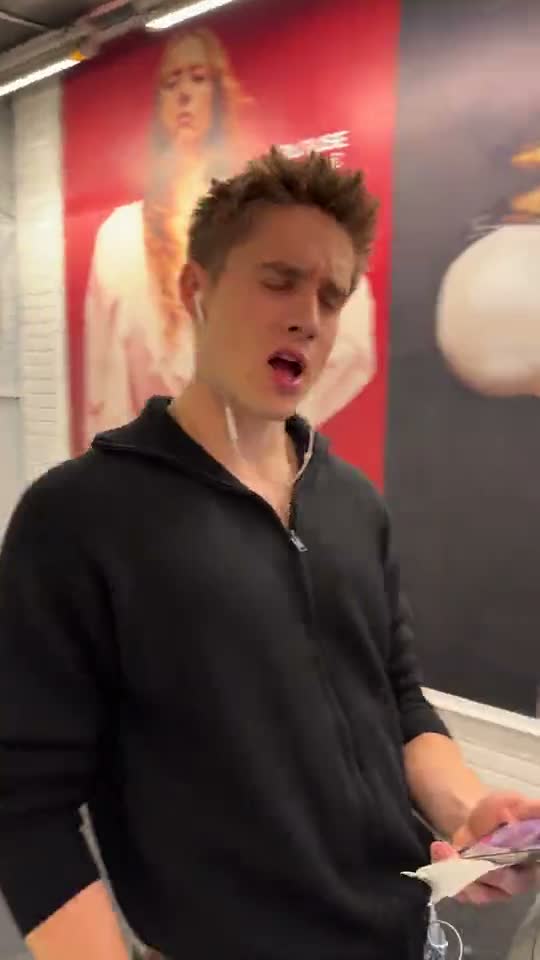
Phone on the Train AI Video Generator
Phone on the Train
Upload Your Photo
Upload one clear photo of one person with the face visible. Your face, hair, gender presentation and outfit come from the photo; the metro performance and train ride come from built-in footage.
Resolution
About 30 seconds · 9:16 · fixed length. Higher resolution uses more credits per generation.
About 30 seconds · 9:16 · fixed length
By uploading or generating, you confirm you own these photos or have the person's permission, and you won't impersonate real people or celebrities. Responsible use
Quick answer
To do the Phone on the Train trend, upload one clear photo where your face is easy to see, then press generate. imageat places you into the trend's original video, and the video is ready to download when it finishes. One generation costs 409 imageat credits; no prompt writing or editing app is needed.
The Phone on the Train AI Video Generator puts the person in your photo into a Paris metro performance. The scene moves from a close-up on the platform to a phone filming from the train window, then follows the performer running as the train departs. The closing view continues toward the Eiffel Tower. Your photo supplies the face, hair, gender presentation and outfit. The built-in reference supplies the motion, scene, timing and camera changes. Upload a sharp photo of one person, select an available resolution and generate an approximately 30-second portrait video. This template uses existing reference footage, so there is no need to film on a platform or attach a phone to a train. Fast movement and changing angles may affect face and hand consistency.
What is the Phone on the Train AI Video Generator?
The phone on the train trend, also called the phone taped to train trend, is a vertical Paris metro video: a performer plays to a phone on the platform, the phone keeps filming from the train window while they run alongside, and the ride ends with a view of the Eiffel Tower. This template gives that performance to the person in your photo.
How to Do the Phone on the Train Trend
Here is how to make your own video on imageat:
- 1Upload one clear photo of one person with the face visible.
- 2Choose 480p or 720p. Length and vertical framing follow the built-in clip.
- 3Check the credit cost on the button, then generate.
- 4Preview the result, check the face and hands, then download the MP4.
What comes from where
Your photo supplies the face, facial features, gender presentation, skin tone, hairstyle, body proportions and outfit. The reference supplies the movement, timing, Paris metro platform, train, background passengers, camera changes and the closing view toward the Eiffel Tower.
Photo tips
Use one person with a sharp, visible face and even lighting. A full-body or waist-up photo helps with the running shots. Avoid group photos, sunglasses, covered faces and heavy filters, and wear the outfit you want in the video.
About the preview
The video on this page is the original performance reference, not a personalized result.
Limitations
Running, motion blur and quick angle changes can distort faces, hands or the phone in some frames. Only upload photos you own or have permission to use.
Tips for Best Results
- Use a sharp, well-lit photo of one person.
- Keep the face fully visible.
- Wear the outfit you want in the video.
- Try 480p first, then use 720p for the final version.
Phone on the Train AI Video Generator at a Glance
What to upload
Your photo.
What you get
An AI video (About 30 seconds · 9:16 · fixed length) that follows the trend's original take, ready to download and post on TikTok, Reels or Shorts.
What it costs
409 imageat credits per video at 720p. The price is shown before you generate, and a failed generation is refunded.
FAQs About Phone on the Train AI Video Generator
Create this trend with imageat
Go beyond the phone on the train ai video generator — generate any AI video from text or an image with Veo, Kling, Seedance and more.